
Leaderboard
Popular Content
Showing content with the highest reputation on 01/28/2014 in all areas
-

Minecraft Screenshots
STUDZ and 2 others reacted to Fush for a topic
Random selection of shots I took a while ago, since JJ wanted his tutorial shot to be pushed off of the recent pictures. Dramatic shot of me looking u[p at EXRicky's pagoda It's a cave. No, I have no idea why I screencapped this. This is a spider jocky that spawned on this thing... yeah. I found it way more amusing that I should have. Monsters like to spawn on the walls of RRU tower at night.... and finally, an aerial shot of the RRU tower construction site. You can barely see a tiny Ace in there.3 points -

Tutorial: Adding Custom Decals into LDD
Zed and one other reacted to Jimbob for a topic
Adding Custom Decals into LEGO Digital Designer As great as LEGO Digital Designer is, it doesn't contain all the textures ever produced by the LEGO group. This tutorial will show you how to mod in custom textures to LDD so that you can use them in your models, and includes a little section at the end on setting these models up for rendering in POV-Ray. In order to add custom decals into LDD, you will need the following: LIF Extractor by JrMasterModelBuilder Notepad++ (or any decent text editor, this is free and recommended) A decal in PNG format Step 1: Preparing LDD Before you can add in custom decals, you'll need to prepare LDD for modding. To do this, you will use the LIF Extractor you downloaded previously. Navigate to your Application Data directory, and locate LDD's folder. On Windows 7 this path should be: C:\Users\YOURUSERNAME\AppData\Roaming\LEGO Company\LEGO Digital Designer Inside you will find, among other files, a large file called db.lif. This file contains all the decorations that are loaded into LDD, in addition to various other files. Now open the LIF Extractor in a new window. Navigate inside the folder relevant to your operating system - for my 32 bit computer, this is LIF_Extractor_Win_32bit. Drag the db.lif file onto the LIFExtractor.exe file inside, and it will begin the extraction process. This might take a while depending on your computer - on my Windows 7 netbook it took almost an hour, but on my old Windows XP laptop it took about a minute - so feel free to pop off to the nearest Support Station for a sandwich. Do not get impatient; just wait for the command window to disappear. Once it does, the extraction is complete. Ta-da! You'll see a shiny new folder called db sitting next to the db.lif file. Now, to set LDD to run from this folder rather than the db.lif file, simply rename the db.lif file to something else (don't delete it - you'll want to keep it as a backup). In this example I'll rename it to originaldb.lif. Your folder should now look like this: That's it, Step 1 is complete and you're all set! Step 2: Adding Custom Decals Now to the main part of this tutorial. Adding custom decals into LDD is actually very easy, and you probably won't need to refer to this tutorial any more after your first few tries. Open the db folder you extracted in Step 1. There are several files and folders here, but the only two we're concerned with are Decorations and DecorationMapping. I have highlighted them in the image below. The Decorations folder contains over 1,500 PNG images, all of which are used as decals on bricks and minifigure parts. The DecorationMapping.xml file is just one big list of all these files, and tells LDD which parts these decals should be available to. To add your own decal into LDD, simply save it in PNG format (if it isn't already) and copy it into the Decorations folder. The important thing is that you must now name it with a unique 5-digit number (plus the extension, of course). You can give it any number, so long as no other file in that folder already has it, so in this example I will use 10001. Here you can see I've created a masterpiece of a face decal and placed it in the Decorations folder. Now that the decoration is in the correct location, go back out into the db folder, and open DecorationMapping.xml in Notepad++ (or another decent text editor). You will see, after the first two lines, an indented list many lines in length. The format is: <Mapping decorationID="54580" designID="3626" surfaceID="1"/> The decorationID number is the name you gave your decal in the Decorations folder, excluding the extension. If you remember, in this example it is 10001. The designID number refers to the part that the decoration can be placed onto - in this case, it is 3626, which is the minifigure head piece. Tip: To find out the number of a particular piece, look for a decal that the relevant piece currently uses in the Decorations folder (for example, 55071). Then search this number in the DecorationMapping.xml file, and the associated designID is the part's ID (55071 has designID 3070, hence the 1x1 tile piece's ID is 3070). My custom decoration is intended to be used on a minifigure's head, so I'll leave it as 3626. Copy any line you wish and paste it at the top of the list, after the first two lines (or manually type a new one). Then change the decorationID to your decal's name, and the designID to your part's ID. By placing your decoration at the top of the list, LDD will read it first, so it will appear at the top of the decorations list in the application. Save the file, close it, and you're done! Step 3: Checking Out Your New Decal Launch LDD and enter LDD Extended mode. You can do this by selecting View > New themes > LDD Extended. Place the part you added a new decal to, select the Decoration tool (found by first selecting the Paint tool), and click on your model. If all goes well, the first decoration in the list should be your newly modded one! But what happens if you want to distribute this file? Well, the decoration ID of each part is saved to the file. If you save your model with a custom decal on it, then load it into an unmodded (or modded without the current decal in it) version of LDD, it simply won't appear. The part is still registered as containing that decal though, as mentioned previously, and therefore if you open the file in a correctly modded version of LDD it will reappear again. This means that you can distribute your .LXF files either with standard decals, for users with unmodded version of LDD, or containing the modded files so that other people can use them too. Or both, which is probably better. One final note: le717 pointed out that updating LDD will cause any current mods to be lost, so you will need to backup your decals somewhere else and reinsert them into LDD each time there is an update, starting from Step 1 of this tutorial. Rendering Models with Custom Decals You've just finished building an AWESOME model using custom decals, and want to render it in POV-Ray*. But the POV-Ray converter requires that you use an unmodded version of LDD, so what do you do? It's very simple. After saving your model, change all the decals in it to any standard decals that LDD uses by default. Save a new copy of the file, and then rename your originaldb.lif file back to db.lif. When you load the LDD-to-POV-Ray converter, there is an option to render with custom decals. Just tick this, and replace all the decals with your own ones. Remember, if you want two of the same part (a minifigure's head, for example) to use different decals in the same model, you will need to give them both different standard head decals. The LDD-to-POV-Ray converter changes each individual decal for all parts that use it in a model. *Not sure how? Check out le717's tutorial here.2 points -
Rail Runner
aidenpons and one other reacted to Fush for a topic
Special Delivery. Made a cargo car. Still have yet to change anything on the cab itself....... In other news, I thank "Rail Runner" might be a better name, thoughts?2 points -
LDD Step 3-1: New Decal
Fush and one other reacted to Jimbob for a gallery image
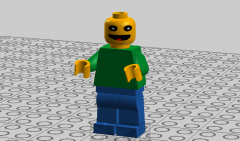
From the album: Tutorial Pictures
2 points -

Map Creator (0.9.11)
ShadowDraikana reacted to Cyrem for a topic
Map Creator (0.9.11) Map Creator is a tool to build new LEGO Rock Raiders levels. Things to know: Import/Export single map files by clicking the "Options" button in the correct map mode. Press [shift] while placing to speed place. That this is a BETA and you should report all bugs and errors. The Arrows on the bottom right hand corner change the mode. In the Monster Editor Right Click + [shift] will clear that tile. Import original game maps with the specific Original Map Importer. Paths and Rubble cannot be hidden. Screenshot: http://i.minus.com/izwI0JwMKmVBQ.jpg v0.9.11 Added Crystal to Object Mode Set Quantity of Rock Raiders or Crystals on one tile. (Position is randomized on that tile when exported) Download1 point -

Rock Raiders Vehicles and Buildings
Sadie Meowsalot reacted to PeabodySam for a topic
As of today, I do believe that I have at last finished a project of mine that I've been working on for a long time. No doubt that this project has already been attempted by countless before me. In fact, while doing Google searches for reference pictures, I stumbled upon quite a few attempts by various people. As a recent victim of art theft myself, I refrained from using anything but the Rock Raiders manual and direct screenshots/videos from the game for reference, to avoid copying anyone else's models. Some of you who know me may know that, for a long time, it has been my goal to recreate Rock Raiders vehicles and buildings from the PC game in LEGO Digital Designer. Back before LEGO Digital Designer Extended (and, before that, LEGO Universe) mode was available, I did my best to recreate some of the assets in LEGO Factory and DesignByMe, such as the Tunnel Scout, Power Station, upgraded Small Transport Truck, upgraded Small Digger, and Super Teleport Pad, but I was limited by the limited LEGO Factory pallet. Once LEGO Universe mode was released and I had access to so many more bricks in every available color, I restarted my project. jamesster, you might remember this screenshot I sent to you early this year, showing my work-in-progress Power Station, Super Teleport Pad, Support Station, and Docks. But, sadly, as I found only a limited supply of screenshots online, was too lazy to make some myself, and had difficulty interpreting the blurry pixelated images in the Rock Raiders manual PDF, the project was temporarily put on hiatus. Now that I've got Rock Raiders installed on my new Windows 7 and quite a bit of free time on weekends, I was able to return to this project. After discovering that Search N' Rescue made a great sandbox level for constructing buildings and teleporting in vehicles, I took tons of reference screenshots. You can see a few of these screenshots here. Plus, I found that the RRU Wiki, as well as Lair's own screenshot gallery, proved to be valuable assets. But still, what to do about those grainy pixelated images in the Rock Raiders manual PDF? That's when I discovered this website, which provided high-resolution renders of the vehicles and buildings. This allowed me to make out so many details that had limited my progress before, allowing me to finally finish my project. Since sometimes the manual renders and the in-game models differed in certain details, I tried to combine "the best of both worlds" whenever such a discrepancy showed up. But first, I've already given credit to RRU Wiki, Lair, and the Rock Raiders Fan Wiki for providing images. Before I go on, I must also give credit to Daedalus304, who provided LXF models of the Rock Raiders sets and created custom replacements for the Rock Raiders cockpit, chassis, drill, and mining laser. I also used penguin3332's LXF model of Rock Raiders HQ for the Upgrade Station and Mining Laser. Okay. Now that credit has been given where it's due, I present to you... Note: As the Teleport Pad, Upgrade Station, and Rapid Rider are unaltered from the original sets, they will not be covered in further detail below and are included in the above screenshot merely for purposes of completion. Vehicles Upgraded Hover Scout A Hover Scout with engine and radar upgrades. Upgraded Small Digger A Small Digger with engine, radar, and drill upgrades. Note that the magnet holder brick is not included in LEGO Digital Designer, so the magnet has been placed off to the side while a brick-built solution has been substituted in. Upgraded Small Transport Truck A Small Transport Truck with engine, radar, and cargo upgrades. Because the Jet Engines cannot be placed in their correct location due to collision errors with the tires, I had to opt for the next best option available. (Rear View) Small Mobile Laser Cutter This was one of the trickiest models, and I still don't think I quite got the rear correct. Thanks to the odd angle of the manual render and the low-poly in-game model, the front end of the laser stumped me for quite a while; however, after watching the Small Mobile Laser Cutter clip in the main menu, in which the laser turret is raised to aim upward, I think I finally figured it out. (Rear View) (Side View) Tunnel Scout This was probably one of the first models to be finished... it probably helped that my LEGO Factory rendition gave me a headstart. Upgraded Loader-Dozer A Loader-Dozer with engine, cargo, and radar upgrades. I know that the Slanting Standard 2x4/2x2 has a more detailed in-game model (as seen on the Cargo Carrier) than what is used for the Loader-Dozer, but while I originally used the Rudder 1x4x3, I realized that the Slanting Standard 2x4/2x2 was much closer to the scale of what is used for the upgraded Loader-Dozer. Also, if you notice, even though it is not three-dimensional like it is on the Granite Grinder, the upgraded Loader-Dozer uses the same mudguard design as the standard Granite Grinder according to its 2D textures. Also, just for future reference, whenever the Chrome Crusher scanner shows up in these models, I'm using the set-accurate version, not the in-game version. Upgraded Granite Grinder A Granite Grinder with drill, radar, and engine upgrades. Large Mobile Laser Cutter Since the flex tubes cannot attach properly due to collision errors, I've just put them off to the side. Hoo boy, if I thought the Small Mobile Laser Cutter was tricky, it was a piece of cake compared to the Large Mobile Laser Cutter. If you look at one of my reference screenshots, you can see that entire parts of the Large Mobile Laser Cutter are untextured! Plus, its rather compact build made it difficult to discern how its chassis was designed, since it was clearly not the standard Rock Raiders chassis. That's the story behind that LMLC-Interior.png screenshot, which helped tremendously in figuring out how to build the chassis. (Rear View) (Side View) Upgraded Large Mobile Laser Cutter A Large Mobile Laser Cutter with drill and radar upgrades. I'm not fully sure about how the radar upgrade is attached; unfortunately, studying the radar upgrade as it appears in-game did not really help, since it appears to be attached to a place where there is no possible connection. Upgraded Chrome Crusher A Chrome Crusher with drill and engine upgrades. Yes, I am aware that these flex tubes are too long, but the original tubes are not flexible and Daedalus304's original LXF looked empty without them. I think the Chrome Crusher has the most subtle in-game engine upgrade of all the vehicles, since it does not alter the Chrome Crusher model at all; it simply changes the textures. Of course, for the LEGO Digital Designer model, it required a bit of alteration to the model itself. Cargo Carrier Before I discovered the high-resolution manual renders, I actually found a screenshot from the Cargo Carrier slider puzzle from the PS1 version, put it in MS Paint, and did the slider puzzle myself to piece together the highest-quality picture of a Cargo Carrier that I could find at the time. (Rear View) Buildings Tool Store A Tool Store, as it appears in beta and in the manual (right) and as it appears in the released game (left). I decided to include both models for the heck of it. In fact, one beta screenshot on the RRU Wiki actually helped me figure out how the beta Tool Store was built in the rear. (Rear View) Docks These two models of the Docks are exactly the same, except one has the Holder 16 MM bricks angled upwards while the other has the Holder 16 MM bricks angled downwards (in-game, a powered Docks has an animation that switches between the two version). For this model, I was more faithful to the in-game model than the manual render. (Rear View) Power Station Of all the models here, this one probably underwent the greatest changes upon discovery of the Rock Raiders Fan Wiki, since the front of the lower half of the larger tower is actually more compact than it appears in-game. I did not bother attaching the flex tubes to this one, mainly due to collision errors. (Rear View) Support Station I don't think I have much to say about this one... it's pretty darn accurate, if I do say so myself. (Rear View) Geological Center Did LEGO ever actually produce dark gray sloped bricks with those Rock Raiders radar decorations? I thought they were only available in teal, and yet the Geological Center uses them in dark gray. Ah, well, too bad LEGO Digital Designer lacks most Rock Raiders decorations. (Rear View) Ore Refinery That large antennae is not in the in-game model, but is plainly visible in the manual render. However, for the most part, I used the color scheme of the in-game model, not the manual render. I may want to make an alternate model with the manual render's color scheme, though... (Rear View) Upgraded Mining Laser A Up. 1 Mining Laser. You know, I find it interesting that the Mining Laser is the only time you see one of the actual Rock Raiders in-game, and it's Sparks. Some remnant of the beta stages, perhaps? Still, even with dual laser turrets, the Mining Laser is useless for its intended purpose: mining. Takes forever to blast through dirt. And yet, it can destroy your buildings in just two shots. Data Design Interactive, I don't think "griefing" was what you programmed the Mining Laser for... Super Teleport Pad Because just "Super Teleport" sounds just silly. Like the Tunnel Scout, this model was mostly finished in LEGO Factory, so when LEGO Universe mode came along, it was completed quickly and easily. ----- So, what do you guys think? An impressive attempt at recreating the buildings and vehicles in the most accurate presentation to date? Or am I just someone who is late to the game and trying my hand at something done countless times before me to much greater fanfare? And now that the buildings and vehicles have all been done, what's next for me to do? Oh, just you wait...1 point -
Scene 24: Johnny Thunder Blows This Taco Stand
thunderzizi reacted to PeabodySam for a topic
Note from Director Steven Spielbrick: What you are about to read is the script of a deleted scene from the upcoming blockbuster, The LEGO Movie, soon to be in theaters. The script was written by Frank, best known for his screenwriting of the 2002 blockbuster The Johnny Thunder Movie when he wasn't writing love letters to lead actress Giselle and crying in a corner in the commissary because he was too cowardly to actually give her any of those love letters. There is some speculation by Dr. Albert Overbuild that this script was actually ghostwritten by another individual who wrote this scene just to stroke his already-inflated ego, although Johnny Thunder denies any of these accusations.This scene was written entirely as a homage to fan-favorite LEGO lines and games from the late nineties, exploiting fan nostalgia to its maximum levels. I promise that only reason we left this on the cutting room floor is because of running time, and most certainly not because of any allegations that I am a cheapskate who refused to pay the cast and crew to film this scene. Scene 24 FADE IN. The shot opens with a low-angle shot of a hill, with dark and stormy clouds in the background. Occasionally, the sky is brightened by a flash of lightning. When filming this, be sure to tell the best boy Eddie to make sure that gaffer Hank doesn't electrocute himself with the lighting equipment again, even though it would produce the desired effect if we want it to look like lightning. The music should be dark and foreboding, with the only other sounds being wind and the distant rumbling of thunder. On that note, make sure the gofers bring coffee to Unit 2 cameraman Nero so he won't fall asleep while shooting again, since it takes forever to edit out his snoring in post. And make sure it's an espresso, not a latte or mocha, because it takes even longer to edit out the sound of Nero screaming at the gofer who brought him the wrong cup of coffee. The music crescendos, becoming less dark and foreboding and giving way to a march that is most certainly not a cheap knock-off of the "Raiders March." Enter JOHNNY THUNDER, who climbs up the hill before standing proudly and triumphantly at the top, fixing his hat and staring off into the distance. As the march hits its most dramatic and emotional peak, complete with ominous Latin chanting, the backlighting turns bright and angelic, as though the sun is rising directly behind JOHNNY THUNDER (again, make sure Hank doesn't electrocute himself), sure to give this scene some faux symbolism that will leave literary critics scratching their heads for years and wondering, "What does it mean? Obviously, it means Johnny Thunder is awesome, but surely there must be an even deeper meaning!" Text flashes at the bottom of the screen, reading: "5900: Adventurer Johnny Thunder available at your local toy store! Only $4.25!" JOHNNY THUNDER: Aces! Good on ya, Johnny! If that bludger Lord Business and his dodgy Robot SWAT Team think they could hold the Thunder himself prisoner aboard that dropship, they've got kangaroos loose in their paddock! CUT TO AERIAL SHOT of the nearby wreckage of the crashed police dropship. Text flashes at the bottom of the screen, reading: "70815: Police Dropship available at your local toy story! Only $69.99!" CUT back to JOHNNY THUNDER standing on the hill. This time, he is joined by the Rock Raiders CHIEF, who climbs up the hill to stand beside him. He is not accompanied by dramatic music or angelic lighting because he is not as awesome as JOHNNY THUNDER. However, he gets to appear in this scene because we're exploiting fan nostalgia. After all, that's the reason why we have JOHNNY THUNDER, BENNY, and other classic figures for no reason other than to make older LEGO fans swoon while younger LEGO fans are confused, failing to recognize their significance. Those poor children. CHIEF frowns and crosses his arms, glaring at JOHNNY THUNDER, most likely jealous of how awesome he is. CHIEF: You know, I did help! If it weren't for me, we'd- JOHNNY THUNDER: Oh, of course you wanted to get in on a bit of the action, Chief! Doesn't everyone dream of the opportunity that they may have the chance to work with the Thunder himself? Well, mate, today's your lucky day! CHIEF: Rather than standing idly on this hill like it's a sandwich break, I'd rather resume our mission to stop Lord Business! But we can't do this alone... we need the other Master Builders. I don't know how many of the others escaped, but I overheard Vitruvius grumbling that the Infomaniac was not present at the meeting in Cloud Cuckoo Land. Perhaps we can a landslide has occurred! BEAT. CHIEF covers his mouth and looks sheepish. JOHNNY THUNDER does not appear to have noticed his sudden outburst, instead staring off into space while stroking his chin. We need a few seconds of silence that will most likely be drowned out by the laughter of older LEGO Rock Raiders fans and a chorus of confused "What just happened?" cries from the younger audience before we continue. CHIEF: Err, sorry about that. I've got a plan for the mission! We gather some resources and... are you even listening? JOHNNY THUNDER: Hmm... let's see... aha! The Thunder has a plan! Of course he does, he always does! CHIEF: But I was just about to brief you on- JOHNNY THUNDER: There's gotta be a map somewhere in Lord Business's evil lair that shows the routes that the police dropships will follow after leavin' Cloud Cuckoo Land with the captured Master Builders. And once I have a map, I can find anythin', whether it's a Golden Dragon or a Green Ninja! But first, I'll need to explore Lord Business's evil lair to find this map, and before I do that, I'll need to find the evil lair in the first place... CHIEF: Alright, fine. I'll check my handheld geological scanner to see if I can locate... Camera REVOLVES around JOHNNY THUNDER and CHIEF and ZOOMS OUT, revealing Octan Headquarters towering before them. Dramatic musical stinger plays. Text flashes at the bottom of the screen, reading: "70809: Lord Business's Evil Lair available at your local toy store! Only $69.99!" CHIEF: Oh, there it is. JOHNNY THUNDER: Chief, you stay here and contact the Infomaniac. The Thunder is going in! CHIEF: Wait! You can't just walk into Octan Headquarters like that! JOHNNY THUNDER: Hmm, that'd be right. I'm so famous, everyone will recognize me the moment I step my foot in that door, and then I'd be taken apart faster than some shonky MegaBloks rubbish! I can't believe it, a situation where no one is allowed to notice the Thunder! Those poor fangirls will have to wait! JOHNNY THUNDER takes off his hat and rubs his forehead. JOHNNY THUNDER: Think, Thunder, think! That one other Master Builder... the one always wearin' his underwear on the outside... what was his name? CHIEF: Clark? JOHNNY THUNDER: Yeah, that's it. Clark. What did he say to do in such a situation? CUT to Cloud Cuckoo Palace, filmed in black-and-white to indicate that this is a flashback and, more importantly, to cut costs of filming. While other Master Builders mingle in the background, SUPERMAN is speaking to JOHNNY THUNDER, who isn't paying much attention and is instead attempting but failing miserably to flirt with WYLDSTYLE. JOHNNY THUNDER also fails to notice BATMAN in the background, angered by the flirting, repeatedly throwing batarangs at him but missing every time. SUPERMAN: If you're ever in a situation where you need to go unnoticed, find a phone booth and wear glasses. JOHNNY THUNDER: Yeah, mate. Goin' unnoticed. Doubt I'll ever have to give it a burl- A batarang finally hits JOHNNY THUNDER and knocks him out of the shot. SUPERMAN and a few other Master Builders gasp. BATMAN performs a fist pump. BATMAN: First try! CUT back to JOHNNY THUNDER in front of Octan Headquarters. He grins and puts his hat back on. If he had fingers, he would snap them. JOHNNY THUNDER: Ripper! Find a phone booth, wear glasses! CHIEF: Oh, brilliant. But where can we find a phone booth in these modern... JOHNNY THUNDER: Well, ain't this a beaut? Have a gander at this, 'cause there's one right there! PAN to a blue police box situated just outside Octan Headquarters. CHIEF: Okay, Johnny Thunder! Go for it while I contact the Infomaniac. Good luck on your mission! And watch out for those landslides - I mean, Robot Feds! CHIEF leaves the shot to contact the Infomaniac. Or, at least, that's what he claims to be doing. In reality, we all know that he is actually going on a sandwich break. JOHNNY THUNDER runs to the blue police box, opens the door, steps inside, and closes the door behind him. JOHNNY THUNDER: Crikey, it's a lot bigger on the inside! The door opens and JOHNNY THUNDER steps out of the police box. He is now wearing a disguise: a grey fedora, a pair of sunglasses, a fake mustache, a sleeveless leather vest, a satchel, and green pants. JOHNNY THUNDER: Wicked, they'll never recognize me now in this disguise! They'll take a butcher's hook and say, "There's no way that's the fair dinkum Thunder. That's some lousy motorcyclist Thunder-wannabe!" Maybe they'll even write a ton of fan mail askin' me to come back and kick this stupid motorcyclist in the hip piece! Now, time to find that map... CUT to the Octan conference room, where there is low lighting and low, sinister music playing in the background. At the start of the shot, make sure the camera focus is on a large map of the globe, in order to highlight that Gilligan Cut between JOHNNY THUNDER saying "map" and the fact that we're cutting to a map. It's supposed to be clever. Then, PAN OUT to gradually reveal the rest of the room, including PRESIDENT BUSINESS and EVIL OGEL, who are sitting at the conference table and talking. At the end of the shot, FOCUS IN on a giant brick-built taco in the room, promoting the upcoming Taco Tuesday with a sign that ends with the following message: "Please do not rebuild this into something that will help you defeat the bad guys." Just some subtle foreshadowing. PRESIDENT BUSINESS: ... but after that incident with the noodles, I've been trying for days to sink Benny's classic spaceship, but every unit I send out to do the job ends up spontaneously combusting and falling through the floor! EVIL OGEL: Those minions are only good for tossing out a window to relieve some stress. You cannot rely on them, which is why you must pay close attention to every word I say. Heeding my advice could mean the difference between failure and victory. Now, listen: when we send out the giant plastic badger, we... Enter JOHNNY THUNDER. PRESIDENT BUSINESS and EVIL OGEL both stop talking and stare at him. When each character speaks, make sure WIDE-ANGLE LENS is used in a CLOSE-UP SHOT. Despite how many films try to do this and only look awkward and uncomfortable, we will get it right! Maybe. PRESIDENT BUSINESS: Who are you? JOHNNY THUNDER: Err, yes. Hello. My name is John... son... uh... Thun... doo... yeah. And I'm here to clean your block. PRESIDENT BUSINESS: Ah, Johnson Thundoo? You sure look nothing like that Johnny Thunder fellow. JOHNNY THUNDER: Of course not! The Thunder is a brave and awesome hero! I'm a mean, rebellious, law-breakin', motorcycle-ridin' Thunder-wannabe son of a MegaBlok! PRESIDENT BUSINESS: Hold on. Do correct me if I'm mistaken, but did you just say that you break the law? Surely, we don't want any of that around here, now, do we? JOHNNY THUNDER: Uh... of course not. I said, I'm a mean, rebellious... err, law-abidin'... motorcycle-ridin' Thunder-wannabe son of a MegaBlok... yeah. PRESIDENT BUSINESS: Oh, good! That's a very good thing to hear, or else I would have you put to sleep! Err, I mean, uh, yes, pleased to meet you, Mr. Thundoo! It's so hard finding villains who are willing to work with me... most of the time, they're just out to break the law and spread chaos. Not like Ogel here, who's perfectly happy with enforcing rules with an iron fist! Or a plastic hook, in this case. EVIL OGEL: Yes, President Business. Mr. Thundoo, I welcome you to the Organization of Great Evil Laughter. That's O.G.E.L., which spells "Ogel". Quite ingenious, isn't it? I came up with it myself! Now, please, take a seat and make yourself uncomfortable while I get back to Business. PRESIDENT BUSINESS: "Back to Business." Oh, that's clever! JOHNNY THUNDER takes a seat next to the giant taco. I bet you never expected to ever read that sentence in a movie script. JOHNNY THUNDER: Hey, mate, why is LEGO Island blinkin' red on that map? EVIL OGEL: Ah, you're just in time to witness the launch of a rocket from the spaceport on LEGO Island! Once launched, it will release its cargo and blanket the Earth with Evil Orbs that will put everyone under my mind-control so I can usurp Lord Business and rule the world... I mean, uh, just kidding! Pretend that you didn't hear that! PRESIDENT BUSINESS: Oh, I love this guy! He's so funny! What a joker! But, in full seriousness, we've got that rocket loaded with a bunch of micro-managers that will take over the world, and there's no one who can stop us! Those Master Builders have been a thorn in my side long enough! JOHNNY THUNDER: Yeah? Well, this thorn is about to take you down! JOHNNY THUNDER jumps out of his seat and rips off his disguise. A triumphant fanfare plays, and the lighting in the room brightens (keep an eye on Hank). PRESIDENT BUSINESS and EVIL OGEL gasp in astonishment. PRESIDENT BUSINESS: You're not Johnson Thundoo! You're... uh... Ogel, who is this? EVIL OGEL: Johnny Thunder! I'll have you sent to the Melting Room for this! Text flashes at the bottom of the screen, reading: "70801: Melting Room available at your local toy store! Only $12.99!" JOHNNY THUNDER: G'day, mates! Thunder's the name, building's the game! And it's time to blow this taco stand! JOHNNY THUNDER disassembles the giant taco and rebuilds it into an explosive escape catapult. The catapult launches him out a nearby window as it explodes. SLOW-MOTION SHOT of JOHNNY THUNDER flying through the air with the explosions behind him, complete with epic music playing in the background. The explosions serve no real purpose, but it'll be great trailer footage. JOHNNY THUNDER lands conveniently in a fountain outside Octan Headquarters, because if there's one thing we learn from videogames, it's that water negates fall damage, so therefore audience's suspension of disbelief won't be broken. As JOHNNY THUNDER emerges from the fountain, the camera is focused on him, although CHIEF can be seen in the background out-of-focus. JOHNNY THUNDER: Crikey, that was a close one! The other Master Builders will have to wait; I gotta stop that rocket from launchin'! But, how will I get to LEGO Island in time? It’s a back o' Bourke from here! CHIEF: A landslide has occurred! JOHNNY THUNDER cries out in surprise and spins around. FOCUS IN on CHIEF. JOHNNY THUNDER: Chief! Good to see you again, mate! Did you contact the Infomaniac? CHIEF: Yes, I did. I'll brief you on the good news and bad news. The good news is that the Infomaniac is safe; he explained that he was unable to attend the meeting due to having to attend some annual tug-of-war competition held over a shark's bay, but he was hoping to arrive fashionably late. By the time he arrived, everyone was gone... the Master Builders, the Robot SWAT Team, and even the LEGO Studios film crew! That's why he didn't have a cameo appearance earlier in this film like you did. After that, he returned home to LEGO Island... and that's where the bad news comes in. JOHNNY THUNDER: That'd be right, mate. Listen, I gotta rock up at LEGO Island as quickly as possible, and I ain't got time for a walkabout. CHIEF: I can help you build a Teleport Pad that will send you there instantly! Even better, we don't need to worry about following any complicated procedures or overly-convoluted mechanics in constructing such a teleporter. We're Master Builders; we don't need to follow the instruction manual! Just... don't tell my Rock Raider cadets I said that, or else they'll never listen to another thing I teach them at the academy, and then I'll be a landslide has occurred! JOHNNY THUNDER: You little ripper! Let's build this Teleport Pad and stop that rocket! Let's hope that audiences will ignore the fact that we’re only using CHIEF as a blatant Mr. Exposition and deus ex machina in addition to exploiting fan nostalgia. JOHNNY THUNDER and CHIEF quickly disassemble the fountain and rebuild it into a Teleport Pad. CHIEF salutes JOHNNY THUNDER as the latter steps into the Teleport Pad. The scene around JOHNNY THUNDER dissolves in a bright flash of light (okay, maybe just this once, let Hank accidentally electrocute himself for the best results). As the light fades away, JOHNNY THUNDER finds himself in front of the Information Center on LEGO Island. Text flashes at the bottom of the screen, reading: "5731: Information Center available at... oh, wait, LEGO hasn't produced that set yet." JOHNNY THUNDER looks around and sees the Super-Secret Police terrorizing the town populace in a lengthy MASTER SHOT. The camera lingers for a moment on PEPPER RONI throwing pizzas at one Robo SWAT, which is unaffected. PEPPER RONI: Whoa! Man, these bad robot dudes are nothing like the Brickster-Bots! When the camera returns to JOHNNY THUNDER, he turns around and meets the INFOMANIAC, who is clearly distressed and acting even more erratic than usual. JOHNNY THUNDER: G'day, Infomaniac! How- INFOMANIAC: Hello! Hola! Velkommen... oh, forget the usual spiel! There is no time! This should be enough: welcome to LEGO Island! Please sign the Big Blue Brick Book and, oh, no, don't sign it, we haven't got time! Oh, this is terrible! We're in danger, Johnny! Not only are all these dastardly robots everywhere, but- JOHNNY THUNDER: A big, bad rocket is gonna blast off from the spaceport, I know. How could this happen? How did you let Ogel build the rocket here? INFOMANIAC: Ogel? Well, then, I'll bet that no-good Brickster is behind this, somehow! That crook is always proclaiming himself to be Ogel's fanboy! Now, I've got a brilliant plan to stop them, but if only I could remember what it is! JOHNNY THUNDER: No worries! I once knew this lad named Zack... INFOMANIAC: Zack? JOHNNY THUNDER: He's a LEGO maniac. And he once told me, "GOTTA BUILD LIKE CRAZY!" INFOMANIAC: Eureka, that's it! INFOMANIAC runs inside the Information Center and comes back out with the Constructopedia in his hands. INFOMANIAC: Lord Business is all about following the rules; sticking to the instructions and nothing else! This book... it gives him strength! We need to stop following the instructions! Think outside the Constructopedia! INFOMANIAC tears a page out of the Constructopedia. Behind him, the Information Center deconstructs and its bricks fly up into the sky. JOHNNY THUNDER and INFOMANIAC watch the bricks as they disappear, then INFOMANIAC sheepishly sticks the page back into the Constructopedia, causing the bricks to reappear and rebuild the Information Center. INFOMANIAC: I... probably could have thought that one through a little better. Okay, forget tearing the pages out of the Constructopedia. JOHNNY THUNDER and INFOMANIAC disassemble the Information Center, manually this time, and rebuild it into a crazy flying vehicle that would probably never fly in real life, but that’s okay because this is LEGO and not real life. As a song that is most certainly not a cheap knock-off of "Flight of the Valkyries" plays, they hop into the flying vehicle and take off. CUT to AERIAL TRACKING SHOT of the flying vehicle as it passes over the Super-Secret Police down below. JOHNNY THUNDER: Crikey! I've got a gut feelin' that those bots will stop us from stoppin' that rocket if we don't stop them from stoppin' us from stoppin' that rocket! INFOMANIAC: Quick, a trick! With green bricks and red bricks... INFOMANIAC pushes a button. CUT to TILT DOWN SHOT as the flying vehicle starts dropping green and red bricks, then a FOLLOW SHOT of the bricks as they fall upon the robots. The bricks block the robots' paths and trap them in the center of the island. The LEGO Island civilians cheer. CUT back to JOHNNY THUNDER and INFOMANIAC. INFOMANIAC: They stay! JOHNNY THUNDER: Good on ya, mate! We're almost at the spaceport! The flying vehicle lands atop Space Mountain, next to the spaceport. JOHNNY THUNDER and INFOMANIAC jump out of the vehicle and run to mission control, running towards the camera in slow-motion, but they stop in shock upon seeing the off-screen minifigure at the control panel. JOHNNY THUNDER: Crikey! Well, I'll be stuffed! Isn't that the friendly mechanic who works at the gas station? INFOMANIAC: It cannot be! In all my years, I would never have thought it would be you... Nubby Stevens! LOW-ANGLE SHOT of NUBBY STEVENS operating mission control, surrounded by Robo SWAT bodyguards and looking as evil and sinister as a friendly mechanic working at your local gas station can be. Dramatic music stinger plays. NUBBY STEVENS: Hmm, I wonder who you might have been expecting. The Brickster? Don't be ridiculous... he's a criminal, a law-breaker, not at all the type of villain that President Business would hire! I, on the other hand, have been working at the Octan gas station here on LEGO Island for all these years. It only makes sense that my CEO would want a trusted employee to oversee the launch of Ogel's rocket! It's like I always say: life is like a skateboard... because you can grind it beneath your feet! INFOMANIAC: Nubby, please, listen to me! You don't want to do this! If you launch that rocket, Lord Business will take over the world! NUBBY STEVENS: I'm tired of always asking why we're yellow and what's an elbow and all those other philosophical questions. Sometimes, the answer to the question of life, the universe, and everything is to rule it all! And nobody can stop me! JOHNNY THUNDER: Listen, ya fancy yabberin' wuss. Do you know who you're dealin' with? NUBBY STEVENS: Why, you're... JOHNNY THUNDER: The name's Johnny Thunder. Australian. Master Builder. And the minifigure who's gonna burn Octan Corporation to the ground! You know what? I've got writer's block. Just blow the whole movie's budget on some cool action sequence with lots of explosions. After that's over, JOHNNY THUNDER stands victoriously in front of Brickolini's Pizzeria, with the entire population of LEGO Island (except NUBBY STEVENS, for obvious reasons) crowding around him and cheering. JOHNNY THUNDER: Aces, we did it! We gave Nubby a drubbin' and stopped that rocket! I'd daresay that was the most excitin' adventure I've been on yet! PEPPER RONI: Dude, thanks for foiling Nubby's evil plan, stopping that rocket, and saving LEGO Island! INFOMANIAC: The day has been saved thanks to Johnny Thunder! Let's throw a celebration! JOHNNY THUNDER: I'd be stoked to stay and celebrate, mates, but adventure is callin'! My fellow Master Builders are in peril, and Lord Business is still at large, and only I can stop him and save the world! INFOMANIAC: Are you ready to leave LEGO Island? Thanks for the visit, and you're welcome to come back anytime! JOHNNY THUNDER climbs back into the crazy flying machine and waves goodbye to the citizens of LEGO Island, then takes off. CUT to LONG SHOT of LEGO Island. JOHNNY THUNDER flies towards the camera, and the shot freezes on him winking to the audience, sure to make any girls in the audience swoon. FADE OUT. And now, for something completely different: the boring adventures of Emmet.1 point -
Tutorial: Adding Custom Decals into LDD
le717 reacted to Fush for a topic
Er.... your counting is off. Also, LDD has a scrollbar in the decal window now, so nothing gets cut off.1 point -

Tutorial: Adding Custom Decals into LDD
Jimbob reacted to le717 for a topic
Two things: The position of the decal in DecorationMapping.xml matters. If you it near the bottom of the list, the texture will be listed near the bottom of list. Because of the varying amount of decals (mainly on heads), doing this can make the GUI selector cut off (even further) on smaller screens. Putting it near the top of the list (thus near the top of the selector) is always advised. That is the second time you have linked to that tutorial. Sounds like I need to back on updating it for the newest version.1 point -
LDD Step 2-2: Decorations
Fush reacted to Jimbob for a gallery image
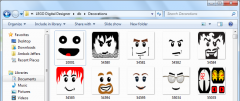
From the album: Tutorial Pictures
1 point -

In Soviet Russia, <Something Blank You>
Guurahk204 reacted to McJobless for a topic
http://www.youtube.com/watch?v=37OWL7AzvHo People can bump forum games. These games are pointless anyway, so bumping prevents multiple topics of the same thing being created.1 point -
Cavern Exploration Vehicle
aidenpons reacted to Edrjune1 for a topic
So I decided, while I'm waiting to move forward with the slimy slug project, to give a go at some building with real bricks. Here is what I came up with. It is a transported for all the Kabaya promo sets to explore and do recon drilling in new caverns. What do you think?1 point -
Rail Runner
Fush reacted to Jimbob for a topic
One would think you two were actually designing a set for the LEGO company.1 point -
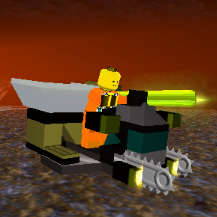
Rail Runner
Fush reacted to aidenpons for a topic
Ahhhhhhhhhhhhh, so this is a small train... Mebbe I'm being fussy but I think it should have two lights or none at all.What's the point of one, non-centered light? Fair enough that they won't have steering wheels, but they should probably have a sideways lever. A Super Station Master ( ) could control it, but Planet U is a big place and there shouldn't be too many running at once. I think I meant 'why do you want to attach something to the front? It's the front.' However I now see your design and that makes sense. One point - You say that the cars move around. How? You can't run them across anything that isn't a rail track (good luck trying), so do you have another little train there or what? Yes... unless you have a sort of fold-out-able track then you can't really do much. Ah. You can probably keep it black - it's just that it sort of 'pokes out' of the front. Whoever said it worked there? It's just that you never really use it anyway. I see what you mean about it being official, but who says official is good? I still think it'd look better in dark grey. I think the problem is that the comparatively light grey clashes with the midnight black. Then make a new, small laser for a small train! The 'huge' bit is difficult. Technic cross Lego is your best bet for stability, but not so much for turning and size. Perhaps starting them from the middle of the boxes might help? I think just copy the original Power Station design. It seems to work for me. Yes. Yes. My soul is touched by this act of kindness. Thank you for doing such a benevolent deed which will be remembered throughout history.1 point -
Guardian Outpost
aidenpons reacted to RRChief for a topic
Hey guys! After a delay of almost 4 months, I'm back with my newest RR building creation, presenting the Guardian Outpost! The Guardian Outpost is the ultimate base defence, it consists of two main towers, each housing a laser cannon and sonic emitter dish. The laser cannon serves to destroy any rock monsters trying to wreck your base (or act as a mining laser if you want ), while the sonic emitter dishes scare away any pesky slimy slugs looking for a quick EC snack. Thats not all! It also comes packed with two landing pads, each housing a tunnel scout so you can perform reconnaissance & scouting missions. Moreoever, unlike most other buildings, the Guardian Outpost can just be teleported down instead of having to go through the labourious process of having to set up the barriers and carry the resources over etc if you have the necessary ores & ECs. This way you can quickly reinforce an area far away from your main base to protect your Raiders or the resources they are trying to collect. Hope you all like it! A creation by RRChief1 point -
Futuron Explorer
Quisoves Potoo reacted to LegoMathijs for a topic
I'm building a Space layout in the Futuron colour sceme. I don't use the Futuron sets in the layout, only MOCs. Some of them is a modular space ship. Every part of the ship can be connected in multiple ways. You can make three space ships with the parts: Futuron Explorer: All Parts disconnected: Assembly: Assembly: Assembly: Assembly: More pictures at my flickr photostream: http://www.flickr.com/photos/mathijslegofan/1 point -

New version of ROCK RAIDERS - update
Ben24x7 reacted to Cirevam for a topic
The problem is that this is exactly what the Rock Raiders United community doesn't want, or at the very least that is the general attitude that many people have around here. Rock Raiders is a very casual game already up until a few levels near the end and many of the mods that RRU has made try to make the game more challenging. The core demographic for the original game was children, so that is understandable. Now, we have grown up and the majority of us are 15 to 25 years old. We can take a challenge. This makes me feel a little bit better about the situation. In my eyes, Rock Raiders was one of your best games and I have hope that you are willing to show us a game that's even better than the original Rock Raiders. Of course, when I say "you" I'm addressing all of DDI -- the programmers, the artists, the musicians, the engineers, and the leaders. I was talking to a few people about this and we're actually concerned about you developing this game on multiple formats at once. Having multiple formats means that you need multiple teams to work on each version, which splits your time and energy. If you're planning on PC, Wii, WiiU, Android, iOS, and Facebook... you're spreading your effort way too thin and the main product (PC) will suffer. And honestly, the game will end up being completely different for each format. The PC has mouse and keyboard controls which are superior to a controller (WiiU) or pointer (Wii), and far superior to a touchscreen (Android, iOS). The general attitude towards Facebook games for many people around here is negative, and I feel that you will receive either backlash or apathy towards a Facebook version of the game. We do not want Farmville Raiders. We do not want to waggle a Wiimote at a screen in order to drill a wall. Please understand this. Your trending analysts may say that Facebook games are hot right now and the casual market is something you need to capture, but RRU in general is not in that market. I don't want to speak for everyone, but I think we are looking for a game that makes us think and plan ahead.1 point -

Scrapped Zones And More
Quisoves Potoo reacted to lol username for a topic
Oh man, you guys aren't gonna believe this stuff... Tom and I talked quite a bit via email today, and Bill Benecke (the concept artist guy) got involved too. They're really great guys, both very friendly, and were happily surprised to hear the game has fans. Here's the rundown. So, I initially emailed Tom and briefed him on the game/theme's status as a well-loved classic in the LEGO community, our progress in modding it, and the various finds regarding LEGO Logic and such, and basically asked if he had any info he could add to this. Boy, did he ever! So yeah, my jaw dropped. I sent an email back, thanking him for the details, and also linking him to this and this as examples of what fans have done with the theme. He loved them, and added that he's gonna try to dig up some more LEGO Logic and Alpha Team development stuff sometime. He also had an amusing little anecdote to share: He also mentioned where some of the other developers are at now, and what their current projects are: He then forwarded my email to Bill, who added the following: And Bill's email reminded Tom of more specific details of LEGO Logic, and then things started really coming together: And finally: I'm so darn happy right now.1 point -

Pc Vs Mac
aidenpons reacted to RockmoddeR for a topic
I just totally realized how he says nothing about being able to play Deer Hunter 2 after he buys his Mac.1 point