
Leaderboard
Popular Content
Showing content with the highest reputation on 03/23/2015 in all areas
-

Let's Make a Game
Drill Master and 3 others reacted to Jimbob for a topic
It is complete. In just 10 days, we have produced a working game from scratch! Check it out in the first post (again, it may take a little while to load) to play it. I have also released the full source code and assets there too, including credits for the sound effects, however to view the code you will need a copy of Adobe Flash Professional - you can download 30-day trials for the non-subscription versions here. In case anyone's concerned, it's legal as they're just trials which lock after the 30 days, hosted on another server. I'm certainly pleased with how it's turned out. With the exception of the sounds, we produced everything from scratch and already have a functional game which, at least in my opinion, isn't too bad. To everyone who took part, give yourself a pat on the back, and take this free Energy Crystal. We achieved what we set out to achieve, and more! Let me know if you can find any bugs. Really muck about with it. If you can make the player move off-centre, fall through the floor or something else, please post here including steps to reproduce it.4 points -

ractrak.exe
Wognif and 2 others reacted to MaelstromIslander for a gallery image
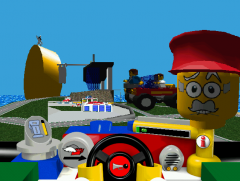
From the album: Other
LADIES AND GENTLEMEN, START YO-- You sure gave me a run fo-- SHW00OOOOOOOooooo-- What's the matter? Got lead I-- Helemt was on backwar-- GO!! Things like racing! Things like racing! Things like racing! Things like racing! Things like racing! Things like racing! Things like racing! Things like racing! Things like racing! Things like racing! Things like racing! Things like racing! Things like racing! Things like racing! Things like racing! *ractrak.exe has stopped responding.*3 points -

Bvb Files (Collision Meshes?)
CaptainGolem reacted to Sluicer for a topic
In another thread there was a discussion about the bvb files (I do not know why). Since I did a little more research on them I think the content should be referenced here: I had a first look at the .BVB files. I looked into two COLLIDE files. There are vertices without additional information and triangles with additional information. I was able to create the following images with the data from the 34 and the 2d sections: The test track The 8e section fills the rest of the file. It looks like the Binary Editor could not handle dynamic (unknown) structures. I am not able to interprete the content of the 8e section yet. There are always a variable number of integers followed by 4 shorts (except the last group of integers). Here is an extract from the TESTCOLLIDE.BVB Please remember: 0x04 is an integer 0x17 is a struct that was defined in this file 0x14 is an array with 0x__ 0x__ entries of type 0x__ [...] I had a closer look at the k_8e section. And the data in that section also seems to describe a tree (I have no idea why!). 7 numbers per node: pointer to left child (when -1 no left child) pointer to right child (when -2 no right child) x y z offset triangles number of triangles x, y and z are mostly really big numbers (between 0x40000000 and 0xC0000000 (=-0x40000000)). When you divide them by 0x40000000 you will get a normalized 3d vector. I think it is something like a normal or here a colliding direction(?). I changed the values to RGB and got the following image for the test track: I already have a working replacemant (a simple box). I am not falling through the ground but I am falling over the edge :-(. Maybe it is because of the tree!?!1 point -
BDB Files
Quisoves Potoo reacted to Sluicer for a topic
Even if it not necessary any longer because is working, but I found out what the four floats are for. They discribe planes (one normal and a distance) to divide the 3D world in smaller sections. By this it is very fast to find the region the car is currently in. The first node of the tree contains (float) 1 (float) 0 (float) 0 (float) 101.2483 This describes the blue plane. When the x-coordinate of the car is greater than 101.2483 (or -101.2483; I am not really sure) we have to go to the left child of the current node. That node contains (float) 0 (float) 1 (float) 0 (float) 68.672 This describes the green plane. When the y-coordinate of the car is greater than 68.672 (or -68.672) we have to go to the left child of the current node. That node contains the red plane. And so on until we reach a leafe. Then we know in which region the car is.1 point -

A simple mistake in creating game levels
BerixMaster2010 reacted to McJobless for a blog entry
Ben...what do you think half of game testing is? The whole point of testing is to make sure that the game is stable and reacts to any player input appropriately, and that the player can continue to play the game at any time without having to hard reset the game. I mean, this is confusing because it's EXTREMELY obvious. I don't think there's a game designer alive who doesn't know this. It's the same reason we get players to do very weird tests, such as jump in a single spot 5000 times or make bets on whp can break the level's physics and use a tree to jump out of the level bounds. Furthermore, those solutions...those are not "designer" solutions, they're "player solutions". That's how we would try and justify to the player that the story ingame works, but in terms of the physical gameplay elements, we have special tools such as kill volumes, blocking volumes (invisible walls) or teleports. It's simply impossible to test the game to get every bug out. A lot of players out there are simply playing to break the game. Others will play the game in ways the designers really didn't intend, and those developers may believe it's the players fault for causing such issues. I personally don't agree with them, but the point is that a lot of game testing is about this one issue. It's not some big secret. It's what we do normally.1 point -
BDB Files
Fluffy Cupcake reacted to Sluicer for a topic
Here are the images with a little bit of description: The test track has 24 regions (defined in k_2a): The first leaf in the k_27 section is the following: k_29 (ushort) 7 // parent node in the tree (ushort) 0 // offset in GDB 2E (ushort) 31 // number of elements in GBD 2E (short) 0 // when the car is in this region (short) 150 // offset in k_2B (short) 18 // number of visual regions (values of the k_2B) If you have a look at the referenced values of the k_2B you will find the following: (int) 38 (int) 8 (int) 36 (int) 20 (int) 2 (int) 34 (int) 32 (int) 4 (int) 10 (int) 16 (int) 6 (int) 22 (int) 18 (int) 12 (int) 28 (int) 14 (int) 26 (int) 24 These are the leafs that will be also visible. If I visualize the regions in the leafs I get something like (red is the current region; blue are the additional visible regions): The vertices I had added to the test track should have resulted in something like this (the yellow cube): But since the last region is the green one I would never see my cube. Here is another example: When the car is in the red box the blue ones will be visible. So if we want to change tracks it is not enough to change the mesh files and the collide files. We also had to change the BDB files. And they have to fit on the GDB files!1 point