Leaderboard
Popular Content
Showing content with the highest reputation on 06/06/2015 in all areas
-

Peculiar Glitch
Zubay and 6 others reacted to Wognif for a topic
I was doing my usual skeleton hunting, when I found this: I thought that was mildly interesting. However, when I went into the floor below: Turns out it was just a skeleton stuck in an infinite skydive in the ceiling.7 points -

Lost? Want to get back home? Here's How!
LimeKiller and 2 others reacted to Fluffy Cupcake for a topic
*This tutorial assumes that you have built your things somewhere by spawn, or somewhere that you can remember how to get to by finding your way from spawn. Ever had that moment where you chased an ostrich off your lawn and went so far out as to go way out in the ocean while driving around in circles on a boat trying to ram it, and then suddenly you realize you've forgotten which way is home and hours later you still can't find it? (This is a true story by the way, mine in fact). Well then, I can help you! (to an extent). Things you will need: 1. Your world seed 2. A hex editor (I use HxD myself) 3. A way to browse files on the computer. 4. Hands that function with a working brain (I'd say using your own is a good idea) Step 1: On the main menu, select and observe the world you are lost in. Check the seed. It will look something like: 1234 - 5678 - 9777; Got it memorized or written down? Good. Now create a new world with the exact same seed. You will tell if you have it right if when you switch between selecting worlds the map preview looks identical. Note the name of your new world. For the sakes of this tutorial I will call it WorldCopy, and the original world WorldOriginal. Step 2: Enter the new world, go to wherever you want to be, and quit. Step 3: Go to your user folder, and go into AppData\Roaming\Warner Bros. Interactive Entertainment\LEGOWorlds\SavedGames\Slot1\##########\WorldCopy\ (AppData is a hidden folder, so unless you have "view hidden folders" checked in your folder settings, type it out) and open the file "AutoSave.GameSave" in your hex editor. Step 4: Go to offset 54 (84 in decimal) and select and copy the 12 bytes following that offset, like so, the length is C (12) bytes long, 4 bytes an axis, although the Y seems to have a generic value of 1 (00 00 80 3F): *Special thanks to Will Kirkby for the correction. Step 5: Go back one folder, and go into into WorldOriginal folder now. Go into the "AutoSave.GameSave" file in that folder, and paste the bytes you just copied in the exact same location in that file. Step 6: Go back into the game and in the original world to find yourself at the desired place set in step 2! If all went well, you can now delete the WorldCopy folder and continue on with your LEGO life.3 points -

Peculiar Glitch
STUDZ and 2 others reacted to Ben24x7 for a topic
3 points -

Post your cool minifigs
spacepals and one other reacted to Drill Master for a topic
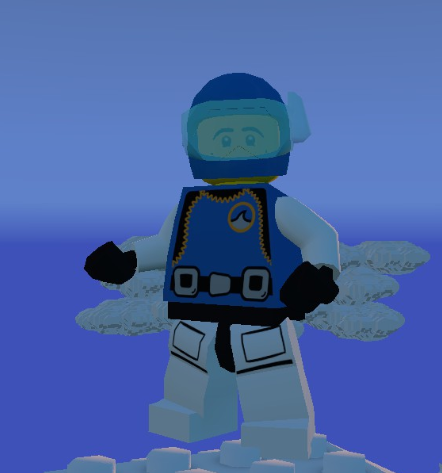
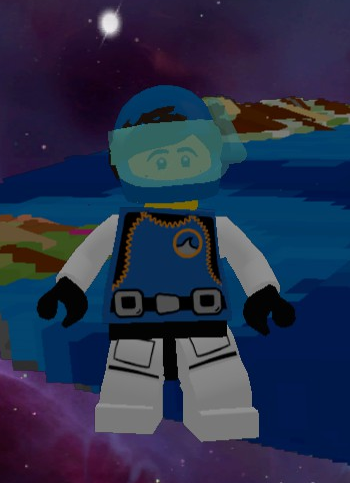
This is my character. (Angled for dramatic effect.)2 points -

Mafia: The Game
Onegreatrace and one other reacted to Seaborgium for a topic
"I am persuaded, however, that Mr. Adams ...was always an honest man, often a wise one, but sometimes and in some things, absolutely out of his senses. " -Ben Frankin2 points -

How to import your own models
Jimbob reacted to Neal for a topic
Hey guys! If you missed what I said in chatbox, here's the general message; I've been playing for some time now and have modded the game quite a bit. TT also left a mods folder in app data. Should be here: \AppData\Roaming\Warner Bros. Interactive Entertainment\LEGOWorlds\Mods\Models\ (you drop them in here) Now, what if you want to import your LDD creations? Well, first get your model into the lxfml format. (the game ONLY takes this format) There are heavy piece restrictions and angle restrictions but it does work. I will be posting some LU model packs I made. They should show up in your premade model area in-game once you've put them in the mods folder. EDIT: If you're trying to make the lfxml, here's how; 1. Get the desired model (LDD model) and open it in 7-zip or winrar. (or just, when in LDD, export the model as an lxfml) 2. Extract the lxfml from it. 3. Bring that lxfml to the mods/Models folder1 point -

Skeleton parts in character customization
Gmr_Leon reacted to lol username for a topic
In CHARS\COLLECTION.TXT, you might notice this line: collect "Skeleton" locked buy_in_shop 2500 customiser_parts customiser_ignore "Body Front" "Body Front" "Right Arm" "Right Hand" "Hips" "Right Leg" If you remove the "customiser_ignore blah blah blah" stuff, you'll be able to select the skeleton parts in character customization... Well, except for the hands. For some reason I haven't found yet, those still don't show up in the hands menu. (There's no icon for them in ICONS\CUSTOMISERPARTS\ICONTPAGE_HANDS_NXG.TSH, but I doubt that's the reason - other parts without icons just use a default icon instead.) There's a workaround - go to CHARS\MINIFIG\SKELETON\SKELETON.TXT, and remove or comment out this line: Ability "DoNotShowInFullCustomiser" You'll now be able to select the skeleton as a full minifig in the customizer - which sets the hands to be skeleton hands. You can then customize as you like. I gave him a beanie, put him on a skateboard, and now I've got Gnarly Bones/Bony Hawks from the LEGO Island games:1 point -
Unlocking props by default, unused props
Quisoves Potoo reacted to lol username for a topic
Props are specified in the various files under STUFF\TERRAFORM\PROPS. INDEX.TXT tells the game which of the surrounding text files to use - at the moment, CITY.TXT and FRIENDS.TXT (and some others) are set to "DebugOnly" in INDEX.TXT; remove that and you can use them. Then, inside those files, for a prop you want access to, add this at the end of its definition: SetFlag = #DefaultCollect Some of the (currently unused) City and Friends props already have this enabled. Edit:1 point -
Texture Modding
Fluffy Cupcake reacted to Neal for a topic
I'm just going to cover how to reskin minifigures in this tutorial. Imgur gallery to look at for visuals of what I'm saying; http://imgur.com/a/7h1HP Now, looking in \CHARS\, which folder seems like it's the texture folder? \SUPER_CHARACTER_TEXTURE\? You'd be right. Once you're in there, take a look; it has every separate piece of a minifigure in there. Want to make a torso mod? Want to give someone really fancy pants? You can. But wait, when you open the folders, there are .TEX files! What can you possibly do with that format? Oh. Wait. It's just a .dds file. Give it the .dds extension and then edit it with whatever paint tool you use. (I strongly recommend backing up character textures as they are a pain to work with) Once you've edited that .dds to have your desired texture, rename the file with .TEX on the end instead of .dds. (you'll need to have it show full file names before being able to do this, check your Windows settings) If you've done it correctly, it should appear instantly in-game when you switch to the shirt. Facetex and you You're going to struggle with faces, though. What's wrong, you ask? Can't I just edit the \HEAD\ folder? Take a look at \FACETEX\. This is how the game does animated faces. This does allow for far more customization, but it is a far more annoying process. (gotta edit the whole sheet of faces) I think there may be a static head or two in the game but I'm not sure. All facetex files are .TEX, aka .dds, so they're the same easy format to edit. EDIT: Oh yeah, with faces, you have to edit both the static face in \HEAD\ and the \FACETEX\ of the minifigure in order for it to work properly.1 point -
Unused characters, vehicles, and creatures
le717 reacted to lol username for a topic
Here's a video of (hopefully) all the unused characters, vehicles, and creatures (and also the normal things, as it'd be strange to just skip over them). I took a fairly thorough look through the game's data, but I could have missed something - if I did, post it. (I'm aware I didn't show the bat you can transform into as a vampire, but whatever, not important.) I've heard some of these unused minifigures can be spawned via imported models (the game maps certain pieces in LDD to special props, like the Creator house stuff - and going by steam forum discussions, minifigures too), but many of them are probably unusable if you don't mod them in. There's also unused props, items, etc... Haven't toyed with those yet. See this topic for how to unlock stuff, just be aware you run the risk of broken character customization, corrupted save files, spontaneous combustion of your computer, etc: http://www.rockraidersunited.com/topic/6534-how-to-unlock-any-charactersvehicles/1 point -

Post your cool minifigs
DisplayDismay reacted to Onegreatrace for a topic
1 point -
Remaps
Quisoves Potoo reacted to lol username for a topic
Prop/character remaps tell the game to replace a specific piece in a specific color in an LXFML with a prop or character. In other words, you make a model in LDD, and certain pieces are replaced with minifigures or props or vehicles. They're defined in STUFF\TERRAFORM\PROPSANDCHARSREMAPS.TXT. The syntax is explained at the start of the file: // Syntax // Remap // { // LegoID = ID of the lego piece we are remapping // LegoColor = color of the lego piece we are remapping // AddItem - adds an item // Type = either prop or char // Target = target char/prop for this item. Ability or/and ThemeAppropriate override it // Weight = the spawn chance. All weights of a remap should amount to 1 // ThemeAppropriate = spawn a char/prop from the current theme where the object would be placed // Ability = will choose randomly between all props/chars with this ability // EndItem - closing tag // } // ThemeAppropriate and Ability can be mixed as well. So for example, this: Remap { LegoID = 85863 LegoColor = 21 AddItem Type = 'char' Target = 'SKELETON' Weight = 1.0 EndItem } Means that any red microfigures (board game figures) in LDD models imported into the game (via modding or mods folder) will be replaced with skeletons in-game. It's also worth noting that if you have an LDD model in the mods folder that has the same name as an internal LDD model, the game will actually load the internal model when you tell it to load the model in the mods folder. There are also brick remaps at STUFF\TERRAFORM\MODELS\BRICKREMAPS. When the game loads a piece it doesn't support, it checks here for an LXFML with the desired part ID as the name. It then loads that LXFML in place of the brick. In other words, they're assemblies of parts the game supports designed to look like/replace parts the game doesn't support, and the game will use them automatically. Note that if you add any files here, you must also add them to INDEX.TXT, which lists all the LXFMLs in the folder.1 point -
A ghost in the machine
fun reacted to Phoenyx for a blog entry
___ _/ "\ ( \ ~/__ \ \__) / \ / _\ `"""""``1 point -
What Vehicles Am I Missing?
Drill Master reacted to Fluffy Cupcake for a topic
Well here is a list of vehicles: http://steamcommunity.com/sharedfiles/filedetails/?id=453934566 WHERE to find them I don't know.1 point -

Which LEGO Island game is your favorite?
LimeKiller reacted to BobaFett2 for a topic
You've completely lost the point. I look at old things from the mind of a child back in those days. And as i played LEGO Island i can say its amazing, and can still be enjoyable at this time. Its not like they had a lot to work with back in 1997, especially when 3D was first getting developed. You're asking for pacman to have the graphics Halo 5. Isn't that missing the point? We can't re-experience being a child, and nostalgia blinds us to how things really are. You were likely a different age when you first played IXS than you were when you first played LEGO Island, so even if you could be "accurately" nostalgic, you'd have two different frames of reference. I don't expect Pac-Man to look like Halo 5 - it is absurd to compare it to games like Super Mario Brothers, let alone more modern ones like Halo 5. It's also absurd to compare modern retro games to the games they pay tribute to (comparing Spelunky or Cave Story to Super Mario Brothers, for example). The ~5 years between LEGO Island and IXS are quite a gap, and all we can really compare is how fun they are. IXS wins in that. LEGO Island is more magical, has a lot of clever bits, and is closer to what many would consider the 'ideal' LEGO game, but that does not make it a better game. It may or (may not) be a musically better, artistically better, or better in some other way, but at the end of the day what matters is what you enjoy more today. I enjoy Island Xtreme Stunts more: it has better music, better graphics, more interesting gameplay, more exploration, and more stuff to do. This is not a slight against LEGO Island, which is brilliant in its own right. It just is.1 point -
Lighthouse Island
Ayliffe reacted to lol username for a topic
Given that the Worlds forum is likely going to be divided into subforums for modding, your builds, etc soon-ish, it's probably a good idea to start posting your builds in individual topics - they'll be moved to some sort of subforum specifically for stuff you've built once we've got it. So here's that lighthouse I said I was going to make. It's nothing amazing but I'm happy with it. No interior, but the one I built in LEGO Universe had one:1 point -

Post your cool worlds
Quisoves Potoo reacted to someswedish for a topic
1 point -

Post your cool minifigs
DisplayDismay reacted to spacepals for a topic
I still haven't found all the minifigures yet, but here's the lil fella I have right now to build and explore with! :-)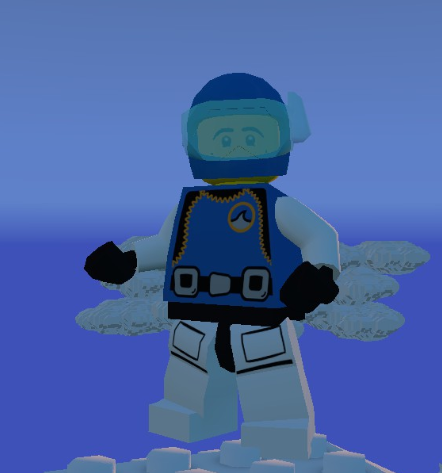
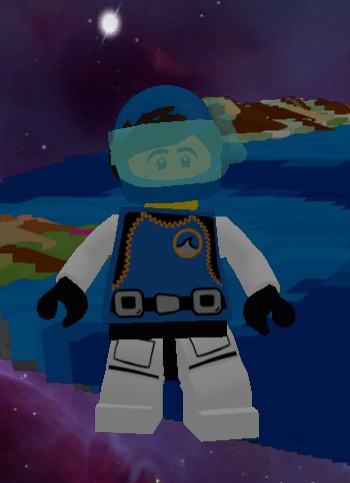 1 point
 -
Post your cool minifigs
DisplayDismay reacted to Ben24x7 for a topic
Only those who know me well will know who this is meant to be;1 point -

Post your cool worlds
Zubay reacted to mumboking for a topic
What!? NO INFORMATION CENTER YET? You guys need to recreate LEGO Island!1 point