Leaderboard
Popular Content
Showing content with the highest reputation on 06/08/2015 in all areas
-

Make any(?) item throwable and explosive.
aidenpons and 2 others reacted to Gmr_Leon for a topic
This is probably one of my favorite silly tricks I've found so far. Dynamite's nice, sure, but you know what's better than dynamite? Exploding ice cream, bananas, fish, apples, you know, anything else normally not explosive. So here's the trick: Go into Chars > Items_Txt. From there, open up ThrowingItems.txt. Take the following: item_type "Dynamite" { reference "GenericBomb" scn "Items\" obj "Dynamite" icon "items\ICON_Dynamite" name "DYNAMITE" explode quick_reuse //rtl_vfx "VFX_LEGOTorchFlame" //ItemAbility Always "TreasureTroveItem" //ItemAbility always "CanLightFires" ( resource=#resourcelevel,tag=#ITEM_VFX,path='VFX_LEGOTORCHFLAME' ) //OwnerAbility Always "TorchLitHint" //ItemAbility Always "MithrilLEGOAttack"///< this means the explosion I make can destroy silver/mithril lego! //OwnerAbility Always "LIGHTUPDARKAREAHINT" fetch sfx_Destroy "Wpn_Dynamite_Explode" sfx_Impact "Prop_Bounce" sfx_PutAway "Act_PutAway" sfx_TakeOut "Act_TakeOut" ItemAbility Always "ItemCanBeCollected" effects_for_event "OBJECTALIVE" offset 0.0 0.2 -0.03 Dynamite_Fuse1 effects_for_event "OBJECTKILLED" Dynamite_Explo1 } And then change it to whatever other item you want to throw and have explode, e.g. item_type "IceCream" { reference "GenericBomb" scn "Items\Friends\41094\" obj "ICECREAM" icon "items\ICON_Icecream" name "ICECREAM" explode quick_reuse fetch sfx_Destroy "Wpn_Dynamite_Explode" sfx_Impact "Prop_Bounce" sfx_PutAway "Act_PutAway" sfx_TakeOut "Act_TakeOut" ItemAbility Always "ItemCanBeCollected" effects_for_event "OBJECTALIVE" offset 0.0 0.2 -0.03 Dynamite_Fuse1 effects_for_event "OBJECTKILLED" Dynamite_Explo1 }3 points -

Lego "Angry Birds" sets arriving in 2016
Zed and 2 others reacted to Ayliffe for a topic
For some reason I drew a short comic strip about this. Dunno why, but here it is anyways:3 points -

Post Your Cool Custom Skins
Quisoves Potoo and 2 others reacted to OJ for a topic
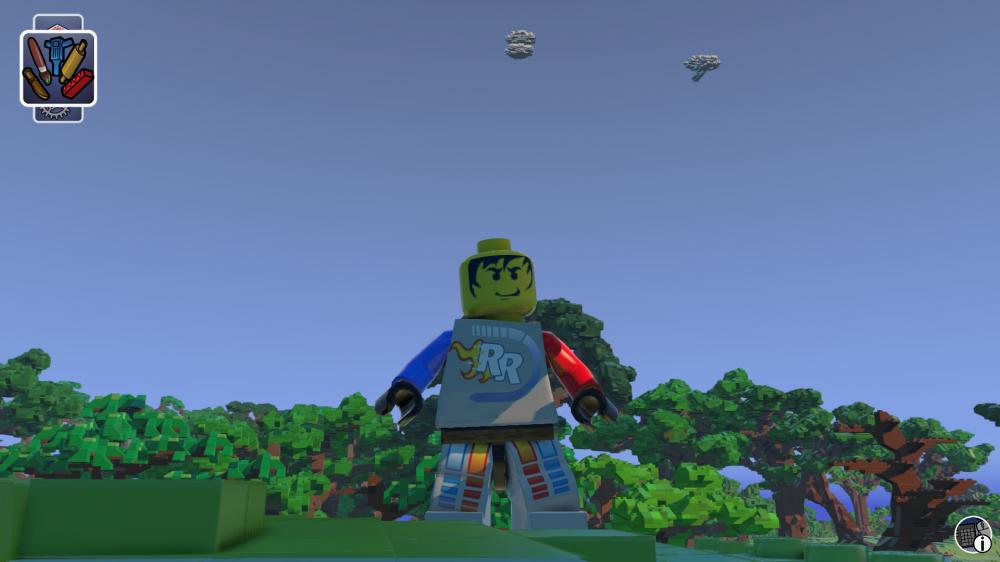 3 points
 -
Camera Tweaking! =D
KeinSkill and one other reacted to Gmr_Leon for a topic
Hi guys! I've been really excited about Lego Worlds this whole week, and finding out that you guys have been digging even deeper into it made me doubly interested in trying it out myself. I've not made a ton of progress yet since like everyone else, I'm figuring some of this out as I go along, but I did find the notorious camera settings files! If you go into, after having extracted these files, the folder Stuff > ChaseCam you'll see all the configuration files for camera settings while on foot, in a vehicle, riding a mount, and so on. Now some of these settings may be familiar to you if you've ever dug around camera settings files before, so I won't cover what all of them are (besides, I don't know entirely how all of them may work in this game, so it wouldn't help that much). Nevertheless, what you may be particularly interested in are the following lines across basically any of these files: -Avoidance_weight: this one's fortunately explained in the file, basically it lets you set the camera to clip through terrain when set to 0.0. -Upper/Lower Angle Limit: this sets the amount you can move the camera vertically. Set these to 0 and you can't look up or down. Set them to 100/-100 respectively and you can move the camera directly above/below your character. -Pan_User_Rotate_Speed: pretty self-explanatory, but it works! Upping the numbers increases camera rotation speed. -Smooth_Lookat: this seems to keep your character in focus when above 0. Not sure what else it might do with other numbers. There are more settings beyond these, but I haven't figured out how adjusting them changes anything. Was hoping some of the los_width/height options would allow for some FOV changes, but unless I'm blind, I couldn't see any, going from the lower values to higher. I definitely encourage anyone else interested to try adjusting some of these and seeing what you can find, just remember to back up the default settings before you change everything. =)2 points -
Lego "Angry Birds" sets arriving in 2016
aidenpons and one other reacted to Ayliffe for a topic
Rovio, that game studio who keep pumping out angry bird games like there's no tomorrow, have just announced that they will be partnering up with TLG to release a full "Lego Angry Birds" theme in spring 2016. Apparently the line will mainly be based on the sony pictures film which is being released in, surprise surprise, spring 2016. In case you didn't know, here's what them main bird-y characters will look like in the film: Well this is gonna be, um, interesting. Here's the press release anyways:2 points -

Lego "Angry Birds" sets arriving in 2016
aidenpons and one other reacted to Jimbob for a topic
Dammit, I would have given you a like for effort but "LEGO" isn't capitalised...2 points -

LEGO Magazines!
emily and one other reacted to mumboking for a topic
I found the cover art for Issue 3 of the 2015 LEGO Club Magazine. http://moleism.deviantart.com/art/Avengers-Age-of-Ultron-Lego-Club-Magazine-cover-532422842 EDIT: Turns out this person made quite a few of the covers... http://moleism.deviantart.com/gallery/2 points -

Lego Worlds Mod Manager
Quisoves Potoo and one other reacted to lol username for a topic
The devs are considering official modding support once the game is more stable, but we don't really know what that means yet... Do you think it's worth putting effort into a mod manager that has a chance of becoming obsolete, potentially as soon as the full launch of the game early next year? For reference, here's what the devs have to say about modding: Also, do we have enough mods to make such a thing worthwhile? So far it's been more of just exploring how the game works and unlocking new stuff than adding entirely new things. And as the devs said, it's likely that mods will likely be broken by updates to the game, as it's still in development. So while modding may take off (or may not yet, who knows), will there be enough working mods for the current version of the game at any given point to make a mod manager helpful? As for my opinion - I'd just stick to modding the game data by hand. Most of the modding so far is just changing lines in text files, and I don't see how a mod manager could help with that. As for minifigure textures (which I expect are what people will be modding the most, going by how popular they've been for other LEGO games we've modded), I'm fine just downloading and sticking in the textures myself. Running another program to do as simple of a task as that, and then having to make sure it did its job correctly... Nah.2 points -

Post your cool minifigs
Ayliffe and one other reacted to Fluffy Cupcake for a topic
AAAAH! AYLIFFE IS THE BOSS OF MAFIAS! GET HIM INNOCENTS!!!!2 points -

Will's Modding Extravaganza
Quisoves Potoo and one other reacted to dead_name for a topic
Well I think I got it...2 points -
LEGO Worlds News And Discussion
Gmr_Leon reacted to Ayliffe for a topic
So over on Eurobricks, this intriguing teaser image was found on the back of an instruction booklet for 60097 City Square: It's extremely vague and the URL doesn't work (yet), but could this be the sandbox free-building lego game we've all been waiting for?1 point -

How to ability mod and change jumpheight
Lind Whisperer reacted to Neal for a topic
Ability Modding Say you want your character to fly. It's very simple! 1. Pick the minifigure you'd like to mod. 2. Go to the \CHARS\ folder, then open \MINIFIG\ and find the desired 'figs folder. 3. Once you're in the folder, open the name_gender.txt (example: FARMER_F.TXT). 4. Add this line under the normal abilities: Ability "MinifigFlying" 5. Save the text file and open the game back up, choose the minifigure, and then jump and press jump again as if you were double-jumping. Another interesting ability is the sprint ones, like AnalogueSprint. This allows you to continually boost your running speeds. Or maybe you want to mirror the zombies and their ability to walk under water. Add these two lines: Ability "DoNotSwim" Ability "UnderwaterMovement" Jumpheight Jumpheight is also an easily value to change. 1. Open the \STUFF\ folder. 2. Open the GAME.TXT. Search for high_jump_height. 3. The number after it is the normal double jump height. Change it to whatever you like. (in my video, I used 99 as the value) 4. Save the file and open the game. Try double jumping! (does not apply to flying characters)1 point -
How to unlock any characters/vehicles
KeinSkill reacted to Neal for a topic
First things first, you need to extract the game files from the GAME.DAT file. Use QuickBMS and the TT Games script to get the game files extracted. Rename the GAME.DAT to GAME2 or something. Or delete it. Now, in \chars\ there should be a collection.txt. That's where all character & vehicle prices are listed. To unlock unused chars/vehicles: Here's an example "unused" character (this being a LEGO Friends character): //collect "Minidoll_Player" Now here's what the line should look like to have it unlocked: collect "Minidoll_Player" UnlockedByDefault You might be able to add customiser_parts on the end to have her unlocked to use for pieces, but not sure. Haven't tried that. To unlock used chars/vehicles: Maybe you don't like exploring to find the stuff. Maybe you just want the cool vehicles unlocked. First, comment the line out. This is what you want the line to appear like: //collect "70502_NinjagoEarthDriller" UnlockedByDefault Then start up the game, go into your world, and exit the game. Go back to collection.txt and uncomment the line: collect "70502_NinjagoEarthDriller" UnlockedByDefault It will now believe it is new and unlocked by default and give it to you for free.1 point -
Unlocking props by default, unused props
Quisoves Potoo reacted to lol username for a topic
Props are specified in the various files under STUFF\TERRAFORM\PROPS. INDEX.TXT tells the game which of the surrounding text files to use - at the moment, CITY.TXT and FRIENDS.TXT (and some others) are set to "DebugOnly" in INDEX.TXT; remove that and you can use them. Then, inside those files, for a prop you want access to, add this at the end of its definition: SetFlag = #DefaultCollect Some of the (currently unused) City and Friends props already have this enabled. Edit:1 point -
Adjust size, speed, and other minifig/creature characteristics...
Gmr_Leon reacted to lol username for a topic
I'm just gonna merge these topics into one as they're talking about the same thing.1 point -

Adjust size, speed, and other minifig/creature characteristics...
Gmr_Leon reacted to Wognif for a topic
First, go to CHARS/TEMPLATECHARACTERS, and open up MINIFGTEMPLATE_STANDARD.txt From there, you should see something like this: tiptoe_speed=0.2533 // Tiptoe speed in game units (Maya units/10) walk_speed=0.5 // Walk speed in game units (Maya units/10) run_speed=1.2 // Run speed in game units (Maya units/10) sprint_speed=2.385 jump_speed=2.375 // Jump speed, works with Air Gravity to define total jump range air_gravity=-6.25 // Gravity in air, works with Jump Speed to define total jump range water_gravity=0 // Gravity in water acceleration=10 // Acceleration of the character turn_rate=1.0 // Turn rate of the character These are the movement speeds. Change them any way you want. I personally have mine set like this: tiptoe_speed=0.2533 // Tiptoe speed in game units (Maya units/10) walk_speed=5.5 // Walk speed in game units (Maya units/10) run_speed=9.2 // Run speed in game units (Maya units/10) sprint_speed=12.385 jump_speed=2.375 // Jump speed, works with Air Gravity to define total jump range air_gravity=-6.25 // Gravity in air, works with Jump Speed to define total jump range water_gravity=0 // Gravity in water acceleration=10 // Acceleration of the character turn_rate=1.0 // Turn rate of the character Have fun moving super fast (or at a snail pace, if you so desired.)1 point -

Make any(?) item throwable and explosive.
Wognif reacted to someswedish for a topic
I don't think a whole mod is necessary, once the dev's implement multiplayer we should have everything we need for a silly banana bomb battle. Just put up a server with banana bombs modded in and build an arena where people can blow each other up.1 point -

Make any(?) item throwable and explosive.
aidenpons reacted to Ben24x7 for a topic
Boom Banana? I sense the possibility of a LEGO/Worms Mod.1 point -
Camera Tweaking! =D
McSpiffy reacted to Gmr_Leon for a topic
Hey again, I figured out how to adjust the camera distance for your character! I was being a little dense yesterday, thinking that the stick_length/height settings were somehow related to the analog sticks on a controller. However, it turns out these affect how far the camera is from your character! Stick_length: default on-foot is 1.95, but upping it to 7 really gets you far out. Stick_height: default is 0.25. Putting it at 7 may be a little much for the default minifig size, but if you want it way above your character, this might be a good option. Edit: Fun fact, you can almost get these settings close to a crude first-person mode, but there's still some issues (e.g. camera starting looking directly down through your character, locking into looking almost directly up, constantly jolting upward as you move, etc.). That last issue is the closest I got it to a functional first-person state, and it mostly relied on tricking the camera into clipping through your character's head.1 point -
Post Your Cool Custom Skins
le717 reacted to Jimbob for a topic
Has no one done a vector version of his textures yet? If not I may have a crack at it some time.1 point -
Lego "Angry Birds" sets arriving in 2016
Wognif reacted to Ben24x7 for a topic
I see two problems with this; 1. Not a lot of people pay attention to Angry Birds nowadays, and LEGO should have made maybe a few sets back in the game's hey-day, where practically EVERYONE knew, and was addicted to, Angry Birds 2. The new film looks worse than the jokey war-like "trailer" that the devs released when Angry Birds was picked up by a swarm of people. The look of the film now makes me want to... ...I dunno, get brain damage, believe I am one of the birds from the game, build a giant catapult and launch myself into the air and land on hard Tarmac.1 point -
Enhanced Screenshots
Ayliffe reacted to Jimbob for a topic
I've recently finished Mass Effect 3, taking 182 screenshots of various moments throughout the game. If you've played it and would like some backgrounds there are plenty in there for you to download - album links have been added to the original post. The differences between the screenshots aren't so drastic as before for two reasons: one, ME3 seemed to handle lighting/depth-of-field/etc better than ME2, at least it felt like it did; and two, as I had taken so many screenshots I avoided spending too long on individual images. You can check out some spoiler-free screenshots below. Admiral Hackett Mars Base Normandy Cockpit Normandy SR21 point -
Soccer Mania ALL Character Stats (Official Numbers)
Neteni reacted to Fluffy Cupcake for a topic
SPACE TEAMS Astronauts Ian Orbit Speed: 272 Shooting: 128 Passing: 128 Tackling: 128 Goalkeeping: 272 Star Gazer Speed: 272 Shooting: 240 Passing: 272 Tackling: 240 Goalkeeping: 48 Buzz Lunar Speed: 272 Shooting: 240 Passing: 256 Tackling: 256 Goalkeeping: 48 Jet Thruster Speed: 272 Shooting: 256 Passing: 256 Tackling: 240 Goalkeeping: 48 Johnny Spacedust Speed: 256 Shooting: 272 Passing: 240 Tackling: 256 Goalkeeping: 48 Lunar Unit Speed: 272 Shooting: 272 Passing: 256 Tackling: 272 Goalkeeping: 48 Martians Cassiopeia Speed: 272 Shooting: 128 Passing: 128 Tackling: 128 Goalkeeping: 272 Excavation Searcher Speed: 240 Shooting: 224 Passing: 240 Tackling: 272 Goalkeeping: 48 Altair Speed: 240 Shooting: 240 Passing: 272 Tackling: 272 Goalkeeping: 48 Antares Speed: 256 Shooting: 272 Passing: 224 Tackling: 240 Goalkeeping: 48 Guard Speed: 240 Shooting: 256 Passing: 256 Tackling: 240 Goalkeeping: 48 Centuri Speed: 272 Shooting: 272 Passing: 240 Tackling: 240 Goalkeeping: 48 Bricksterbots Brickster Bot 1 Speed: 272 Shooting: 128 Passing: 128 Tackling: 128 Goalkeeping: 272 Brickster Bot 2 Speed: 272 Shooting: 272 Passing: 256 Tackling: 256 Goalkeeping: 48 Brickster Bot 3 Speed: 272 Shooting: 256 Passing: 272 Tackling: 240 Goalkeeping: 48 Brickster Bot 4 Speed: 272 Shooting: 272 Passing: 272 Tackling: 224 Goalkeeping: 48 Brickster Bot 5 Speed: 272 Shooting: 272 Passing: 272 Tackling: 240 Goalkeeping: 48 Brickster Bot 6 Speed: 272 Shooting: 272 Passing: 272 Tackling: 240 Goalkeeping: 48 Intergalactic The Brickster Speed: 272 Shooting: 128 Passing: 128 Tackling: 128 Goalkeeping: 272 Redbeard Speed: 272 Shooting: 272 Passing: 272 Tackling: 272 Goalkeeping: 48 Rudo Villano Speed: 272 Shooting: 272 Passing: 272 Tackling: 272 Goalkeeping: 48 Captain Click Speed: 272 Shooting: 272 Passing: 272 Tackling: 272 Goalkeeping: 48 Sam Sinister Speed: 272 Shooting: 272 Passing: 272 Tackling: 272 Goalkeeping: 48 Cedric the Bull Speed: 272 Shooting: 272 Passing: 272 Tackling: 272 Goalkeeping: 481 point -

How to unlock any characters/vehicles
aidenpons reacted to Fush for a topic
It gets better. I was missing the face... which cannot be selected from the menu. And for good reason. The only way to equip it, like with the skeleton hands, is to choose the minidoll as a full costume... and when you do, this is the result.1 point -
How to unlock any characters/vehicles
Neal reacted to Fush for a topic
You can unlock her parts... sort of. The game tries to map her textures to regular minifig pieces.1 point -
How to ability mod and change jumpheight
Gmr_Leon reacted to Neal for a topic
Ability "ImmuneToPickUp" Ability "Bicycle" Ability "Discoverable" Ability "GenericAmbientVehicle" Ability "VehicleSmash" Ability RowingBoatAnimOverride Ability "FlyingVehicleControls" Ability "DefaultVehicleFireExtinguisher" Ability "Skateboard" Ability "TerraformVehicleFlattenAbility" (Mode = "Lawnmower", ForwardOffset = -0.1, YOffset = -0.2, Width = 0.4, Height = 0.2, Depth = 0.2) Ability "TerraformVehicleFlattenAbility" (Mode = "Digger", ForwardOffset = 0.0, YOffset = 1.3, Sphere = true, Width = 2.2, UpDirectionAdjustment = 0.25, DownDirectionAdjustment = -0.3) Ability "TerraformVehicleFlattenAbility" (Mode = "Steamroller", ForwardOffset = -0.11, YOffset = -0.135, Width = 0.75, Height = 0.37, Depth = 0.5) Ability "TerraformVehicleFlattenAbility" (Mode = "Digger", ForwardOffset = 0.0, YOffset = 0.02, Width = 1.0, Height = 0.7, Depth = 1.0) These are some of the possible vehicle abilities. You'll find more in the \ABILITIES\ folder.1 point -

Track Blue (Modular Racetrack)
Gmr_Leon reacted to Alcom Isst for a topic
About Versions Style Guides Videos1 point -
RRU Quotes 2: Reckoning
noghiri reacted to dead_name for a topic
In which Jamie starts to have an existential crisis... [20:47:03] jamesster: it's 2:46 and I haven't eaten yet [20:47:19] jamesster: I'm gonna fix that [20:47:30] jamesster: getting seriously annoyed at this whole mortal body thing [20:48:09] jamesster: help I'm trapped in a randomly generated chunk of flesh [20:48:37] jamesster: procedurally generated I guess [20:48:47] jamesster: I AM MY OWN ROGUELIKE1 point -
Post your cool minifigs
aidenpons reacted to Ayliffe for a topic
Ayliffe is a mafia boss confirmed1 point -
Extreme Cavern Swimming
STUDZ reacted to Fluffy Cupcake for a topic
"Hey uh, you okay up there?" "Yeah, I'm fine. I totally didn't get my head stuck in the water again!"1 point -
Extreme Cavern Swimming
STUDZ reacted to lol username for a topic
MEANWHILE IN AUSTRALIA1 point -
possibly going to be on xbox live?
Onegreatrace reacted to Phoenyx for a topic
Uhh... Everything made by TT since LEGO Star Wars: The Video Game has used the same engine. And that game was made long before this, so I'm pretty sure that's not from LSW. Except they've used it in almost every game until now. It could be possible that they left it in out of habit.1 point -
Peculiar Glitch
STUDZ reacted to Ben24x7 for a topic
1 point -
Post Your Cool Custom Skins
Ben24x7 reacted to Jimbob for a topic
It took me a little while to work out how to modify the textures correctly, but I've managed to make my own Docs. I probably spent longer making the house though, I'm not finding the building tools particularly easy. EDIT: Anyone else having issues where, when you exit a world, your character's parts are changed? My hat frequently changes and I find a cape equipped too. EDIT 2: I feel like I should draw some man-hair on his exposed chest.1 point -
Post your cool worlds
KeinSkill reacted to Alcom Isst for a topic
1 point -
Post your cool minifigs
aidenpons reacted to Wognif for a topic
Bazooka slinging cave pirate girl is best girl.1 point -
LEGO Dimensions
Quisoves Potoo reacted to Ayliffe for a topic
http://www.gamespot.com/articles/the-original-lego-family-could-have-been-the-villa/1100-6427766/ In case you're wondering what they're talking about, here's a picture of the 1974 lego family: Wow, I actually kinda wish they left that in. Would've been fun for sure.1 point -
Post your cool worlds
STUDZ reacted to Ben24x7 for a topic
And now, without further ado, I have screenshots of the Info Center in its (kinda insignificant) glory; So the idea to build this was actually a suggestion from Ace during my boring stream yesterday. So I levelled out an area, painted part of the landscape with grass and built the Information Center on top. I am a bit worried that the big glass observatory at the top is too big, but thats what I think. Tackling the lack of certain bricks was, in some cases, a bit of a nuisance, there isn't a pole at the top of the observatory, the Windows and doors are all brick-built, etc. So, as much as I'd like to modify it to perfection, I think now is a good time for a Banana-in-Cup Break.1 point -
LEGO Dimensions
emily reacted to Ayliffe for a topic
So there's another short trailer-y thingy for that dimensions game, which you can catch below: The trailer doesn't really show much (other than the "3 builds per mini-model" thing), but the description has a ton of juicy details... Not only does this officially reveal (albeit not very well) all those packs that were leaked before, but it also reveals the rather unexpected addition of, um, Midway Arcade. Wow, TT games really seems to be scraping the bottom of the barrel for IPs here. Oh yeah, and there's this image: EDIT: Some more images of the game here. And here. And here. And here and here. Oh, and here.1 point -

New version of ROCK RAIDERS - update
Phoenyx reacted to StewartG for a topic
The levels will look most like the original Rock Raiders, I can't yet point to a picture, and the site shows no pictures yet, because we simply dont have any levels designed or rendered. The level with what you call a minecraft level is on the site clearly stated as 'concept' if enough people like this then we will do a series of levels like this. I can see no reason why we can't have 'classic' levels to start with and then bring out an expansion which lets players design and play 'minecraft style' levels - lets get over the petty arguing, we can have both, and if you dont like a particular style then DONT PLAY THAT LEVEL !!! Being a producer on a game, is often (very often) referred to being alike to herding cats, as in "they all want to wander off in the direction they like" a producer has to pull the team together and give it a focus, it can't be done without the co-operation of the rest of the team, so it does require everyone at some point to man up, to put away their person preferences and realize that the final goal, a finished game is what we are all after and that is what you all need to focus on, I guarantee that it will not be 100% of exactly what you want, or even what I want! but no game ever is because no two people like exactly the same thing. Embrace the difference, you honestly dont know if you will like it until its finished, and my experience is that people who HATE some detail in the concept, often end up loving it in the final game. So lets pull togther, focus on a finished project.1 point -
New version of ROCK RAIDERS - update
Phoenyx reacted to StewartG for a topic
Hi Polaris, I hadn't seen your post until now, but I think it is excellent, it makes a good argument for keeping the game in horizontal planes, in response, I would disagree that blocks make it Minecraft, as Minecraft was not the first and has not been the last, there have been many succesful games since that have, and do use blocks, however, the good news is that we plan to do a 'remake' of RR with classic horizonal levels, at least initially and then we will see how it goes for future expansion. I do like the idea of levels and ramps - this would be easy to identify which 'level you are on' and detecting the position of a vertical ramp adds another seeka nd find element to the standard game, this is just the sort of constructive concepts I hoped toget with getting more brains looking at the problems! thanks. P.S dont listen to people who say to keep articles short, if it is interesting and well written, people will want to read it, I think your article proves that.1 point -

New version of ROCK RAIDERS - update
noghiri reacted to Polaris for a topic
I've got some things to say. This little rant is meant to be read by both the developers of the new Rock Raiders game and the fans and forum posters alike. So this is going to be a long post - I apologize in advance - but it is only because I feel very passionately about this issue. The final word count clocks in at 2,100+ words, but good words, I believe. I encourage you to read through what I have to offer because I think it is some of the most CONSTRUCTIVE advice you're going to receive. Also included in this post are several illustrations I made trying to convey the concepts I have in my head. I'm sorry if they are confusing or difficult to read - I'm not the greatest artist, but I'm also not a tech guru, and I felt that a pencil and paper would better represent the thoughts and suggestions I had. Okay, let's dive in! First things first. There is great concern for the whole "Minecraft" thing being a large part of this game's inspiration. Though I too share this concern, I want to explain and possibly defend the developers stance on this. Minecraft is a game which is so deceptively simple to learn and universal in its approach that it has won the world over. What developer wouldn't want to make a game like this? Also, the obvious connection between mining in Minecraft and mining in Rock Raiders is valid and an understandable conclusion to make. In addition to this, there are many great features of minecraft that would serve a Rock Raiders game well - like a large sandbox to explore and mine in! I remember being a kid and playing the mission "Frozen Frenzy", (one of my personal favorites). I knew darn well where the Tunnel Transport was, (it was in the only spot of the map that when you scrolled over it, the screen dipped down because of the hidden waterfall!) but I would play the level just to collect resources and build my base as big as possible, just like a sandbox game. And that's where the similarities end, and honestly, should end. Someone once told me that Minecraft is the Pac Man of our generation. I wholeheartedly agree. 20 years from now, people will remember the cultural legacy that this game has created and any game that follows too closely in its footsteps will be forgotten in its wake, just like all those Pac Man clones of yesteryear. I'll get back to the Minecraft thing in a bit, but for now I'll move on. So from the looks of this discussion, it seems the developers have come to conclusion that there are two ways to approach the mining in this new Rock Raiders game - I'll lump them into two categories titled "Freeform" and "Grid". Here's a picture comparing them both: In a previous post, there was concern for "Freeform" mining because it would be tricky to fit vehicles into tunnels you create and I 100% agree. "Freeform" is not the way to go. Well that leaves us with "Grid" mining like Minecraft right? Wrong. "Blocks" are the devil. Remember that. It's important. If you make a game world out of blocks, you are making Minecraft. Simple as that. I could stop now honestly. Minecraft's influence over culture is so strong that simply making your game world consist of blocks that are breakable and buildable, you are creating a game that can and will be seen in the public eye as a Minecraft clone. Same with making an objective-less open world sandbox game with an emphasis on mining - you are making Minecraft. Simply put, do not make Minecraft. But let's get real. There is money in Minecraft. And money is important! It should be! You, as a game designer, have every right to make money off of your product. Hopefully, a lot of money! But I have to explain something that is vitally important to this new game's success - as it stands, there is literally NO market for this game in its current direction. Let me explain. You have two fundamental fan bases you are targeting: fans of the original Rock Raiders and fans of Minecraft. Original Rock Raider fans aren't actually that hard to please! They understand that legal limitations restrict certain things and mainly just want a game that plays much in the same way and recaptures the spirit of the first game. For the most part, they don't care that it's not Lego, or that you can't reuse music or textures or whatever. They just want something faithful to the original. Not really a tall order if you ask me. Then you've got the other targeted fan base: Minecraft fans. This is where the real money is. It's important that you get these people to buy your game! But here's the truth: Minecraft fans don't want this game. At all. I'll try to explain why by using an example. I'm a big guitar guy. I have many electric guitars and one of my favorites that I own is my Gibson Les Paul. If you're not familiar with guitars, think of the first guitar shape that pops into your head. Then think of another - it's that one. Anyways, say there is a new guitar company coming out, and for the sake of this comparison, let's call them "Raider" guitars. So Raider guitars come up to me and tell me that they've made a guitar they think I'll like. So I take a look at it - and it looks just like the Gibson Les Paul I own and love! Not only that, but they've got new features like and 3rd pick up and a whammy bar - things I don't have on my guitar! For intents and purposes, this guitar could sound even better than the one I have right now! But I hate it. I can't explain it, but for some reason I hate it! Logically speaking, it meets every criteria I look for in a guitar so I should naturally like it, right? Well, there's a little part of my brain that shouts "it's nice and all, but they just copied my Gibson! They just emulated the Gibson and added fancy features. They didn't innovate on an original idea". This is so important to understand. The Raider guitar didn't fail because it was a bad guitar, or because it was competing against an already well established guitar - it failed because it tried to take on a powerful BRAND. It's stupid, I know, but we are but animals and brand loyalty is a powerful, sometimes unbeatable force. I'm somewhat partial towards Gibson guitars, so I passed up the opportunity to play that Raider guitar. I gave up the chance to play a better guitar. And now, more to the point. Minecraft is the Gibson of gaming. No matter how great your product is, if it specifically emulates Minecraft features to reach that audience, they will hate it. If you try to take on the brand of Minecraft, you will lose. So how do we fix this? We hide our influences. Right off the hop, "blocks" are a dead giveaway, so we can't do that. Also, marketing your game as Lego + Minecraft isn't doing anyone a favor as you own the rights to neither, so what are we left with? Rock Raiders. Of course! The answer was there all along! So let's look at the original Rock Raiders and what it did right. IMPORTANT: Now is the time to really tune in, because this is where things get CONSTRUCTIVE! So here's the basic layout of an RTS game, like the original Rock Raiders: It's awesome! Keep it. So let's look at the basics that made the game great. The game was based on a single flat plane in which a grid system dictated where you could build, mine, and move. Mining was done in the form of breaking down rock "walls" that allowed passage to new areas previously unseen. I have to stop for a second to point out that this is brilliant. This format of mining based solely on "walls" is so brilliant, creative, and easy to understand, it baffles me why you would look anywhere else for inspiration. Game designers should be copying your system of mining, not the other way around. So this is my proposition for the direction you should take with this new game. It should be a grid based RTS mining game set on a flat plane that utilizes the "walls" mechanic from its predecessor, with the option to play the traditional "mission" styled gameplay, or a sandbox mode. That should be the basics. Forget "blocks", (they're the devil, remember?) "walls" are where it's at, brother. So now I'll give you some ideas expanding on this premise that may inspire you! First off, I understand the need for verticality. You want to mine deeper and deeper for new materials - I get that! I do too. But the flat plane is essential to make the "walls" format work, so here's my solution: Multiple planes. This diagram will show it better: So let's say you start on Level 1, (LV1). There are some materials and resources for you to gather, limited monsters, and that's about it. You don't have access to the better materials you need to make better buildings and vehicles. So you need to dig deeper. The deeper and deeper you go, the more difficult the game becomes, with more monsters, landslides, and other hazards. In addition to this, this allows for interesting color schemes and level features as you progress to deeper layers, greatly expanding the creativity you can pool into your project. Now, either at predetermined spaces or at viable spaces based on what's underneath them on the lower level, you will have the ability to build "ramps", allowing you to travel into a deeper level, in this case LV2. These pictures will show it better: Now you may be thinking, "how will I keep track of all these different levels during gameplay?". Well to be frank, that's your job as game developers, but here's one way I think would work great - basically, only one level will be "active" on your HUD at a time, the others will move to the top or bottom of the screen and become greyed and translucent, moving them effectively out of the way, while still keeping them "within reach", so to say, so each separate level doesn't feel like a whole new map. Then you simply could scroll the mouse wheel up and down to switch between levels quickly. In this instance you'd scroll up to move to LV1 and down to LV3. On the Wii, all it'd take is a quick upward or downward sweep of the hand. Simple. Effective. Awesome. Beyond that, please continue with some of your great ideas - the vehicles, (and possibly buildings) based on parts is also brilliant! This would work flawlessly in the format I have suggested. Basically, make this game an expansion on the direction you originally took with the first Rock Raiders and you'll please everyone. The original fans will love it because it gives them what they already love. The Minecraft fans will like it because it is DIFFERENT enough not to offend them and offers things that Minecraft doesn't have. This makes it appealing to everybody - the true thing that made Minecraft so successful. If you've managed to read this far... thank you. I am very passionate about this matter and it made it very easy for me to go on forever about this, so I apologize again for the lengthy read. And if the developers of the original game actually are reading this, I only have one more thing to say to you. Thank you. I cannot express in words how much your original game meant to me in my childhood. It was basically my first step into the world of gaming. I spent countless hours playing and replaying missions, (never could beat that last one though! And I love the Rocky Horror Picture Show reference there!) and even had to get my dad to buy me the Lego sets from the game, which he later told me was very tough to do, as they had discontinued the Rock Raiders line before I had played the game. I tell you honestly that the Rock Raiders series is still my favorite Lego series that they have ever released, no matter how short lived it was - largely due to the awesome game that you produced. Me and my brother still say words like "Dirt!" and "Tool Store!" like the characters from that game time to time. And when it comes down to it, even if you screw up this next installment, I'll always have the original to play. I hope you don't, mind you, but if "blocks" are in any way a fundamental part of this games structure, you can consider it DOA. Finally, I'd LOVE to hear feedback on my points made, as I feel all are constructive and supportive. We all want to see the best final product possible. Thanks for reading.1 point