Leaderboard
Popular Content
Showing content with the highest reputation on 08/17/2015 in all areas
-

LEGO Worlds Provides an Even More Accurate Simulation of Articulated Trucks
aidenpons and 5 others reacted to Fush for a topic
Step 0: Make sure your GAME.DAT is extracted Step 1: Make Burnard playable by copying BURNARD.CD into any playable minifig's folder and rename it to that minifig's name Step 2: Be Burnard Step 3: Spawn an articulated truck or articulated digger and get in Step 4: Crash Step 5: Sit back and enjoy the show Make note that if you try this your game might freeze.6 points -
LEGO Worlds Provides an Even More Accurate Simulation of Articulated Trucks
Quisoves Potoo and 5 others reacted to Fush for a topic
Now in video form!6 points -

I think you guys are going to like this ;)
Lendelik and 4 others reacted to Skanibani for a topic
I've never posted on these forums... I've been lurking for two years now and I enjoy reading everthing. I think you people like this: I am remaking Lego Racers. First person... With advanced llighting. Let me know what you think... (PS i know that is not the model of the game.)5 points -

I miss my detective kit inside the police station.
Zed and 2 others reacted to lol username for a topic
3 points -

Evil is a Giant Robot Swivel Chair
Quisoves Potoo and one other reacted to chiunafish for a topic
I hope you don't mind me adapting your LXF - your LXF rendition was amazing! Reps to you OP!!! *bows*. The images I posted were built by the designers of the film. I am now replicating in LDD, before sourcing parts to build the real thing for myself. Scissors have been worked out! Next - the pen! I'm most of the way there now and will post up the LXF when it's complete. It's the pen which is now bugging me! MEGA frustrating!2 points -

The 2016 Leak Thread
Quisoves Potoo and one other reacted to emily for a topic
Source: CM4Sci (via Eurobricks Forums)2 points -

List of (probably) every L.M.S. Explorer MOC on the internet (Last update: 2021-11-26)
Arthuriel and one other reacted to PeabodySam for a topic
Why, majhost? Why?2 points -
Monster truck wheels (replaces the wagon wheels)
RacerRabbit reacted to TheStranger for a topic
I made this tiny mod that replaces the Wagon wheels with re-textured wheels from Baron von Barron's car, making it look a bit like a monster truck. I mostly just copied the data straight from BVB's car files in piecedb into the ones from the wagon (DA). I hope I didn't forget to include any file in the mod so if you try it and it doesn't work, please let me know. Screenshots: Download link: monster wheels.rar Edit: I just realized the thing in the back of Joan of Cart's car is a stake because Joan of Arc was burned at a stake.1 point -

Shadowblaze - The Core
Ayliffe reacted to Shadowblaze for a blog entry
A music from the RR2 game (which isn't gonna happen anytime soon)? Enjoy! FINALLY IT EMBEDDED! Listen on SoundCloud: https://soundcloud.com/officialshadowblaze/shadowblaze-the-core1 point -
What Pepper Is Doing
someswedish reacted to lol username for a topic
1 point -
LEGO Worlds Provides an Even More Accurate Simulation of Articulated Trucks
emily reacted to Fush for a topic
1 point -
Evil is a Giant Robot Swivel Chair
chiunafish reacted to emily for a topic
Oh, those pics are from the designer? Neat! I looked it up and, for anyone who is curious, they were from here. Good luck recreating the model, chiunafish.1 point -

My Lego rock raiders can't launch properly please help
AlliedSiren2 reacted to Ben24x7 for a topic
Try the following steps; 1. Launch "Rock Raiders (TM)" 2. Change to "RGB Emulation" 3. Launch the game 4. It might work, if it doesn't then let me know.1 point -

I think you guys are going to like this ;)
noghiri reacted to McJobless for a topic
Unreal 4 has full support for OBJs. The issue is that the file format lacks itself support for some of the nice safety features that FBX includes. If you screw up and export it with an FBX, generally you'll be okay (but his screenshot indicates significant issues that go beyond the file format). If you screw up and export it with an OBJ, those errors will become more obvious. I prefer to export with OBJ when I'm testing meshes since it's quicker, but I switch to FBX for the final import and I use the guides in the documentation to double-check everything. I'm willing to go along with Skanibani if he thinks he's got this (for now), but I'm going to continue being critical and post any relevant, helpful links I have so that this project can be successful, providing that he's got the effort and isn't going to cheat on it.1 point -

Impersonate le717 Day 2018
Ben24x7 reacted to Fluffy Cupcake for a topic
@Wognif; That isn't how fads work. On the other hand, if I was to make my own JJ avatar, the ship might get sailing... but even then it wouldn't be as much as a big hit because the foundation is weak. We'd sink before we hit land.1 point -
Impersonate le717 Day 2018
Wognif reacted to Ben24x7 for a topic
Are you, sir Wognif, implying to begin 'Impersonate JJ Day 2015"?1 point -
LEGO Worlds Provides an Even More Accurate Simulation of Articulated Trucks
aidenpons reacted to lol username for a topic
absolutely beautiful1 point -
Krysto's minifigure mods
Zed reacted to lol username for a topic
Posting these for Krysto as he's not signed up on the forums. He made some torso textures - Blacktron, Flex (2004), Hydronauts, Ice Planet 2002, and Insectoids. The download includes TEX/DDS textures all ready to go, plus the vectors he made that they're derived from. If anybody has more vector requests, references for back prints, custom or otherwise, feel free to ask him. http://oresome.rockraidersunited.com/download/2721 point -
RRU Quotes 2: Reckoning
aidenpons reacted to Ben24x7 for a topic
Ayliffe: http://images.brickset.com/sets/images/41100-1.jpg Ben24x7: Such Girly Ayliffe: granted this is the stupidest plane ever, but still Ben24x7: Ayliffe: proves my point look at that back wing LOOK AT IT Ben24x7: ITS SOO TINY Tcm0: or the cockpit Ayliffe: IT WILL NOT FLY LIKE THAT Ben24x7: Ayliffe: BUT ITS NOT PINK THOUGH Tcm0: well bright blue and pink stickers Ben24x7: At least this is (probably) the first proper LEGO set to have a metal detector Metal detector? Sorry Ayliffe: good luck with that metal detector with her Ben24x7: Airport Security, somewhat Ayliffe: SOLID GOLD SUITCASE Ben24x7: WE'RE KEEPING THIS FOR FURTHER INSPECTION, MISS Ayliffe: WHY IS IT GOLD Ben24x7: BECAUSE THESE STUPID GIRLS ARE RUDDY RICH RICH Ayliffe: I'm sorry miss, we can't let you on this plane because your SOLID GOLD HANDBAG is literally too heavy for the plane Ben24x7: Ayliffe: let's put your bag through the scanner and see what it has in it Ben24x7: We also think you stole it from a nearby bank, so we are putting you under arrest Ayliffe: it has: Ben24x7: DYNAMITE Ayliffe: GOLD GOLD MORE GOLD GOLD Ben24x7: AND A BOMB YOU TERRORIST Ayliffe: LITERALLY GOLD AND A GOLDEN GUN1 point -
Insane Raiders No. 21
Sadie Meowsalot reacted to Arthuriel for a gallery image
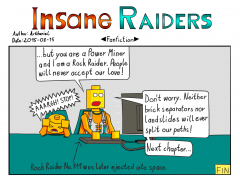
From the album: Insane Raiders
When will the Rock Raiders find the worst Rock Raider themed fanfiction ever made? P.S.: This is my first comic since February 2015. I wondered what I should make and thought, that a simple one panel comic would be a nice start.1 point -
*.BLX Format
ShadowDraikana reacted to Yellowkey for a topic
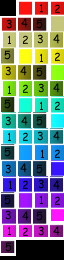
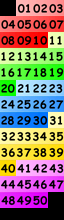
Hi everyone, I recently looked into the RRU-Wiki and saw that the BLX-Format is still unkown, so I decided to share my knowledge with you. It contains 16*16 Images for the *.map file with the same name. One Images for each possible tileid. I guess they were used for the editor. I figured out the format by examining it with a hexeditor. All values are encoded in Little Endian. Header: "BLX " (4 Bytes, note the Space) Number of Images (4 Bytes) Width (4 Bytes) Height (4 Bytes) Unkown (4 Bytes, I guess this is some kind of Id for for Format, for example 11 for the surface map) Unkown (4 Bytes, I guess this is the file version) Images (BGR565) If you don't want to encode the files yourself, I attached some samples + testprogram + source code (PureBasic, should work with demo). The Testprogram converts all *.blx files in the same directoy to *.png. Emrg: Dugg: Cror: Surf Tuto: Fall: Erod: High Download Program+Source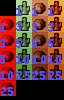




 1 point
 -

Creating Custom Biomes
Fush reacted to Wognif for a topic
This tutorial assumes you've already looked up my previous guide to making custom models spawn naturally, and have taken a look in STUFF/TERRAFORM/CELLTYPES.txt. If you haven't yet looked at my guide to making custom models naturally spawn, here's the link: http://www.rockraidersunited.com/topic/6621-getting-custom-models-to-naturally-spawn/ In order to make a custom BIOME, you must first make a custom THEME. Go to STUFF/TERRAFORM/THEMES and pick a theme to use as a template. I just used CANDYTHEME for when I experimented. The file should generally look something like this: DayTimeAmbienceTrack = 'Amb_Forest_Day' NightTimeAmbienceTrack = 'Amb_Forest_Night' Characters { AddCharacter = "Skeleton" Weight = 1.0 EndCharacter } Props { Density = 0.01 StartProp = "Functional/TreasureChestSmall" Weight = 0.005 EndProp } Not showing the TerrainLandscape bit as that was covered in my previous guide. This is where my previous tutorial comes in handy. Pick what characters and props you want to spawn and what models, and save it (in ALL CAPS). For this example, I named the file INFOTHEME.txt. Now, go to STUFF/TERRAFORM/THEMES/INDEX.txt and add it to the index. InfoTheme.txt 40 Not exactly sure what the purpose of having a number by the filename is, but just to be safe, put a number beside it. Now, we have make the biome. Go to STUFF/TERRAFORM/BIOMES/DEFINITIONS and pick the biome to use as template. Again, I used CANDYLAND for the experiment. It generally looks something similar to this. Reference the theme you made where it says: DefaultTheme "InfoTheme" 1.0 Lines like AddBrickType = #LegoBrick_Solid_BrightRed are where you define a material by its name in CELLTYPES.txt Save your in the same way you did the theme, except with a different name. (such as INFOLAND.txt) Add it into STUFF/TERRAFORM/BIOMES/DEFINITIONS/INDEX.txt. No numbers this time. Then, go to STUFF/TERRAFORM/BIOMES/GROUPS/NORMAL.txt Add in the following lines AddBiome { Type = "InfoLand" //name of the biome Weight = 0.9 //chance of biome spawning } Save it, and make a new world, find your biome, and you're done! Here's an example of what it might look like in-game:1 point