
Leaderboard
Popular Content
Showing content with the highest reputation on 11/19/2016 in all areas
-

Night of Phanta Sea ★ レゴの夜
DistrictToTheFuture and 4 others reacted to Fluffy Cupcake for a topic
Which part is your favourite? Leave a comment! Video Description copy-paste:5 points -

Does anybody here remember Clutch Powers?
Quisoves Potoo and 3 others reacted to Lair for a topic
nobody remembers4 points -

Pepper Roni in LEGO Club Magazine
Lair and 3 others reacted to lol username for a topic
I have never before seen a collection of posts managing to simultaneously overthink and underthink something this much Edit - Pure spam post was made below, now hidden, locking topic. Stop and think about what you're posting, people.4 points -

Does anybody here remember Clutch Powers?
eagleeyedan and 2 others reacted to emily for a topic
Clutch Powers is weird because it came out at that liminal stage where long-form Lego animations were still uncommon, but were just about to start flooding the world in an endless stream. So like, it was all "cool! the first ever lego movie!" and it seemed like it was going to lead into something more directly (like, idk, more dtv lego movies) but instead the ninjagos and starwarses and lego movies just started parading in from their own independent paths and clutch is left as this kind of bizarre anomaly that doesn't have any real successor to its name, directly or spiritually. You might even say it....... works alone3 points -

Mining Alone
Lind Whisperer and 2 others reacted to Ben24x7 for a gallery image
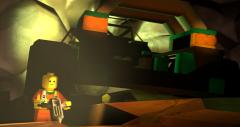
From the album: SFM stuff/Screenshots
A wee render I did a while back, yet I could't find a good place to post it. Enjoy!3 points -

LEGO Alpha Team HD Texture Overhaul
Ben24x7 and one other reacted to Jimbob for a topic
EDIT: I'm reworking this mod, making most of the textures from scratch instead of upscaling them. I'll leave the downloads below but I'd recommend waiting until I've overhauled this overhaul. This mod replaces almost all textures in the game with higher-quality versions, with each texture usually being anywhere from 4x to 8x larger than the original. Everything should look crisper and cleaner at high resolutions. The GUI has been redrawn from scratch to look good in widescreen, and most real-world textures (that is, textures not used in a LEGO model) have been remade with more realistic graphics. LEGO textures were put through a kind of vector upscaler, due to the simple graphics, and hence you'll see some parts are rounded so I might come back and clean them up another day. The only textures that haven't been edited are cursors, which don't scale, and fonts. Also the LMap.pac file was left alone as there is some crazy junk in there. Download Warning - this is a 520MB download, which uncompressed hits around 1GB. You'll need enough RAM to load that, and may notice loading screens being a tad slower than usual. Google Drive Mega Installation If you have LEGO Alpha Team installed, see @lordtobi's post here to set it up for custom resolutions including widescreen. If you don't have LEGO Alpha Team installed, check out the Windows 10 installation tutorial here. Go into the game's install folder, which for me is C:\Program Files (x86)\LEGO Media\Games\LEGO Alpha Team, and create a new folder called "Original PACs" or something to that effect. Move the game's original Map.pac and Etc.pac files into this folder, so that they are no longer present in the same folder as the game's install files and you have them as backups to easily restore. Now extract the Map.pac and Etc.pac files from the downloaded ZIP file and move them into the install folder. Launch the game as usual and enjoy the mod! Previews Check out previews of the mod here. I recommend you open them in a new tab and flick between the two for comparison. Splash Screen The main level is too zoomed out, but notice the new "Alpha Team" logo and water. Main Menu Earth uses textures from NASA, I redrew TeeVee's screen from scratch, and you can see the new widescreen HUD too. For some reason TeeVee's antennae always look somewhat pixellated, even though they're currently smooth at 1024x1024 resolution. Game Here you can see substituted textures for the real-world elements, as well as the smoother LEGO parts such as the text on the studs.2 points -
Tutorial: Running LEGO Rock Raiders on Windows 10 with VirtualBox
Pixus reacted to Jimbob for a topic
Tutorial: Running LEGO Rock Raiders in Windows 10 with VirtualBox This tutorial will show you one method of running LEGO Rock Raiders in Windows 10. This may work for Windows 8 too but I haven’t tested it. Also I cannot guarantee that this will work for everyone as Rock Raiders is arguably the most fickle game to install on RRU, but hopefully it will work for you. There are a lot of instructions in this so I will break them down into steps and explain as clearly as possible. Here is an overview: 1. Download a copy of Windows XP 2. Install VirtualBox 3. Set up Windows XP 4. Install and run Rock Raiders1 point -
"The Pit"
Lair reacted to Ben24x7 for a gallery image
From the album: SFM stuff/Screenshots
Sure thing! Oh deep pit, what secrets thou yield?1 point -

LR2 - My Custom Player Roster
Fluffy Cupcake reacted to Fifi La Fume for a gallery image
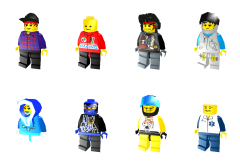
From the album: RACERS 2
My current custom player roster. Includes: Taxi Guy Default Guy Digger (by BadDream) Veronica Voltage (by Terrev) Glacia (by BadDream) Gypsy Moth (by BadDream) Chip (by BadDream) Dr. Clickitt1 point -
The 2017 Leak Thread: More Leaks, More Legos
Quisoves Potoo reacted to emily for a topic
http://brickset.com/sets/theme-Star-Wars/subtheme-Buildable-Figures/year-2017 <== new sets at this cool link. most of the 2017 stuff is on brickset now if you haven't seen already. Maybe it's just because I'm not huge into star wars but these star wars figures are already starting to get boring for me. Apparently there are 6 more coming this summer so maybe they'll have room to do something a little more radical. I'd love a battle droid or a droideka!1 point -
LRR Pictionary
someswedish reacted to Ben24x7 for a topic
Welcome back to LRR Pictionary, with your hosts; Someswedish and Ben24x7! Lets get going: "Too many rock raiders" "Rocket Racer lives up to his name": "Plants are people too": "Worst motorcycle chase ever": "Why would you go in there": "Most anti-climatic rollercoaster in the world"1 point -
Night of Phanta Sea ★ レゴの夜
Brigs reacted to emily for a topic
all it's missing is a part where lewa from the 2003 game says "deepwood!" to the beat of the music1 point -
LEGO Alpha Team HD Texture Overhaul
Jimbob reacted to lol username for a topic
I just checked the first few levels and encountered no problems. I then loaded some other misc levels at random; some ran fine while others had the major FPS drops. I also noticed that the laser textures were only bugging out some of the levels, not all - and that when they did bug out, the texture they turned into seemed to vary based on distance/mipmap level (those last two screens are of the same level, just different camera positions). So, that leads me to think that at some points the game is just getting overloaded in various ways. 8x probably is a bit excessive, haha. Edit: I just extracted your PAC files and... oh geez. Many of these are ridiculously huge. I also noticed some textures were upscaled that had no reason to be, like solid colors, or small textures rendered in-game with point filtering (the result being you get a crisp edge, clearly showing the border between two colors of LEGO pieces or whatever, without having to use a high-res texture... So increasing the resolution of those specifically doesn't help). Many of them also look really muddy. I was working on an Alpha Team texture pack myself a little while back, though not a full overhaul like this, just touching up the specific textures I found to be eye sores (mostly character textures and misc other things). While doing that I noticed POSTER_WANTSYOU_256.TGA had an unused alpha channel, just showing Ogel, oddly without the torso and hip pieces. I guess you, uh, didn't notice that (this is what it should look like). The texture for the "asteroid" at the end of a rope on one unit is miscolored too, it looks like this in your mod but it should be light grey, like the real LEGO piece(s). Anyway, here's some of the textures I upscaled for my unfinished mod vs the ones in your mod: radioact.tga (mine) radioact.tga (yours) black_board.tga (mine) black_board.tga (yours) poster_wantsyou_256.tga (mine) poster_wantsyou_256.tga (yours) poster2up256_wide.tga (mine) poster2up256_wide.tga (yours) Not sure what exact process you're using (though I have the feeling we were both using waifu2x for much of it), but maybe take some pointers for improving it? Like, past a certain point, it really doesn't help to keep increasing the resolution of something - especially if it just starts exaggerating ugly artifacts and blurs. Plus, at the extent you're upscaling things, you'll pretty much never even see the full res of your textures in-game due to the game's mipmapping, so you're just burning space. Also, when using waifu2x, it's a good idea to run a texture through in multiple modes and see which looks better for that individual texture, combining aspects of both versions if need be (especially on face textures)... And when it comes to tiling textures, this varies case to case, but it's often a good idea to assemble a 3x3 grid of the texture and run that through, then crop it down to the middle one again, so waifu2x treats the edges properly (can be a 1x3 grid for Alpha Team's face textures since only the left/right edges meet each other in-game).1 point -
LEGO Alpha Team HD Texture Overhaul
Jimbob reacted to lol username for a topic
On one hand, the screenshots look pretty... On the other, this makes the game completely unplayable for me. First I noticed the load screens were taking upwards of 10 seconds (they were previously nearly instant), but that's fine, I can deal with that. Then the game started hitching as I switched between screens in level selection. Then I loaded a level, and the game dropped to 3-4 FPS and some textures started getting scrambled... This is the level "Double-Duty Charge", I was getting around 3-4 FPS, and as you can see the laser textures are very much broken. The broken laser textures were continually changing, here's another screenshot where they look different. Then I moved the camera, and the framerate went back up to 60, but the laser textures were still broken. I tried some other levels, with similar results - long loading times, broken textures, and either 3-4 FPS or 60 with no middle ground, depending on what was on-screen. You say you upscaled some textures by 8...? I have a hunch you may be plainly pushing the game too far, haha. (Especially given the game's aggressive mipmapping means you don't even really see many of them until you get REALLY close up.) Oh, btw, I'm on Windows 7, processor is an i7, graphics card is an NVIDIA GeForce GTX 660M (2 GB), and I've got12 GB of RAM.1 point -
LR2 - Dr. Clickitt
lol username reacted to Fifi La Fume for a gallery image

From the album: RACERS 2
take these bricks and call me in the morning1 point -
Pepper Roni in LEGO Club Magazine
lol username reacted to emily for a topic
Not sure what you mean by "is this a leak?" Its in something officially released by Lego, and leaks are when new lego stuff comes out from someone who isn't lego and isn't supposed to be sharing what they do share. If you mean it in the sense that the fig is from a new Island line, well, this is clearly an unaltered IXS Pepper and we know what the winter 2017 lineup looks like - no Island stuff. And it would be completely unprecedented to have a fig from a release more than a few months away to show up in Club Magazine. It's just a fun little thing for people like us to notice and smile at.1 point -
Tutorial: Running LEGO Rock Raiders on Windows 10 with VirtualBox
Ben24x7 reacted to Jimbob for a topic
1. Download a copy of Windows XP. Credit for this first part of the tutorial goes to download3K for their article here, which I have adapted below. Downloading the File The first thing you will need to do is download a copy of Windows XP. Thankfully this can be done legally with no purchase necessary (at least temporarily). Follow this link to go to Microsoft’s download page for Windows XP Mode, which was designed for Windows 7 but never adapted for Windows 8 or 10. Click Download, then select the checkbox next to the first file: WindowsXPMode_en-us.exe. Then click Next to open the Save As dialogue window. Save the file in your desired location, such as the Downloads folder. This file is just under 470MB so it may take a while. Installing 7-Zip If you don’t have the program 7-Zip already you will need to download and install it. Windows’ own extraction tool isn’t enough and 7-Zip is a useful tool to have anyway. Click here to download the software, making sure you choose the correct type depending on your system (32-bit or 64-bit). I’m going to download the 64-bit .msi file as I have a 64-bit system. If you’re unsure about which one to get, right-click on the Windows start menu icon (at the bottom-left of your screen) and select System. Save the file and run it to install 7-Zip. Extracting the File With 7-Zip installed, look for the WindowsXPMode_en-us file you downloaded earlier. Right-click on it, highlight 7-Zip from the pop-up menu, then select Extract to “WindowsXPMode_en-us\” from the sub-menu. Open the WindowsXPMode_en-us folder that appears when 7-Zip is finished, then open sources to find three files. The top one, xpm, is the file you’re looking for. Right-click on the file, highlight 7-Zip from the pop-up menu, then select Open archive from the sub-menu. A 7-Zip window will appear showing the contents of the file. Select the file named VirtualXPVHD by clicking on it, then select Extract from the toolbar above (the blue minus sign). Click OK on the window that appears to extract the file. Now you can close 7-Zip. Go back to the sources folder and you will find a new VirtualXPVHD file. Rename this to VirtualXPVHD.vhd. Copy it to another folder (I chose Downloads), then delete the original WindowsXPMode_en-us folder and WindowsXPMode_en-us.exe file to tidy up. Excellent, you have downloaded the Windows XP operating system to your computer!1 point