
Leaderboard

Popular Content
Showing content with the highest reputation on 01/02/2018 in all areas
-

Cavern Run
Shadowblaze and 3 others reacted to Jimbob for a topic
Updated OP, the game's been rehosted. Sadly leaderboards aren't working though, the code's too old for me to bother going back through and trying to fix it.4 points -
Ben24x7 - Cavern Run Poster
le717 and one other reacted to Jimbob for a gallery image
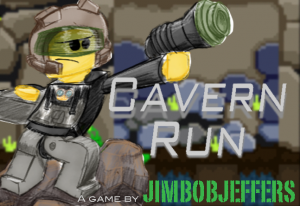
From the album: Rock Raiders
This awesome poster was made by Ben24x7 for my Cavern Run flash game. I've reuploaded it on RRU as it was previously hosted on Imgur.2 points -
Time Raiders
fun and one other reacted to Cirevam for a topic
Some of you may have noticed a few screenshots of this mod I've posted on Discord recently, along with some short videos, and I'd like to say that my 2018 New Year's resolution is to get back into modding and make some real progress. I have been finalizing some things that were close to completion and putting the old files into "removed" folders that I will end up deleting for official releases. It makes everything cleaner and it's a good way to visualize progress. Here are some random screenshots from the latest build. ORANGE TRANSPARENT glow? I will update the first post with a list of things that are considered "complete," which may not count final polish like sound effects.2 points -

Air Filter (New Building)
Antillies reacted to Cyrem for a topic
Air Filter Building Cirevam and I have put together an additional building for LRR, it does not replace any previous building and you can build it from the menu. However its function isn’t exactly new, as it produces breathable oxygen. This building is designed to take the oxygen function away from the Support Station and make it its own dedicated building. The advantage of this is not just to have a new building, but it creates additional game challenge. Support Station becomes a dedicated training and sandwich making building. Whereas this handles the oxygen production alone. Its oxygen output will be less than what the support station was, so you will have to build more. Modeling/Animation: @Cirevam Design/CFG/UI: Myself Preview Download: [Soon]1 point -
Cafeteria Patch Documentation
trigger_segfault reacted to Cyrem for a topic
PATCH DOCUMENTATION FOR CAFETERIA If you do not have Cafeteria or don't know what it is, go to the Cafeteria Topic first. WADP Files A WADP file is a standard WAD file with the same format as LEGO Rock Raiders' WAD files. The extra "P" means "Patch". It's used to bundle all the necessary files for a patch into a single file for easy distribution. A WADP file has two necessary files for it to be identified by Cafeteria as a patch it can execute. These two required files will be covered in the next section. WADP Anatomy A WADP file must have 2 files in the root directory. These files must be called info.xml & script.txt (lowercase) so they are correctly identified. info.xml This file provides information about the patch for the patching system. Inside it contains information about the patch such as its name, author, version and more. It also contains information to help the patching system to prioritize your patch and IDs to check for any patches that may be incompatible with each other. script.txt This file is the script that Cafeteria will run in order to apply your patch. The contents contains commands, one per line similar and it will tell Cafeteria what to modify in the CFG and WAD. The format is similar to standard command line. Info.xml The required contents of an info.xml file (for version 1 of the patch system) are as follows. All these elements are REQUIRED. It is however best to create this file using the Developer Tools in Cafeteria itself, rather than writing your own. If this file cannot be found or if it is invalid, it will not appear in the Mod Manager of Cafeteria. Standard Format: <?xml version='1.0'?> <patch system="1"> <name>My Patch Name</name> <author>Username</author> <version>1.0</version> <description>This is a little info about my patch.</description> <uid>rru.lrr.username.mypatchname</uid> <priority>1</priority> <dependency>rru.lrr.username.myotherpatch,rru.lrr.username.someotherpatch </dependency> <incompatible>rru.lrr.username.badpatch</incompatible> </patch> System: This defines the patch system to use to apply this patch. In the future, changes to the system will occur and this number will increase, you should always use the latest version. Name: This is the human readable name of your patch. Do not include a version number here. Author: This should be your username. Version: This is a human readable version number of your patch. Description: This is information about what your patch does. UID: This is a unique identifier for you patch, it is used to internally identify your patch when processing. This is required to be in the format: rru.lrr.[username].[patchname] . This should be in lowercase and contain no spaces. You should never re-use across different patches, this is to say if you make a patch that changes textures and another patch that adds models, these should have different UIDs. Priority: By default this should always be 1. (This property is depreciated since Cafeteria 1.0 BETA 1). Dependency: This is a comma separated (no spaces) list of UIDs of other patches that a user needs for this patch. If a user does not have the patches in this list, your patch will not be applied. Incompatible: This is a comma separated (no spaces) list of UIDs of other patches that this patch cannot be installed with. If an incompatible patch has been installed before your patch, your patch will not be applied. Script.txt CFG Commands CFG:AddProperty - Adds a property to a block. CFG:AddProperty <block path> <property name> <property value> CFG:SetProperty - Changes the value of a property. CFG:SetProperty <property path> <value> CFG:RemoveProperty - Removes a property from a block. CFG:RemoveProperty <property path> CFG:RenameProperty - Changes the name of a property. CFG:RenameProperty <property path> <new name> CFG:AddBlock - Adds a new block { } CFG:AddBlock <parent block path> <block name> CFG:ClearBlock - Clears properties from a block and/or removes child blocks. This will not remove the block itself that you are clearing. CFG:ClearBlock <block path> <remove children TRUE/FALSE> CFG:RenameBlock - Renames a block CFG:RenameBlock <block path> <new name> CFG:InsertCFG - Inserts the contents of a CFG file from the Patch WAD into a block. CFG:InsertCFG <parent block path> <patch file path> WAD Commands WAD:AddFile - Adds a file from the Patch WAD to a directory. WAD:AddFile <patch file path> <wad file path> WAD:AddFilesFromDirectory - Adds a directory of files from the Patch WAD to a directory. WAD:AddFilesFromDirectory <patch directory path> <wad directory path> WAD:RemoveFile - Removes a file from a directory. WAD:RemoveFile <wad file path> WAD:RenameFile - Renames a files in a directory. WAD:RenameFile <wad file path> <new name> WAD:InsertReplaceFile - Replaces a file with another file or adds it as a new file if it doesn't exist. WAD:InsertReplaceFile <wad file path> <patch file path> WAD:ReplaceFileData - Replaces the data of a file in a directory with the data of a file in the Patch WAD. (No file names are changed) WAD:ReplaceFileData <wad file path> <patch file path> WAD:CopyDirectory - Makes a copy of a directory. WAD:CopyDirectory <wad directory path> <wad directory path of copy> WAD:RemoveDirectory - Removes a directory and all it's files. WAD:RemoveDirectory <wad directory path> WAD:MoveDirectory - Moves a directory to a new path. WAD:MoveDirectory <wad directory path> <new wad directory path> Block & Directory Paths These paths are formatted the same, and must finish with a final backslash. Block Path: Lego*\Main\ Directory Path: Interface\RightPanel\ Property & File Paths Again these are the same, however they do not feature a final backslash. File paths must include a file extension. Property Path: Lego*\Main\LoadingText File Path: Interface\RightPanel\CrystalSideBar.bmp If a parameter in your scripts contains a space, for example in a directory path, enclose the parameter in quotes e.g "This Folder Has A Space" Comments You can put comments in scripts. Comments should begin with a double forward slash. // This is a comment1 point -
Cavern Run
MaelstromIslander reacted to Jimbob for a topic
Rock Raiders: Cavern Run Merry Christmas to everyone at RRU! On this special day, I have prepared a little present for you all: Cavern Run, a web game based on the arcade games of the 80s. Weighing in at just over 3MB (a bit larger than the sizes available back then, but meh), this game places a character designed by you, using the character creator at the beginning, into a long cavern filled with deadly hazards and rewarding Energy Crystals. Jump, shoot lasers and blast sonic at the obstacles in your way to make it as far as possible and gain the highest score, all while your running speed gets increasingly faster. With an excellent soundtrack by @Shadowblaze, an addictive-yet-simple gameplay and competitive working leaderboards, Cavern Run is sure to make this Christmas (and beyond) a special one! Play Now Cavern Run Requirements - Web browser with Adobe Flash Player (please ensure to allow data storage before you play the game) - Keyboard Instructions The game is played using the up, left and right arrow keys. The game will guide you through the menus and gameplay mechanics. At the character creator, pressing Jump while on the Head selection will begin the game. Crystals earn you 10 points each, Slimy Slugs earn you 30 points each and Rock Monsters earn you 50 points each. After you are defeated, you may enter your name using your keyboard (Backspace deletes characters, Delete will not work). Please do not use offensive or inappropriate names or your score entry will be removed. It is recommended that you use your RRU name or similar (there is a 10 character limit) to identify yourself to others when viewing the leaderboards. When you have finished a game, press the orange Reload button at the top-right corner of the screen if you wish to play again. In full screen mode you will need to refresh the page instead. Please note that you may have to click on the game screen a few times during the menu if the keys do not respond, this is an issue with Flash. Credits @JimbobJeffers - Coding - Graphics @Shadowblaze - Music - Sounds - Alpha/Beta testing @le717 - Alpha/Beta testing @Ben24x7 - Poster art @rioforce - Web design1 point -

Bonkle: the Cronkle
ticketstoloservile reacted to Pranciblad for a topic
Chapter 1 -- We Have Liftoff! Chapter 1 comments Chapter 2 -- Fingers to Plug Your Ears With Chapter 2 comments Chapter 3 -- I Want to Believe Chapter 3 comments Chapter 4 -- Pick Up Sticks Chapter 4 comments Chapter 5 -- A Swing and a Miss Chapter 5 comments Chapter 6 - In Which Bob and Rob Are Crap at Hockey COMING SOON1 point -

A New Cavern Has Been Discovered
aidenpons reacted to Antillies for a topic
I've always had an itch to capture the feeling of LRR with real LEGO. I finally had the opportunity to give it a shot and, though I don't think I satisfied my aesthetic wishes this time around, it produced some interesting stills. Wanted to share them in case they might prove interesting or enjoyable to others.1 point -
(dgVoodoo) D3DLmm.dll causes game to freeze when mouse stops moving in game
Cyrem reacted to AnotherCrazyCanadian for a topic
Sorry Cyrem, that would have made more sense, thanks. So far, it works! No reported problems with 2.53 and MAN does it make my game run better, with much higher graphics to boot! Also, no issues with Baz's mod thus far, there was one crash but I blame the base game for that. Is there a donate button on this site? That's twice this forum has saved my butt!1 point -

Nick Nuwe - On Thin Ice
Cyrem reacted to Shadowblaze for a blog entry
Surprise! It's an Irish folk song. Except it's got guns! This is probably my new favorite track of mine, even with all the repetitions (which by the way are very intentional). This track is like 80% stuff I've never used or tried before, so it's got a very fresh sound. I hope you'll enjoy it as much as I do!1 point