
Leaderboard
Popular Content
Showing content with the highest reputation on 01/15/2018 in all areas
-
Unused Slizer Disc
G3NC and one other reacted to Sunchipp for a topic
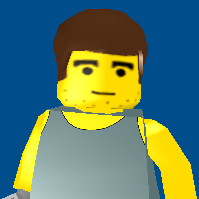
Digging in the Files of Drome Racers I've noticed something a bit strange. I have noticed that the Slizer Disc from LEGO Racers 2 has found its way into the game files I'm unsure if it was just used for Testing Purposes for the Hatchet Power Up but I'm actually glad to see this in the game, you can kinda say it was a lil easter egg found in the game files2 points -

Working Lego Raspberry Pi Terminal Laptop (under construction)
aidenpons reacted to Yutyocraft for a topic
Hi guys! Some months ago, I started to make a Raspberry Pi Terminal Laptop with Lego bricks. I know there're some similar in the internet but it is absoluetly unique with its multifunctional tools, design and hardware. And it is all wireless. Hardware: -Raspberry Pi 3 -echo sound card -laptop speakers -Lipo smart battery (soldered) -Waveshare HDMI screen -Waveshare pi camera -16x2 lcd screen (soldered) -Switch button circuit (soldered) -External usb hub (soldered) -Ethernet ethernet hub (soldered) Software: -Raspbian Jessie OS -Python LCD libraries -Yutyo Studyo apps1 point -

IXS Pepper in LI2 (WIP?)
ticketstoloservile reacted to Fifi La Fume for a gallery image
From the album: ISLAND
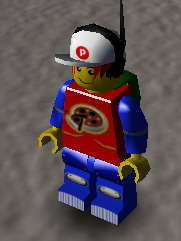
Just messing around with custom textures in LI2...1 point -

LEGO Rock Raiders Playthrough
Cyrem reacted to Tyadran for a topic
I finally got Rock Raiders working and got to play it for the first time in 10 years, so I decided to livestream it. Thought I'd share the highlighted video here so that you can check it out if you at all want to. I go through all the tutorials though, and there's not a lot of commentary since nobody showed up to watch, haha. [And I'm not very good and encounter some frustrating AI issues.] https://www.twitch.tv/videos/218768748 [Skip to after the tutorials] https://www.twitch.tv/videos/218768748?t=00h36m27s I'll probably end up streaming more of it in the near future, so feel free to follow my channel if you think you'd like to see that.1 point -

Unused Slizer Disc
Sunchipp reacted to lol username for a topic
Neat find, I don't think that's been noticed before.1 point -

Run LEGO Rock Raiders with dgVoodoo
Cyrem reacted to Syobnaf for a guide
Yes, in windowed mode the game behaves properly. I tried using a .bat file with the text... taskkill /F /IM Explorer.exe LegoRR.EXE Start explorer.exe but it didn't resolve the issue. I probably could manually close explorer.exe each time, but opening the task manager is much simpler. Thanks anyway though!1 point -

Unlimited Buildings & Vehicles (LRR)
phenix8fr reacted to Cyrem for a topic
There has been one limitation to overhauls (among many) that has stood out as highly restrictive. You can't add any more than 11 buildings or Vehicles without the game crashing. May I present the fruits of pain and labour.... Thats 13 Buildings, all buildable. I haven't tested more than this, but in theory it should support many more. Want to Add buildings that can be placed in levels that can't be built from the menu? > Yes it's possible too, 1x1px menu image & Impossible dependencies will do it. How?!? You will learn more when I post about any upcoming overhaul project. Till then, enjoy the fact that this limitation is defeated.1 point -

All Soccer Mania Cutscenes
Tyadran reacted to Ben24x7 for a topic
1 point -

All Soccer Mania Cutscenes
Tyadran reacted to Ayliffe for a topic
1 point -

Tutorial: Running LEGO Rock Raiders on Windows 10 with VirtualBox
Pixus reacted to Jimbob for a topic
4. Install and run Rock Raiders Now for the final step. Installing Rock Raiders Insert the Rock Raiders disc or, if it’s already inserted, run it from My Computer. Now follow through the installation instructions to install it. You may get a message about a Direct3D accelerator not being found, or something similar, if so just ignore it. When it’s finished, click Yes, I want to restart my computer now. and press Finish to restart the computer. Running Rock Raiders After logging back in you will find two new Rock Raiders shortcuts on your desktop. Right-click on the LEGO Rock Raiders - Enhanced shortcut and select Properties from the menu. Under the Shortcut tab you will see a section named Target:. At the end of this box should be a line saying -best. Replace this with -ftm so that it appears as so: Click Apply, then OK, to save these settings. Now run the shortcut by double-clicking it. After the initial loading screen a Mode Selection window will appear. Choose Window from the Window Size section as Full Screen doesn’t work. Now click OK to launch the game. Congratulations, you have successfully installed and run Rock Raiders! Final notes To install mods or transfer files from your Rock Raiders game to your PC, just place the files in the shared folder and they can be accessed from both Windows XP and Windows 10 systems. The Windows XP virtual machine is only valid for 30 days as it’s a trial. However, it is possible to simply delete the machine and set it up again in VirtualBox (assuming you transfer any important files into your shared folder to save them) to restart the trial, but I’m not sure if that’s legal/in breach of their terms and conditions.1 point -

Island Xtreme Stunts Texture Rips
Fifi La Fume reacted to Zed for a topic
Last week, I ripped some textures from Island Xtreme Stunts using Ninja Ripper and converted the .dds files to .png earlier today: https://www.rockraidersunited.com/files/dl-r449/ Although I got most of the them, a few textures either didn't rip or were skipped (i.e. some character expressions). I had to use the game's normal copy instead of the disc-free one so the that ripper would work. If I can figure out a way to make a modable copy that the ripper will work with, I will rip the face textures for Pepper and other character faces that don't appear in LI2 (Although I will also rip Rhoda Hogg's and DJ Jackitt's because I can't find their faces anywhere in LI2's files).1 point