
Leaderboard
Popular Content
Showing content with the highest reputation on 08/26/2018 in all areas
-

Running LEGO Island in HD On Windows 7 & 10 - Tutorial Video
Mr. Skeltal reacted to ZANTHERA for a topic
Linked below is my video tutorial for running LEGO Island in whatever resolution you want using dgVoodoo. This method was discovered after Mr Skeletal helped me get Rock Raiders running with dgVoodoo and my curiosity saw my trying to run Island with it and it worked! This method was tested on Windows 7 by myself and 10 with the help of some members over on the discord server. If you follow the steps exactly as shown in the video in the same order it will work first time.1 point -

Fixed driver arms
Cyrem reacted to ShadowDraikana for a gallery image
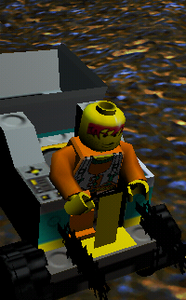
From the album: Overhaul Stuff
Getting better with the 8th Anvil of the Light(wave). This will probably get changed again, so this is just me being pedantic about getting rid of the awful block arms.1 point -

Disobedient Raiders
Example reacted to Cirevam for a topic
This is known as Idleness Syndrome, and it's a very common thing in some levels. We're not sure exactly what causes it, but one of the developers thinks it's a combination of pathfinding, ore/crystal management, and priorities. Some of the research we've done agrees with that. Consider using fewer raiders and use more transport trucks to pick up materials more quickly.1 point -

Map Creator (0.9.11)
Cyrem reacted to aidenpons for a topic
Is the maximum tutorial block 20 just an arbitrary limit you've put in, or does LRR just not support more than 20 tutorial blocks? I'm screwing around with fancy NERPS scripts (mostly involving monster spam, it must be said) and I'm running annoyingly close to the 20 block tutorial limit - although I run into the limit of eight registers a good deal quicker (but there is a painful way around that). As I must have said somewhere before, the tool is fantastic1 point -
LRR remake project
Cyrem reacted to miningmanna for a topic
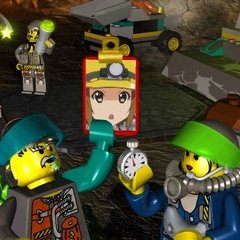
So, I´ve paused working on the animation loading for now. I cant figure it out right now. I will go back to that on another day. Searching through the game files: I have found some files for the level scripts called: "NERP". Which seems to be compilable with C and the defined macros. However it might be smarter to just write an interpreter for it, or maybe a compiler to Java byte code? I have had a little break the last days (since I move my stuff into my apartment), but I have made some progress on the map loading (hence the level scripts). from left to right: Surf_01.map, Dugg_01.map and Croc_01.map. As proposel: instead of the NERP scripts I would include lua as level scripting language (maybe with some spins like brackets), what would be your opinions on that? as of now: I will work on map loading and make a little demo, so you can try it out. Fixes will of course come as I go.1 point -

GeoTool
trigger_segfault reacted to sheepandshepherd for a topic
GeoTool Beta 2 - 18 June 2016 A map viewer/editor for Lego Rock Raiders. Currently it can edit most aspects of a map's terrain, and can also convert the heightmap to and from images for editing in GIMP/Photoshop/Paint. It's written in D and OpenGL. Windows only. You can get the source code on GitHub. It replaces the old Heightmap Converter tool, which was ugly and too badly coded to improve any further. Also, I much enjoyed switching to D, it's a fun programming language. Usage Buttons for creating, loading, and saving maps are at the top right. You can also load by dragging a map's icon onto the GeoTool window. The load and save functions automatically detect the map components by their names, so you only need to open one of the map files; the rest will automatically be detected. They do need to be named correctly though -- as in, contain the words "surf"/"high"/etc. somewhere in their filename. You can view and edit the Terrain and the Heightmap with the tabs under the New/Load/Save buttons. Most image formats are supported for heightmaps. Images are grayscale, with black representing height 0 and white representing height 63 (higher than that bugs out LRR, so no point going that high.) You can move the camera with the keyboard or by clicking/dragging on the minimap. Screenshots New GUI to replace the buggy, gray old one: By default, LRR's radar map colors are used for the terrain: Terrain can also use the textures loaded from LRR biomes. Here's level 23 in terrain edit mode, with the rock biome: Heightmap editor: Controls WASD/Click on map = move Home = reset and center view to the center of the map Arrow keys = rotate camera PGUP/PGDN/+/-/Mouse wheel = zoom camera F5/P = save a screenshot F = toggle the FPS/status bar at the bottom Esc = exit You can load a folder containing textures for biomes. Biome folder paths are saved in the settings.ini file, so you don't have to reload them later on. Requirements Windows OpenGL 3.3 and a video card with relevant drivers Download Latest release Source code1 point