
Leaderboard
Popular Content
Showing content with the highest reputation on 03/09/2019 in all areas
-
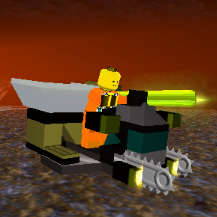
Your Master Guide to get LRR to run
Arthuriel reacted to aidenpons for a guide
Most people these days are running Win10. If you are running an older OS, the process is much the same. If you're on Linux or Mac, this guide doesn't incorporate that yet. This isn't the One Guide to Rule them All, although it may become that eventually: this is merely an amalgamation of a lot of stuff around the forum in one easily-findable place. Hopefully it'll be updated to all the stuff around the forum as I do so (anybody with mod powers is welcome to edit this and add things). Hopefully it'll also contain a few more pictures as time goes on. Step #0: Do you even have a CD & a CD drive? I imagine there are a number of categories people fall into: - Those that have a legitimate CD back from whenever that still works. You might not have a CD drive for it, though - Those that had a CD, and it's scratched - Those that never had a CD and want to see what LRR's all about To those not in the first category, RRU doesn't condone piracy. We won't host a download link of Lego Rock Raiders here. But if you're looking for one... they're, uh, not very hard to find. So if you have an .iso - which there are a couple of legitimate ways you could actually get one - and you don't know what to do with it, the tool WinCDEmu will be able to get the .iso to load: https://wincdemu.sysprogs.org/ From that it probably won't install but at least the next step will allow you to get the files off the virtual CD... Step #1: Does the game install fine? Don’t install it into Program Files: move it somewhere else. Win10 hates you editing Program Files, even sometimes when as an admin: just install it to C:\Games or something like that. Yes: Huzzah, continue! No: Give this a go: https://www.rockraidersunited.com/topic/3904-lego-media-alternate-installers/ or direct link: https://github.com/le717/Rock-Raiders-Alternate-Installer/releases Does that not work / prove too complicated? Try out the ultra-manual way of installing LRR, copying the files off the disk by hand: https://www.rockraidersunited.com/topic/2843-installer-not-working-you-can-salvage-your-game/ That guide mentions pointing Universal Extractor to data.cab - I got better results by pointing it to data1.hdr . Just point it to all the files! and you should be fine. While you're here, make a backup of all the files; coping the CD files to your hard drive may also be a good idea. Also while you're here, you can delete the shortcuts the default installer likes to put on the desktop: they won't immediately be helping us. Minus the Useful Files folder and the LegoRR.exe - Shortcut , the installation should look like this: Step #2: What is the size of LegoRR.icd? 0 kB: Congratulations, you have the DRM-free copy of LRR. This means it’ll actually run on Win10. (Like mine is, in the above screenshot). 720 kB or anything else: This means LRR needs the disk to run via Safedisc and because Safedisc support was taken out for Win10, you won’t be able to run this executable: but we still have a solution! Download this: https://www.rockraidersunited.com/files/lego_rock_raiders/resources/lrr-masterpiece-edition-exe-r249/ and replace your existing LegoRR.exe and LegoRR.icd with that. Step #3: Does LegoRR do something by running LegoRR.exe? Yes: Hooray! Somewhat: is it complaining about missing d3drm.dll? Curiously the d3drm.dll provided on the (or at least my disk) isn’t actually the one LRR wants... I got it off my Lego Island 1 disk and it worked fine. We have uploaded it for you here: https://www.rockraidersunited.com/files/lego_rock_raiders/resources/d3drm-r53/ Unzip that and move d3drm.dll so it’s sitting next to your LegoRR.exe executable (like in the screenshots below). No: Does it do absolutely nothing? Something must have gone wrong in step #1 or #2. Also, don't launch it by the shortcuts on your desktop, as those have command line parameters that aren't useful right now. I reccomend just right-clicking LegoRR.exe and selecting Create Shortcut. At the very least you should be presented with a box like this. If you aren't, check #1 and #2 again, and if it still does nothing - that's what this forum is for! By the way, this box doesn't show up in your taskbar and if you click out of it has a nasty habit of hiding behind other windows. If you lost it, press Windows+D to minimise all windows, then click on any other window to open it - this box will also magically pop up again. But wait, all the buttons are greyed out! This guide is the most comprehensive in what to do: https://www.rockraidersunited.com/guides/run-rock-raiders-in-windowed-mode-r3/ Sure, it's about windowed mode, but the important thing is to change the colour settings. Here's what that guide says you need to do if you're on Win10 (other OSes available and more technical details in the guide; this is just a short summary) Right-click LegoRR.exe, go to the Compatibility tab, click Reduced Colour Mode, and change that to 16-bit. You don't actually need compatibility for XP or admin, interestingly enough (although it doesn't hurt to have them on!). Like this: And the result should look like this, and you should now be able to launch LRR! By the way, don't use RGB Emulation: it has literally never worked for anyone in the history of LRR. Sure, it launches, but it will always crash within the minute. Direct3D HAL is what we want. Step #4: Does the game unplayably lag? Or any other sort of general visual that makes the game literally unplayable No: Lucky you. Everyone else I know of has this problem. Yes: This guide explains what you need to do: https://www.rockraidersunited.com/guides/lego-rock-raiders/run-lego-rock-raiders-with-dgvoodoo-r7/ Yes, Option 2: In addition to dgVoodoo there's also ddrawcompat. I know nothing on the technical knowledge of this, but wander over to here: https://www.rockraidersunited.com/guides/run-lego-rock-raiders-with-dgvoodoo-r7/?do=findComment&comment=250 which will redirect you to here: https://github.com/narzoul/DDrawCompat/releases/tag/experimental Grab the experimental - yes, go one step ahead of the stable and grab the experimental - download. Place the resulting ddraw.dll in your LRR directory, and run LRR. Don't run dgVoodoo and ddraw at the same time, you only need one. I don't know a lot about the technical way either of them work. Feel free to toy around! At this point the game should be playable. It might be in the wrong language, the sound isn’t playing, cutscenes don’t exist, etc; but at the least it should be running and playable. Step #5: [Optional] Do you want to run the game in windowed mode? Windowed mode allows you to check any other application without having to alt+tab, which LRR handles very poorly. Additionally, windowed mode can fix a bunch of silly stuff LRR does - it's more reliable than fullscreen. https://www.rockraidersunited.com/guides/run-rock-raiders-in-windowed-mode-r3/ Now onto troubleshooting! Problem #1: The game isn’t in the language I want Currently the only translation pack we have is in English. If you have LRR in another language, even if you don’t want it, you might want to upload it to the Files database (a more rigorous system (perhaps a language switcher in Cafeteria?) can be implemented later). https://www.rockraidersunited.com/files/lego_rock_raiders/resources/english-lrr-pack-r301/ Download that, unzip, and merge the Data folder and overwrite LegoRR1.wad Other languages? This is still a WIP. There might be some way to get them off the disk? Try Universal Extractor and open any .cab files you see with that: https://www.legroom.net/software/uniextract Problem #2: The cutscenes aren’t playing If you still have the disc, you can copy them from Data\AVI on the disk to Data\AVI in your LRR directory. Alternatively, download them here: https://www.rockraidersunited.com/files/lego_rock_raiders/resources/rock-raiders-avi-cutscenes-r296/ and extract those into your Data\AVI folder. You may also need to download and install this, the codec for playing the videos: https://www.rockraidersunited.com/files/lego_rock_raiders/resources/indeo-iv50-avi-codec-r111/ but I am unsure how necessary this is. Problem #3: The game crashes on any non-tutorial level start I’m not sure how common this problem is anymore. However it might yet be an issue. This may be because the game is trying to play the cutscenes, which in LRR sometimes crash the game. Fortunately this can be disabled very easily with mods (DontPlayAVIs TRUE), and for your convenience this has also been uploaded for English: https://oresome.rockraidersunited.com/download/233 Overwrite your existing LegoRR1.wad with that download. Problem #4: The in-level music isn’t playing I actually never realised LRR had music until topics on the forum popped up about it… We have a guide for this too! https://www.rockraidersunited.com/guides/lrr-music-without-cd-fix-r11/ Alternatively, you can download the music files from here: https://www.rockraidersunited.com/files/lego_rock_raiders/resources/lrr-music-collection-ogg-r259/ and just put them in VLC or Windows Media Player in the background. Problem #5: The main menu music isn't playing Curiously the fix for this is totally different to the fix for the in-game music. For some reason the music files in the .cab data files are corrupted. This means that if you installed your game manually by extracting the cab, the music files will show up in Data\Sounds: but they'll be entirely unable to be played by the game or something like VLC media player, if you try. However, on the disk, the files under Data\Sounds aren't corrupted. So copy stats.wav and atsmodel.wav from [CD]\Data\Sounds to [YourLRRInstallation]\Data\Sounds and it should work when you start the game! Don't have a CD? They're here on RRU for your convenience: https://www.rockraidersunited.com/files/lego_rock_raiders/resources/atmosdel-and-statswav-r323/ Problem #6: Chief’s Briefings don’t play, but the files are all intact 1. Backup LegoRR1.wad. 2. Extract LegoRR1.wad with the Wad Recycler: https://www.rockraidersunited.com/topic/3742-wad-recycler-2/ 3. Open LegoRR.cfg and search "@Sounds" 4. This should jump you to heaps of properties defining sound file paths. Now, to make them work you need to remove all the '@' symbols from the start of the sound file paths. 5. Run search and replace to remove all the '@' symbols. 6. Save and rebuild your LegoRR1.wad file. Problem #7: Black screen on any tutorial level & when you find the Tool Store I have no clue why this happens, but sometimes when a script camera function is called (usually SetCameraGotoTutorial, but CameraLockOnObject will also do it) the screen blacks out (the camera seems to go to NaN...?). The bad news is that there's nothing you can do about this. (I guess I could make a mod that removes that from the script...) The good news is that this only affects the tutorial levels, the very first level (Driller Night), and the next 'central' level, Frozen Frenzy: and Frozen Frenzy will only blackscreen at the end just before you win. Fortunately there's a way to bypass Driller Night: if you use the -programmer command line parameter with LRR, or enable debug keys via any other method (eg Cafeteria or mods), debug keys are enabled: and these include Ctrl+S to instantly win the level (and also break the sound a bit in the process). Thus you can then save and continue with LRR as normal. There's no way to recover the tutorial levels though. Fortunately you'll learn all you need to know through regular gameplay (the tutorials don't even tell you about recharging crystals, erosion, lasers, upgrading vehicles, reinforcing...). If you're really desperate to hear Chief's calming voice, you can unpack your .WAD files (see Modding section below), and navigate to LegoRR1\Sounds\Streamed\Training\ and then Chief's voice lines are in the folders there. The text for the messages, if you would prefer to read them, is the .txt file in LegoRR1\Levels\TutorialLevels\<tutorial-you-want> Problem #8: My problem isn’t listed! Make a forum post! Google! Or wait for me to repopulate this list with less common issues (not recommended...) I want to get into modding! The first step in any LRR modding is to unpack your .WAD files. I recommend the Wad Recycler: https://www.rockraidersunited.com/topic/3742-wad-recycler-2/ If you want to use .wad files for your mods, you can recompile the wads each time. Alternatively, you can run without any wads: move the contents of the new folders LegoRR0 and LegoRR1 under Data (so the Data folder contains stuff like a folder called AVI, a folder called Vehicles, a folder called Sounds, Lego.cfg…). This makes modding to test things much quicker, as you can edit level files without needing to restart LRR. The topic is a little old, but mostly correct (save for priorities and a little bit of level scripting), and outlines what can and cannot be modded with LRR: https://www.rockraidersunited.com/topic/3252-things-we-know-about-modding-lrr/ Tools you’ll likely need include Notepad++ (Notepad, but better, and also free). If you want to do map creating, you’ll need Map Creator: https://www.rockraidersunited.com/topic/630-map-creator-0910/ , used for creating map data NPL Scripter: https://www.rockraidersunited.com/topic/2143-npl-scripter-v21-update/ , used for creating level scripts (predominately “collect X crystals to win,” but we can do much more than that… https://kb.rockraidersunited.com/Writing_NERP_Scripts Cafeteria also allows you to create patches which resolve all the incompatibility issues you could ever dream of, though that's far beyond the scope of this guide, though I will link Cafeteria: https://www.rockraidersunited.com/topic/4521-cafeteria-10-beta-7-launcher-mod-loader-for-lrr/ and its patch documentation (not always 100% up to date, just refer to a patch like CE:Core instead) https://www.rockraidersunited.com/topic/6139-cafeteria-patch-documentation/1 point -

LI2ME - Lego Island 2 Mesh Exporter 0.1.0
FeebTube reacted to pivke for a topic
LI2ME - Lego Island 2 Mesh Exporter Plugin LI2ME is just another modding tool for Lego Island 2. This is a plugin written for Milkshape 3D to save you custom models and meshes in Lego Island 2's *.MSH-format. I decided to develop this plugin for Milkshape 3D, because it gives you huge ability in interacting with many other formats. My first choice was to develop a plugin for Blender, but as it's not supporting that many formats it would have been not as flexible as with Milkshape 3D. Features This plugin cares for everything itself. That means that even your meshgrouping and texture coordinates are overtaken into the *.MSH-format. Furthermore it will calculate normals in realtime. You can chose between smooth and straight normals, which will lets you control wether to let your model appear more edgy or more softly ingame. Since the version 0.1.0 it supports collision files. That means, you can tick a checkbox on the plugin which will create a *.col-file besides the *.msh-file with the same name. For now, it will simply generate a single axis-aligned bounding box around your model. Screenshots Download You can download the plugin on the Sourceforge page (This plugin is, just like LI2GE and LI2TA, opensource and under GNU-GPL license) Installation To use this plugin you need to download Milkshape 3D. You need to activate Milkshape 3D by probably buying it. Please mention that we won't discuss here on how to crack that software or where to get serials. The whole export plugin is combined in one single DLL-file. From the downloaded archive, just copy the "msMSHExporter.dll" and paste it into your Milkshape 3D installation folder "../Program Files/MilkShape 3D 1.8.4/*paste here*". Be sure to not change the name of the plugin ("msMSHExporter.dll"). Milkshape 3D is registrating new plugins by it's first letters "msXXX.dll". Bugs & Improvements LI2ME isn't outgoing tested. When you have improvements, problems or you are encountering bugs, please feel free to create a ticket on the SourceForge project page. Remember that you are helping other people too with your commitment. Have fun! :-)1 point -

Enjoy
FeebTube reacted to RaiderzNation for a gallery image
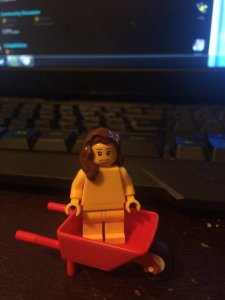 The best lego figure to ever exist1 point
 -

Real Rocket Racer
LazerLuke19 reacted to Brightfall for a gallery image
 1 point
 -

"Whoa. Look at all my babes!"
FeebTube reacted to lol username for a topic
Now seems like a good time to bring up this sheet of LEGO Loco character designs, some of which obviously... got revised: Yep. Those are legitimately 3D busty minifigs. That (almost) happened.1 point -

Tutorial: Changing car sound
FeebTube reacted to alan for a topic
I tried every of the 80 sounds in the GENERAL.SBK and now created a list of which sound is what: 80 Amount 321.pcm 3,2,1 sound or Kahuka's honk block.pcm sound when sth. hits the shields brake1.pcm brake of player brake2.pcm brake of player btmout.pcm hit sth. hard canhit.pcm hitting bullet e.g. in Race 2 of Basil's Circuit cansht.pcm launching bullet (not from player or opponent) cansus.pcm Basil Race flying bomber at end-sound cursehit.pcm curse while driving cursesus.pcm curse of mummy 'gate' engine.pcm player's engine enhan01.pcm collected 1 white brick enhan02.pcm collected 2 white bricks enhan03.pcm collected 3 white bricks form.pcm Respawn of power ups go.pcm GO!-Sound gpwdrdrp.pcm two vehicles scratching with their sides against each other (thanks to RobExplorien) gpwdrsus.pcm Yellow and 1 White: flying backwards grphit.pcm grapple Metal Hit grppull.pcm grapple pulling grprel.pcm another sound of grapple grpsht.pcm throw grapple grpsnap.pcm Metal grapple Fail grpsus.pcm another sound of grapple hitcar.pcm car hit sound hitenv.pcm ANother hit sound horn01.pcm Player 1 Honk horn02.pcm whistling honk (high-low) horn03.pcm Player 2 honk horn04.pcm Old Honk with Kinda Fail horn05.pcm Old working Honk horn06.pcm Redbeard's Honk idle.pcm player engine in idle position mdrop.pcm place 'Yellow with 2 White bricks' mmine.pcm 'Yellow with 2 w. bricks" tractor beam sound mtrap.pcm caught in tractor beam octact0.pcm Green (0 white) startup octact1.pcm Green (1 white) startup octact2.pcm Green (2 white) Startup octact3.pcm Green (3 white) Warp sound Startup octexp0.pcm green (0 white) extinguish octexp3.pcm Come out of Time Warp octsus0.pcm light rumble sound, Belongs to Green0 octsus1.pcm light rumble sound, Belongs to Green 1 White octsus2.pcm flying rumble sound, Belongs to Green 2 White octsus3.pcm belongs to TimeWarp, same as octsus2 oildrp.pcm drop Oil (yellow0) oilhit.pcm opponents slipping on oil oilsus.pcm oil bubbling power.pcm drive through time warp rockhit.pcm rocket (red, 3 white) hit rocksht.pcm Rocket launching rocksus.pcm (Rocket flying sound) Unknown to me shield1.pcm Blue 1 white shield sound skid.pcm Unknown Sound??? skrcar.pcm Dangling car sound (fast hits) skrenv.pcm Another Car hit sound slide1.pcm Powerslide start slide2.pcm Sliding sound soff.pcm Shield fade out spin.pcm Player on Oil or sth else spinning around sput.pcm Deceleration sound (thanks musiclover350) start.pcm Player engine startup tire1.pcm friction of wheels with surface, resulting in a screeching sound (thanks to RobExplorien) tire2.pcm friction of wheels with surface, resulting in a screeching sound (thanks to RobExplorien) turbo.pcm Sound when opponents drive into Time Warp and tire sound when starting any turbo wndexp.pcm wand going away wndhit.pcm wand hitting wndsus1.pcm Lightning active sound of wand wndsus2.pcm Lightning passive sound of wand block1.pcm sound2 when sth. hits the shields block2.pcm sound3 when sth. hits the shields enhbonus.pcm Exchange of power ups grphtenv.pcm grapple failing mrel.pcm tractor beam (yellow 2 white) fade out octexp2.pcm Some sound belonging to green with 2 white bricks shield0.pcm shield blue 0 white sound shield2.pcm shield blue 2 white sound shield3.pcm shield blue 3 white sound eengine.pcm opponent's engine sound One bad thing is that you can't change the sound of when you stop accelerating (so you put your hand away from Arrow up when driving). This sound seems to be hardcoded anywhere. Maybe anyone can find it? A cool thing with the engine.pcm is that you can insert any other sound there (it has then different pitches, depending on how fast you drive). A cool engine sound is shield2.pcm or shield1.pcm and as idle sound use shield0.pcm. The bad thing about that is the sound that is probably hardcoded and so you still hear the normal engine sound when stopping to accelerate (in german: 'den Wagen rollen lassen'). When you want to change some sounds, make sure they are placed there where you want to have them. For example you want to remove the player's honk and give him redbeard's honk. Then you write horn06.pcm where the player's honk is set (horn01.pcm). So you just change horn01 to horn06 and then you recompile, ...1 point -

Runs bad and in Danish
aidenpons reacted to Cid SilverWing for a topic
Tried multiple times with one instance only, it's no good. It simply won't touch any of the .cab files.0 points