
Leaderboard
Popular Content
Showing content with the highest reputation on 04/09/2019 in all areas
-

Run LEGO Rock Raiders with dgVoodoo
trigger_segfault reacted to Cyrem for a guide
This guide is more or less a re-write of many posts of this method that are scattered around the forum with updated links and pictures to make it easier to follow. First and foremost there is sometimes confusion between dgVoodoo and Cafeteria. These are significantly different and perform entirely different things. dgVoodoo is an graphics API wrapper (or “converter”) for DirectDraw & Direct3D (Part of DirectX 6 - a graphics API developed by Microsoft). Most modern graphics cards are not compatible with games utilising old versions of DirectX, Rock Raiders is one of them. Cafeteria on the other hand is a Mod Launcher that allows easy installation of game resource modifications for LEGO Rock Raiders. It also has the ability to force LEGO Rock Raiders to run in resolutions higher than 640x480. You can use both of these together for optimal graphics improvements. in summary - dgVoodoo is what makes it possible to run LEGO Rock Raiders on modern graphics cards, not Cafeteria. Cafeteria is merely a toolkit to make an already working game even better. Secondly, Microsoft has updated Windows Vista through to Windows 10 with patches that remove SafeDisc and SecureRom support from those systems. This is a problem if you own a copy of LEGO Rock Raiders that is copy-protected. If you own the copy-protected version of LEGO Rock Raiders (some of the re-releases did not have copy protection) you'll probably find the game will not run at all. Following this guide will also correct this issue as well. Now that we know what dgVoodoo is and we know about the SafeDisc issue, lets begin. Guide While setting this up is really a piece of cake and requires barely any steps, people still can still get it wrong, so please follow the steps below. If you get stuck, try it again. If you're still stuck, reply to this topic. PREPARATION Before you begin, you will need to download some files. Please note that some Antivirus software may complain that dgVoodoo contains a virus. This is a false positive, it is a clean file. Download the files in the list below. LRR Masterpiece Editon Executable - Download D3DRM - Download dgVoodoo 2.55.4 - Download Note: dgVoodoo 2.53 is also compatible with LEGO Rock Raiders, download this version if you have issues with the latest version above. STEP 1 If you haven't already, install LEGO Rock Raiders. If the installer isn't working, try the Alternative Installer. Once this is done, navigate to the Rock Raider's installation directory (usually its: C:\Program Files (x86)\LEGO Media\Games\Rock Raiders ) and extract the contents of the "LRR Masterpiece Edition" zip file you downloaded just earlier into your installation folder, overwriting the original files. This folder then should look similar to this: STEP 3 Next, from the D3DRM archive you downloaded before extract the D3DRM DLL File into the install folder. After that, open the dgVoodoo archive you also downloaded. You will need to extract: dgVoodooCpl.exe and the contents of the MS folder into your installation directory. STEP 4 You're almost done. We'll now configure dgVoodoo, so double click dgVoodooCpl.exe to start the configuration program. Ensure that you are running the program in Administrator Mode (Right Click > Run as Administrator) or changes may not be saved. When it starts, look at the "Config Folder" path, if it is not the same path as your Rock Raiders install folder, click the ".\" button on the right. Next click the "DirectX" tab. You may want to play with some settings in here, however for this guide we'll just do the important ones. Change the "Resolution" to the same resolution that you are currently using (e.g 1920 x 1080 is common) and uncheck the "dgVoodoo Watermark". Finally click apply. STEP 5 Congratulations, you're set! There's one thing left to do and it's very important. You need to start the game from LegoRR.exe. Afterwards a window will appear, and if you've set it up correctly it will display the driver as "dgVoodoo DirectX Wrapper (display)". STEP 6 (OPTIONAL) While the game will now run, you will notice an absence of music. Typically, Rock Raiders plays music from the disc. However I have a fix to restore the game music into the game without the disc. If you would like to do this, follow this short guide. I hope this guide has helped you get your copy of LEGO Rock Raiders to work. Be sure to reply below if it worked for you or if you're having any troubles. Don't forget that if you do get it running, check out some of the great mods for the game around the community.1 point -

Your Master Guide to get LRR to run
Arthuriel reacted to aidenpons for a guide
Most people these days are running Win10. If you are running an older OS, the process is much the same. If you're on Linux or Mac, this guide doesn't incorporate that yet. This isn't the One Guide to Rule them All, although it may become that eventually: this is merely an amalgamation of a lot of stuff around the forum in one easily-findable place. Hopefully it'll be updated to all the stuff around the forum as I do so (anybody with mod powers is welcome to edit this and add things). Hopefully it'll also contain a few more pictures as time goes on. Step #0: Do you even have a CD & a CD drive? I imagine there are a number of categories people fall into: - Those that have a legitimate CD back from whenever that still works. You might not have a CD drive for it, though - Those that had a CD, and it's scratched - Those that never had a CD and want to see what LRR's all about To those not in the first category, RRU doesn't condone piracy. We won't host a download link of Lego Rock Raiders here. But if you're looking for one... they're, uh, not very hard to find. So if you have an .iso - which there are a couple of legitimate ways you could actually get one - and you don't know what to do with it, the tool WinCDEmu will be able to get the .iso to load: https://wincdemu.sysprogs.org/ From that it probably won't install but at least the next step will allow you to get the files off the virtual CD... Step #1: Does the game install fine? Don’t install it into Program Files: move it somewhere else. Win10 hates you editing Program Files, even sometimes when as an admin: just install it to C:\Games or something like that. Yes: Huzzah, continue! No: Give this a go: https://www.rockraidersunited.com/topic/3904-lego-media-alternate-installers/ or direct link: https://github.com/le717/Rock-Raiders-Alternate-Installer/releases Does that not work / prove too complicated? Try out the ultra-manual way of installing LRR, copying the files off the disk by hand: https://www.rockraidersunited.com/topic/2843-installer-not-working-you-can-salvage-your-game/ That guide mentions pointing Universal Extractor to data.cab - I got better results by pointing it to data1.hdr . Just point it to all the files! and you should be fine. While you're here, make a backup of all the files; coping the CD files to your hard drive may also be a good idea. Also while you're here, you can delete the shortcuts the default installer likes to put on the desktop: they won't immediately be helping us. Minus the Useful Files folder and the LegoRR.exe - Shortcut , the installation should look like this: Step #2: What is the size of LegoRR.icd? 0 kB: Congratulations, you have the DRM-free copy of LRR. This means it’ll actually run on Win10. (Like mine is, in the above screenshot). 720 kB or anything else: This means LRR needs the disk to run via Safedisc and because Safedisc support was taken out for Win10, you won’t be able to run this executable: but we still have a solution! Download this: https://www.rockraidersunited.com/files/lego_rock_raiders/resources/lrr-masterpiece-edition-exe-r249/ and replace your existing LegoRR.exe and LegoRR.icd with that. Step #3: Does LegoRR do something by running LegoRR.exe? Yes: Hooray! Somewhat: is it complaining about missing d3drm.dll? Curiously the d3drm.dll provided on the (or at least my disk) isn’t actually the one LRR wants... I got it off my Lego Island 1 disk and it worked fine. We have uploaded it for you here: https://www.rockraidersunited.com/files/lego_rock_raiders/resources/d3drm-r53/ Unzip that and move d3drm.dll so it’s sitting next to your LegoRR.exe executable (like in the screenshots below). No: Does it do absolutely nothing? Something must have gone wrong in step #1 or #2. Also, don't launch it by the shortcuts on your desktop, as those have command line parameters that aren't useful right now. I reccomend just right-clicking LegoRR.exe and selecting Create Shortcut. At the very least you should be presented with a box like this. If you aren't, check #1 and #2 again, and if it still does nothing - that's what this forum is for! By the way, this box doesn't show up in your taskbar and if you click out of it has a nasty habit of hiding behind other windows. If you lost it, press Windows+D to minimise all windows, then click on any other window to open it - this box will also magically pop up again. But wait, all the buttons are greyed out! This guide is the most comprehensive in what to do: https://www.rockraidersunited.com/guides/run-rock-raiders-in-windowed-mode-r3/ Sure, it's about windowed mode, but the important thing is to change the colour settings. Here's what that guide says you need to do if you're on Win10 (other OSes available and more technical details in the guide; this is just a short summary) Right-click LegoRR.exe, go to the Compatibility tab, click Reduced Colour Mode, and change that to 16-bit. You don't actually need compatibility for XP or admin, interestingly enough (although it doesn't hurt to have them on!). Like this: And the result should look like this, and you should now be able to launch LRR! By the way, don't use RGB Emulation: it has literally never worked for anyone in the history of LRR. Sure, it launches, but it will always crash within the minute. Direct3D HAL is what we want. Step #4: Does the game unplayably lag? Or any other sort of general visual that makes the game literally unplayable No: Lucky you. Everyone else I know of has this problem. Yes: This guide explains what you need to do: https://www.rockraidersunited.com/guides/lego-rock-raiders/run-lego-rock-raiders-with-dgvoodoo-r7/ Yes, Option 2: In addition to dgVoodoo there's also ddrawcompat. I know nothing on the technical knowledge of this, but wander over to here: https://www.rockraidersunited.com/guides/run-lego-rock-raiders-with-dgvoodoo-r7/?do=findComment&comment=250 which will redirect you to here: https://github.com/narzoul/DDrawCompat/releases/tag/experimental Grab the experimental - yes, go one step ahead of the stable and grab the experimental - download. Place the resulting ddraw.dll in your LRR directory, and run LRR. Don't run dgVoodoo and ddraw at the same time, you only need one. I don't know a lot about the technical way either of them work. Feel free to toy around! At this point the game should be playable. It might be in the wrong language, the sound isn’t playing, cutscenes don’t exist, etc; but at the least it should be running and playable. Step #5: [Optional] Do you want to run the game in windowed mode? Windowed mode allows you to check any other application without having to alt+tab, which LRR handles very poorly. Additionally, windowed mode can fix a bunch of silly stuff LRR does - it's more reliable than fullscreen. https://www.rockraidersunited.com/guides/run-rock-raiders-in-windowed-mode-r3/ Now onto troubleshooting! Problem #1: The game isn’t in the language I want Currently the only translation pack we have is in English. If you have LRR in another language, even if you don’t want it, you might want to upload it to the Files database (a more rigorous system (perhaps a language switcher in Cafeteria?) can be implemented later). https://www.rockraidersunited.com/files/lego_rock_raiders/resources/english-lrr-pack-r301/ Download that, unzip, and merge the Data folder and overwrite LegoRR1.wad Other languages? This is still a WIP. There might be some way to get them off the disk? Try Universal Extractor and open any .cab files you see with that: https://www.legroom.net/software/uniextract Problem #2: The cutscenes aren’t playing If you still have the disc, you can copy them from Data\AVI on the disk to Data\AVI in your LRR directory. Alternatively, download them here: https://www.rockraidersunited.com/files/lego_rock_raiders/resources/rock-raiders-avi-cutscenes-r296/ and extract those into your Data\AVI folder. You may also need to download and install this, the codec for playing the videos: https://www.rockraidersunited.com/files/lego_rock_raiders/resources/indeo-iv50-avi-codec-r111/ but I am unsure how necessary this is. Problem #3: The game crashes on any non-tutorial level start I’m not sure how common this problem is anymore. However it might yet be an issue. This may be because the game is trying to play the cutscenes, which in LRR sometimes crash the game. Fortunately this can be disabled very easily with mods (DontPlayAVIs TRUE), and for your convenience this has also been uploaded for English: https://oresome.rockraidersunited.com/download/233 Overwrite your existing LegoRR1.wad with that download. Problem #4: The in-level music isn’t playing I actually never realised LRR had music until topics on the forum popped up about it… We have a guide for this too! https://www.rockraidersunited.com/guides/lrr-music-without-cd-fix-r11/ Alternatively, you can download the music files from here: https://www.rockraidersunited.com/files/lego_rock_raiders/resources/lrr-music-collection-ogg-r259/ and just put them in VLC or Windows Media Player in the background. Problem #5: The main menu music isn't playing Curiously the fix for this is totally different to the fix for the in-game music. For some reason the music files in the .cab data files are corrupted. This means that if you installed your game manually by extracting the cab, the music files will show up in Data\Sounds: but they'll be entirely unable to be played by the game or something like VLC media player, if you try. However, on the disk, the files under Data\Sounds aren't corrupted. So copy stats.wav and atsmodel.wav from [CD]\Data\Sounds to [YourLRRInstallation]\Data\Sounds and it should work when you start the game! Don't have a CD? They're here on RRU for your convenience: https://www.rockraidersunited.com/files/lego_rock_raiders/resources/atmosdel-and-statswav-r323/ Problem #6: Chief’s Briefings don’t play, but the files are all intact 1. Backup LegoRR1.wad. 2. Extract LegoRR1.wad with the Wad Recycler: https://www.rockraidersunited.com/topic/3742-wad-recycler-2/ 3. Open LegoRR.cfg and search "@Sounds" 4. This should jump you to heaps of properties defining sound file paths. Now, to make them work you need to remove all the '@' symbols from the start of the sound file paths. 5. Run search and replace to remove all the '@' symbols. 6. Save and rebuild your LegoRR1.wad file. Problem #7: Black screen on any tutorial level & when you find the Tool Store I have no clue why this happens, but sometimes when a script camera function is called (usually SetCameraGotoTutorial, but CameraLockOnObject will also do it) the screen blacks out (the camera seems to go to NaN...?). The bad news is that there's nothing you can do about this. (I guess I could make a mod that removes that from the script...) The good news is that this only affects the tutorial levels, the very first level (Driller Night), and the next 'central' level, Frozen Frenzy: and Frozen Frenzy will only blackscreen at the end just before you win. Fortunately there's a way to bypass Driller Night: if you use the -programmer command line parameter with LRR, or enable debug keys via any other method (eg Cafeteria or mods), debug keys are enabled: and these include Ctrl+S to instantly win the level (and also break the sound a bit in the process). Thus you can then save and continue with LRR as normal. There's no way to recover the tutorial levels though. Fortunately you'll learn all you need to know through regular gameplay (the tutorials don't even tell you about recharging crystals, erosion, lasers, upgrading vehicles, reinforcing...). If you're really desperate to hear Chief's calming voice, you can unpack your .WAD files (see Modding section below), and navigate to LegoRR1\Sounds\Streamed\Training\ and then Chief's voice lines are in the folders there. The text for the messages, if you would prefer to read them, is the .txt file in LegoRR1\Levels\TutorialLevels\<tutorial-you-want> Problem #8: My problem isn’t listed! Make a forum post! Google! Or wait for me to repopulate this list with less common issues (not recommended...) I want to get into modding! The first step in any LRR modding is to unpack your .WAD files. I recommend the Wad Recycler: https://www.rockraidersunited.com/topic/3742-wad-recycler-2/ If you want to use .wad files for your mods, you can recompile the wads each time. Alternatively, you can run without any wads: move the contents of the new folders LegoRR0 and LegoRR1 under Data (so the Data folder contains stuff like a folder called AVI, a folder called Vehicles, a folder called Sounds, Lego.cfg…). This makes modding to test things much quicker, as you can edit level files without needing to restart LRR. The topic is a little old, but mostly correct (save for priorities and a little bit of level scripting), and outlines what can and cannot be modded with LRR: https://www.rockraidersunited.com/topic/3252-things-we-know-about-modding-lrr/ Tools you’ll likely need include Notepad++ (Notepad, but better, and also free). If you want to do map creating, you’ll need Map Creator: https://www.rockraidersunited.com/topic/630-map-creator-0910/ , used for creating map data NPL Scripter: https://www.rockraidersunited.com/topic/2143-npl-scripter-v21-update/ , used for creating level scripts (predominately “collect X crystals to win,” but we can do much more than that… https://kb.rockraidersunited.com/Writing_NERP_Scripts Cafeteria also allows you to create patches which resolve all the incompatibility issues you could ever dream of, though that's far beyond the scope of this guide, though I will link Cafeteria: https://www.rockraidersunited.com/topic/4521-cafeteria-10-beta-7-launcher-mod-loader-for-lrr/ and its patch documentation (not always 100% up to date, just refer to a patch like CE:Core instead) https://www.rockraidersunited.com/topic/6139-cafeteria-patch-documentation/1 point -

Lego Racers 2 - RL Cars
RobberBaron reacted to kajeuter for a topic
Hello Everyone, Most of the default cars from Lego Racers 2 do already exsist real life. These cars are taken from existing sets. I made a list for Sandy Bay, Dino Island and Arctic with all of the cars that are actually taken from existing sets. Since most of the cars do not have a name, I'll refer to the characters that drive the car in LR2. Sandy Bay Cars: Dino Island Cars: Arctic Cars: As for the Mars Cars, these cars are nowhere to be found in the Life on Mars set. However, using Lego Digital Designer, I managed to build all of the cars (Except sparky's one).I would like to share them with you and I want to actually build them in real lego as well. I will put up a list of items you need and some instructions later. Most of the car pieces can be found in the Life on Mars set itself.Cassaopia's Car: Pippin's Car: Cunningham's spacecraft: Baron Rosso's spacecraft: Frankie Solido's spacecraft: Mac's Car: Johnney Thunder's Car: So, what do you think? It suprised me that most of the cars do actually exsist. Kaj1 point -
Rock Raiders Music without CD Fix
trigger_segfault reacted to Cyrem for a guide
Rock Raiders without music has long been an issue, but following this small guide will restore the music back into the game and you won’t even need the game CD or any other audio disc. How Does it Work? LEGO Rock Raiders uses Media Control Interface (MCI) calls to play tracks from the CD-ROM. This is done through the Windows Multimedia API (winmm) which comes standard with all Windows installations. Since we want to play music without the disc we essentially need to re-route those calls from LRR to our own version of "winmm" which plays OGG files from the Music folder. This fix is based on Toni Spets' OGG winmm wrapper which I have modified to suite LRR. Applying the Fix To begin, download the Music Fix which contains all the necessary files you’ll need for this guide. The download also includes the 3 songs from the PC game in case your copy was one of those missing the audio track on your CD-ROM. Inside the ZIP file you downloaded, there will be 4 DLL files and a ‘Music’ folder containing 3 songs. Extract all these files and folders into your Rock Raiders installation directory (alongside LegoRR.exe). Your LRR should look something like this afterward. Thats all there is to it! If you run the game music should now begin playing after dismissing the “Mission Brief” on all game levels. If you wish to have all the music from the LEGO Rock Raiders games, download the music collection. All the music files are located in the "Music" folder, these files must be OGG files and must be named "Trackxx.ogg" (replace xx with any number from 00 - 98). If you would like to play your own music, there are OGG convertors online, or programs such as Audacity which will convert other audio formats to OGG. Enjoy1 point -
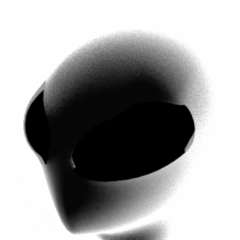
Could someone help me extract the Silence minifig from Lego Dimensions?
RobberBaron reacted to kozcomats for a topic
I've been trying to get a hold of the minifigure (particularly the head) of the Silence from Doctor Who on Lego Dimensions for a long while now. It's been driving me crazy that I can find *_nxg.gsc and *_nxg.ghg files of pretty much everything else in the game but not the one that I want (I have a mentality where, rather than getting discouraged and loosing interest when faced with a challenge, I want it more than ever. I'm exhausted and I'm at the point where I feel like I need it ?). I'm partly wondering if the reason I can't find them is because they are only present in one of the levels from the level pack, though, I feel like it would make sense for the level pack to be in the game files, even if it isn't active. Could anyone please help me find the file for it or even just send me a file?1 point -

LEGO Star Wars: The Complete Roster (Release 1)
RobberBaron reacted to 5h3i1ah for a file
1 point -

LEGO Arthouse announced for Apple Arcade
RobberBaron reacted to MinifigRenderer for an article
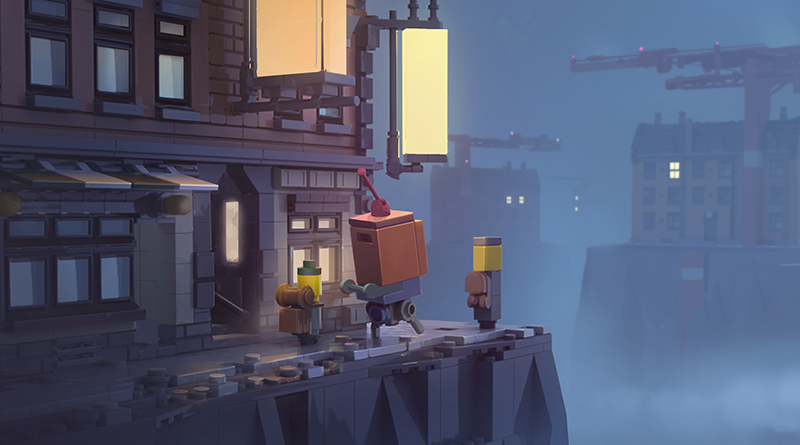 The LEGO Group has recently announced LEGO Brawls for Apple Arcade (see Brickome's post here: LEGO Brawls), but has also announced a second title: LEGO Arthouse. The LEGO Group has now shared information on the two titles. LEGO Arthouse has been developed in a new studio based in Copenhagen, which is “a narrative journey about play itself, touching deeply on the belief of we only get old because we stop playing.” The game is for adults more than children, promising to be “an expression of the value of creativity in a coming of age story, set amongst a micro LEGO world heavily inspired by our AFOL community”. LEGO Brawls, which has already been announced, has been developed with RED Games. In that game, players will be able to play a multiplayer platform adventure, with building, rebuilding and LEGO comedy. Here is more from the official description: Quote: “The key inspiration for the title is a game where players literally build their own Heroes. By design, winning is a team-collaboration, working together to build and control contraptions within the levels, while battling the other team.” LEGO post: https://mobile.twitter.com/LEGO_Group/status/1110617500792877057 Apple arcade trailers: https://www.vgn.it/notizia/93484/apple-arcade-ecco-tutti-i-giochi-svelati-finora/ Game screenshot(s): References: https://www.brickfanatics.com/lego-arthouse-announced-for-apple-aracade/1 point
 -

LEGO Racers 2019 Collection
RobExplorien reacted to RacerRabbit for a topic
The following creations were built to commemorate the 20th anniversary of the 1999 Lego Racers computer game. Pieces new and old have come together to form these newly revised versions of the 8 boss cars. Please enjoy! 1) Captain Redbeard As you can see, Captain Redbeard's new ride uses the microbuild of his ship from set #40290 as a base fo this off-road beast of a racer. But it still retains the large exhausts and rear mounted pirate flag from his original car. The sails make this the tallest vehicle in the collection so far. . 2) King Kahuka King Kahuka's new ride is an improvement over the original. The wheels in the game's intro are yellow while in-game, they're white so the wheels on this new version is both yellow and white. The car retains such details as the spears on the front, the horns on the front and of course, the stone head motif on the back. With added exhaust pipes and a "Bone Bumper" on the front. 3) Basil The Batlord Basil's new ride is a much more powerful looking version of his old car with a larger than life engine. I even used some older Technic wheels on the back. They were looking kinda redundant in my collection and I thought they matched the front wheels nicely so I put them to use. I also really wanted to use these dragon wing pieces on this car and I thought the rear spoiler was the perfect use for them. The old black jet engine piece has been extended by 2 grooved 2x2 round cylinder bricks. 4) Johnny Thunder A major improvement over the original. Making good use of new mudguards and Speed Champions wheels. Includes the old Adventurers printed numberplate piece on both the front and rear. Those jet exhausts make this thing look mighty. And this isn't the only car in the collection to use them. Even the front makes the car look chunky and rugged. Also includes indicators. As if you need them on the racetrack.... 5) Baron Von Barron Now, this one is completely different from the large jeep he drives in the first game. Instead, Baron Von Barron's new racer takes inspiration from set #5920 Island Racer that the Baron drives in the 2nd game and an old fighter plane. The plane inspiration continues around the back. And look at those exhausts... The propeller is powered by the engine but luckily, the car doesn't take off. That'd result in instant disqualification! 6) Gypsy Moth The veteran pilot of the alien Insectoids gets a truly outrageous car inspired by the Insectoids theme itself. With 6 wheels, pincers at the front and a cybernetic abdomen, Gypsy Moth's new racer looks more like an ant than a car. And still has the exhaust at the back like the original car. 7) Rocket Racer Rocket Racer's revamped car is a brilliant new design that echoes the original. Speed Champions wheels and a slighlty forward leaning stance makes this supercar sleek and eye-catching. The windshield is on 4 jumper plates to make sure it doesn't look too far forward or back. Also notice that the Rocket Racer minifigure is custom printed by Minifigs.me. It may have cost a packet but boy, the fit and finish is superb! ? Veronica Voltage Veronica Voltage's new car is basically a big improvement over the original. Much smoother than the old car. Also, exhaust pipes. For aggression. The wide tyres complete the look of the rear. The front headlights on the original are made up of rare chrome silver pieces. This new one uses a much easier and cost efficient method. Like Rocket Racer, Veronica Voltage is a custom printed minifigure courtesy of Minifigs.me. So, what do you guys think of this lot?1 point -

Oriental Expedition Johnny Thunder
RobberBaron reacted to Fifi La Fume for a file
1 point -
Oriental Expedition Johnny Thunder
RobberBaron reacted to Fifi La Fume for a gallery image
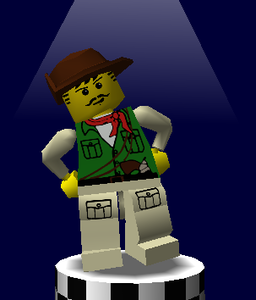 A preview of my next texture mod.1 point
 -

owl city - fireflies lego jack stone music video
Ben24x7 reacted to NovaSquirrel for a topic
Really glad I went through the trouble of buying a new copy of the Jack Stone tape on Amazon and putting it on Youtube.1 point -

WHAT INGREDIENT IS RIGHT ARROW
Ben24x7 reacted to lol username for a topic
DO YOU SEE A BOWL OF RIGHT ARROWS HERE CAUSE I SURE DON'T THANKS GAME1 point -
Rock Raiders stop motion by Duckpondanimations
Ben24x7 reacted to lol username for a topic
Saw this stop motion based on the PC version of Rock Raiders on YouTube tonight. It's pretty neat, thought it'd be worth sharing here.1 point -

Asian LEGO Ripoff Review Extravaganza
Ben24x7 reacted to MisterGryphon for a topic
Hey look, it's Ashens.1 point -
Legos in Space: The Movie: The Fanfic
Ben24x7 reacted to lol username for a topic
hi guys i mad a fanfic based on my movie i own YES ITS A FAN FIC EVEN THO I ROTE IT AND THE MOVIE TWO FIRST THE MOVE REA WATCH THIS FIRST OR U WONT UNDERSTAND FANFIC IT EXPLANS ALL ORIGINAL CHARACTURS! https://www.youtube.com/watch?v=1fTQTBWhOFQ watch it CHAOTER ONE it was a warm day in legolandville. but not THAT warm day LOL. stevnesnon wolk up in his bed (not the floor ). the phone rang: STEVNSON WE NEED UR HELP AN ASTROD HIT EARTH IN TEN MINUTS. so stevnson jumped out o bed BUT THEN stevneons litle brother wlked up . HI STEV CAN U READ THE STORY I ROTE FOR U. now stevenssons litel broteh ALWAYS rote BAD BAD BD stores. but stevensen deceded to reed it anyways. and her is what it sed; FRKIN PRODUCT PLACMENT BRO I TOLD YOU NOT 2 DO TATH NO MORE THIS IS COMPLET RUBISH strevnson yelled . then he reaised that if he didnt hurry the everybody woud dye from th astrod. so he hurried and jumpde in2 his car and vrooooooomed of. CHApTER TOO STEVNSON THNK GOODNS YOUR HEAR yelld the guy at the spess port. but wait i forgot r u old enoug to fly shutle ? YES sad stevnsoon, im 13 now. so they went into spess. I SE THE ASTRIOD yelld robo I DO TO yelld the other guy. WE MUST CHAS IT so they did. but it hid . IN AN ASTOID FELD! so stenson flew RITE IN!!! but robo had a sad and sed 'sir the posibilitty of navigtaing an adstroid field is aprox. 1,000000000,00,,00 to 1. NER TEL ME THE ODS U STUPID ROBOT but sir well DYE oh crud man so they turned aroud and went 2 earth agin CHApTER Thre they all dieded. FIN...for now!!! sowhat do u think guys?? i spent ALL DAY sory i wont improve it its perfct alredy JAMSSTRU OUT1 point -

The LEGO Movie Videogame Trailer
Ben24x7 reacted to Alcom Isst for a topic
Certainly sets an impression when half the trailer for the game is scenes from the movie.1 point -
Legos in Space To: Atack of the Flours
Ben24x7 reacted to lol username for a topic
People, I am stunned. You took my masterpiece... Legos in Space... You called it a joke. I poured my heart and soul into that game, and what did you do? You trampled all over it. Right then and there, I vowed to make a sequel. Something so amazing that nobody could call it a joke. And now... It's here. http://www.majhost.com/gallery/jamesster/Other/LOLSUBFOLDER/LIS2/thegame_2013-04-01_10-59-54-38.png http://www.majhost.com/gallery/jamesster/Other/LOLSUBFOLDER/LIS2/thegame_2013-04-01_11-00-12-60.png http://www.majhost.com/gallery/jamesster/Other/LOLSUBFOLDER/LIS2/thegame_2013-04-01_11-00-33-73.png Go on. Say it's garbage. Crush my heart yet again. I dare you. Download links: PC: http://www.mediafire.com/file/c66662jhxgkvegt/PC.zip Mac: http://www.mediafire.com/file/cm6a7kmmwcpwuv2/Mac.zip Linux: http://www.mediafire.com/file/lbm0a4i76b77y37/Linux.zip1 point -

Legos in Space To: Atack of the Flours
Ben24x7 reacted to McJobless for a topic
THIS MODERN MASTERPIECE CAN ACHIEVE 388 FPS. GAME OF THE YEAR.1 point -
Legos in Space: THE GAME
Ben24x7 reacted to lol username for a topic
Remember that LEGO fan game I posted a topic for ages back? Well, I finished it. http://www.majhost.com/gallery/jamesster/Other/LOLSUBFOLDER/thegame_2012-09-21_14-58-02-24.png http://www.majhost.com/gallery/jamesster/Other/LOLSUBFOLDER/thegame_2012-09-21_14-59-11-83.png http://www.majhost.com/gallery/jamesster/Other/LOLSUBFOLDER/thegame_2012-09-21_14-59-42-18.png Windows download: http://www.mediafire.com/download.php?q7p1mdt0m4vcet0 Mac download: http://www.mediafire.com/download.php?n70b9qinhm9o8k9 BZPower topic: http://www.bzpower.com/board/index.php?showtopic=6924 Enjoy! ^_^ And so far, I've had five people not realize this game is a joke.1 point