
Leaderboard
Popular Content
Showing content with the highest reputation on 04/17/2019 in all areas
-

Run LEGO Rock Raiders with dgVoodoo
trigger_segfault reacted to Cyrem for a guide
This guide is more or less a re-write of many posts of this method that are scattered around the forum with updated links and pictures to make it easier to follow. First and foremost there is sometimes confusion between dgVoodoo and Cafeteria. These are significantly different and perform entirely different things. dgVoodoo is an graphics API wrapper (or “converter”) for DirectDraw & Direct3D (Part of DirectX 6 - a graphics API developed by Microsoft). Most modern graphics cards are not compatible with games utilising old versions of DirectX, Rock Raiders is one of them. Cafeteria on the other hand is a Mod Launcher that allows easy installation of game resource modifications for LEGO Rock Raiders. It also has the ability to force LEGO Rock Raiders to run in resolutions higher than 640x480. You can use both of these together for optimal graphics improvements. in summary - dgVoodoo is what makes it possible to run LEGO Rock Raiders on modern graphics cards, not Cafeteria. Cafeteria is merely a toolkit to make an already working game even better. Secondly, Microsoft has updated Windows Vista through to Windows 10 with patches that remove SafeDisc and SecureRom support from those systems. This is a problem if you own a copy of LEGO Rock Raiders that is copy-protected. If you own the copy-protected version of LEGO Rock Raiders (some of the re-releases did not have copy protection) you'll probably find the game will not run at all. Following this guide will also correct this issue as well. Now that we know what dgVoodoo is and we know about the SafeDisc issue, lets begin. Guide While setting this up is really a piece of cake and requires barely any steps, people still can still get it wrong, so please follow the steps below. If you get stuck, try it again. If you're still stuck, reply to this topic. PREPARATION Before you begin, you will need to download some files. Please note that some Antivirus software may complain that dgVoodoo contains a virus. This is a false positive, it is a clean file. Download the files in the list below. LRR Masterpiece Editon Executable - Download D3DRM - Download dgVoodoo 2.55.4 - Download Note: dgVoodoo 2.53 is also compatible with LEGO Rock Raiders, download this version if you have issues with the latest version above. STEP 1 If you haven't already, install LEGO Rock Raiders. If the installer isn't working, try the Alternative Installer. Once this is done, navigate to the Rock Raider's installation directory (usually its: C:\Program Files (x86)\LEGO Media\Games\Rock Raiders ) and extract the contents of the "LRR Masterpiece Edition" zip file you downloaded just earlier into your installation folder, overwriting the original files. This folder then should look similar to this: STEP 3 Next, from the D3DRM archive you downloaded before extract the D3DRM DLL File into the install folder. After that, open the dgVoodoo archive you also downloaded. You will need to extract: dgVoodooCpl.exe and the contents of the MS folder into your installation directory. STEP 4 You're almost done. We'll now configure dgVoodoo, so double click dgVoodooCpl.exe to start the configuration program. Ensure that you are running the program in Administrator Mode (Right Click > Run as Administrator) or changes may not be saved. When it starts, look at the "Config Folder" path, if it is not the same path as your Rock Raiders install folder, click the ".\" button on the right. Next click the "DirectX" tab. You may want to play with some settings in here, however for this guide we'll just do the important ones. Change the "Resolution" to the same resolution that you are currently using (e.g 1920 x 1080 is common) and uncheck the "dgVoodoo Watermark". Finally click apply. STEP 5 Congratulations, you're set! There's one thing left to do and it's very important. You need to start the game from LegoRR.exe. Afterwards a window will appear, and if you've set it up correctly it will display the driver as "dgVoodoo DirectX Wrapper (display)". STEP 6 (OPTIONAL) While the game will now run, you will notice an absence of music. Typically, Rock Raiders plays music from the disc. However I have a fix to restore the game music into the game without the disc. If you would like to do this, follow this short guide. I hope this guide has helped you get your copy of LEGO Rock Raiders to work. Be sure to reply below if it worked for you or if you're having any troubles. Don't forget that if you do get it running, check out some of the great mods for the game around the community.1 point -

Image LRRP v0.0.4.png
Cyrem reacted to Colinou for a gallery image
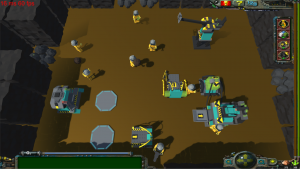
From the album: My Album LRRP
1 point -
RRU Staff Role: Forum & Chat Moderator
aidenpons reacted to Cyrem for an article
 Rock Raiders United is looking to grow it's solid moderation team and we’re looking for a new moderator who is online and available when our current team may otherwise be unavailable. Moderation is an important part of keeping the community together and moving forward. This role will give you a chance to be really a part of the Rock Raiders United community. Ideal Person... Active RRU Member. Uses Discord. Your timezone is between -1 and +4 GMT (inclusive). Experience being a moderator (a plus, but not required). Can take an unbiased approach to dealing with situations. Displaying a sense of reasonableness. Level-headed and dependable. Good at communication. You Will Be... Engaging with the community regularly. Approving & Monitoring posted content. Mediating any conflicts. Enforcing community rules. Involved in staff discussions. Carrying out other assigned tasks. Applications To apply for this role or ask for further details please send me a PM directly, or use the “Contact Us” link located at the bottom of the page. Please include why you would be a good fit for the role. You do not need to be a current member of RRU to apply. Please keep in mind that this is an unpaid volunteer role. Applications will remain open until a suitable candidate is found.1 point
 -

HTML5 Rock Raiders Remake
aidenpons reacted to Scarabol for a topic
Update time! We now have a real but not yet complete pause menu. And all original sounds from the WAD files at hand. Just need to throw them in there. If someone wants to help and create a list where to play which sound, pls do it and post it here. Best, Scarabol1 point -
HTML5 Rock Raiders Remake
aidenpons reacted to Scarabol for a topic
Hello everyone, we're not dead yet Just implemented themes and started with a NERP interpreter, so that we can use the original scripts to handle level actions. Level with ice theme: https://imgur.com/yWmTCIF1 point