
Leaderboard
Popular Content
Showing content with the highest reputation on 04/24/2020 in all areas
-

ProTests
LiquidGravity reacted to Cirevam for a gallery image
From the album: Cirevam
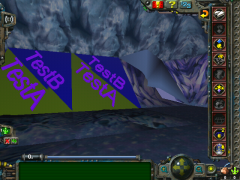
I've been researching promeshes and I've found a few neat things. One, there's a weird discoloration that I can't seem to remove. TestA is supposed to be pure yellow (255:255:000) with emissive pure magenta (255:000:255) text, but there's that bluish tone. You can see it in the untextured problob to the right. I'm thinking it's related to the fog. There's also some overlap with TestA and TestB along the diagonal, which is easy to fix. Once these two problems are resolved I can start real work on the two TR biomes. You may also notice from this that it is possible to make the promeshes and the 3rd person walls have different textures. I don't know why you would want to except maybe for memory management like lowpoly/highpoly, but it's an option. Edit: I have confirmed that the fog is indeed causing the discoloration. Changing it so the RGB values are all equal should fix it.© Provam
1 point -

Binary File Editor
MSC-04 reacted to J_128 for a topic
Oh, that makes sense. But that is rather annoying. In answer to your question, yes and no. The input comes from my "Export LR1 Mesh" Blender addon which I'm currently working on. It writes out a plaintext file that can then be copied into the LR1 Binary Editor and saved as a proper GDB (and eventually [hopefully], BVB) file. I am planning to share it with this community once it's (closer to) done, but if you'd like a link to the current version, I could give you one. It's not nearly finished, and hardcodes a lot of values, but it does pretty much work. Here's a little snippet of a project I'm working on that used it.0 points