
Leaderboard
Popular Content
Showing content with the highest reputation on 05/12/2020 in all areas
-

3DXML to OBJ - Converts LDD model captures to OBJ
LegoLoco7 reacted to lol username for a topic
3DVIA Printscreen can capture LEGO Digital Designer models and save them as 3DXML files. It was discontinued years ago, but can still be downloaded from the web archives (direct installer link). Not many programs can load 3DXML files, so I made a program to convert them to OBJ. It does some other helpful things too. Download The resulting models are far more optimized than exports from other LEGO building software, thanks to LDD's hidden stud/tube removal. For example, a small house model that's 50350 tris exported from LeoCAD is only 13548 tris with this method - and with some additional tricks, only 2586 tris. More info here. I've only made this to work with LDD captures, compatibility with captures from other programs is not guaranteed. It will automatically name materials and textures with their official LEGO names/IDs. Setup: 3DVIA Printscreen should be configured so "Capture of textures" is on, and "Group by textures" is off. LDD should have high-quality rendering options disabled. 3DVIA Printscreen must be launched BEFORE LDD. Usage: Save your LDD model in 3DXML to OBJ's "Models" folder. Launch 3DXML to OBJ and enter your LDD model name in the first text box, then click "Move camera". This saves a new LDD model with the camera set in the proper position for 3DXML capturing. Open the new LDD model (it will have CAM_SET in the name) and capture it to a 3DXML file with 3DVIA Printscreen. Make sure it's saved in 3DXML to OBJ's "Models" folder, like the LDD models. Enter the name of your 3DXML file into the second text box in 3DXML to OBJ. I recommend leaving "Weld duplicate vertices" enabled. Choose a new color palette if you'd like, and click "Convert". It sounds more complicated than it is. Here's a model being converted and imported into Unity: And now, the advanced features, which are mostly for LEGO Universe-style color variation, but keep reading for some geometry removal tricks too. For color variation, we need to randomly adjust the color of each brick... But, LDD often batches bricks of the same color together into one mesh. Thus, we can't do it after capturing a model. We have to have the randomized colors displayed in LDD itself. So, it's LDD modding time! Setting up color variation: Download this LIF Extractor. Extract db.lif, found at C:\Users\YOURNAMEHERE\AppData\Roaming\LEGO Company\LEGO Digital Designer Put the resulting db folder where the original db.lif file was, and rename db.lif to something else so LDD will use your extracted data instead of the original file. Inside your db folder is Materials.xml. Put a copy of it in the same folder as the 3DXML to OBJ EXE. Launch 3DXML to OBJ and click the "Advanced" button. In the "Edit Materials.xml" box, choose what changes to make. You can add color variation and also apply changes to the base color palette. Click "Edit" and it will create a new XML file. Now you'll want to update the program's own internal color definitions. Enter the name of the XML file you just created in the box below, and click "Update color definitions". Replace LDD's Materials.xml with your new version. Again, this all sounds more complicated than it is. There's a video further below showing how it's done. Adding color variation to LDD models is simple enough; in advanced mode there's an option for it in the same box where you set the camera position in your LDD model. Just choose how strong you want the variation to be. I strongly recommend converting all the materials to vertex colors for models with color variation. How you do this will depend on what software you prefer; in the video below I'm using Ultimate Unwrap 3D. There's one more advanced feature: You can keep meshes of certain colors from receiving color variation and/or being exported. This is useful for "dummy bricks" only placed in the model to trip LDD's hidden geometry removal. In 3DXML to OBJ_Data\StreamingAssets, you will find "Color Export Exclusion.txt" and "Color Variation Exclusion.txt". Add the desired color IDs here, one per line. Covering studs is obvious enough, but tubes are a bit more finicky. Original LDD model, vs export with the dummy bricks excluded: A simple brick has the entire underside present. These quickly add up to loads of polygons. Placing 1x1 round plates across the surface causes LDD to replace the underside with two triangles. Nice! There's a small handful of other parts with this effect, but 1x1 round plates are the best. In fact, even just one 1x1 round plate can trigger this so long as the rest is still covered. Covering the bottom entirely will cause LDD to remove it 100%. Beware: Some bricks, like those rounded 2x2 pieces, will look like they have the same effect as 1x1 round plates, but actually don't... They still leave much of the tubes intact. And finally, here's a video showing all of the advanced features, if the text wasn't clear enough: More tips and tricks! If 3DVIA Printscreen is causing LDD to freeze and/or not launch, see this post. If you have developer mode enabled in LDD, you can press Shift W to toggle wireframe mode. You can also turn rendering of different parts of bricks on and off. LDD's bricks come in four sections, and can be toggled as such: K: Toggles studs Shift K: Toggles bottom and inside of tubes Q: Toggles outside of brick Shift Q: Toggles bottom and inside of brick You can use this to, for example, capture a model without studs, and use that as a lower LOD. Don't have developer mode enabled? Go to the same AppData folder as db.lif and developermode=1 to preferences.ini. If you've modded LDD's decorations, or LDD has updated, you can update 3DXML to OBJ's internal texture definitions - just copy the Decorations folder from db to the same folder as 3DXML to OBJ's EXE, and click the button for it in advanced mode. (In case you're curious what this does: The program keeps a list of MD5 hashes of texture data, along side their file names/IDs. This allows the program to identify what textures are what in a 3DXML file, without actually containing any of the texture data itself.) You can add your own custom color palettes, just go to 3DXML to OBJ_Data\StreamingAssets\Custom Palettes and use the existing files as examples of how they work. If for some reason you need to, Shift R resets 3DXML to OBJ's saved preferences (resolution, most recent conversion options, etc). Replacing colors when converting a 3DXML with color variation will work... But look very strange, as it'll only affect bricks that happen to be the original color values. The ones that have been slightly lightened or darkened won't be changed. You can mod lower LODs of bricks from LU into LDD... But that'd be its own topic.1 point -
Rama Texture Issues
pedroj234 reacted to LazerLuke19 for a topic
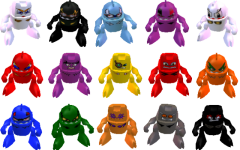
OK, so basically, this mod is basically not working because the heads come up white on Gear, Spiky & Shredd (It might come up with the others). If anyone can help me with solving this problem, give me some advice. Thanks.1 point -

Is music-modding possible?
LegoLoco7 reacted to Zeb for a topic
After listening to the HQ version of "Your Bricks Are Toast", that got me wondering... is it possible to replace the in-game music with custom music, such as HQ versions of the tracks or something different entirely? I know extracting music is possible, but is it possible to do the reverse?1 point -

Lego Racers 2 100% Save Game
aidenpons reacted to MSC-04 for a topic
Documents->Games->LEGO Racers 2->Saved Games Also, don't double-post, it's annoying. Just wait until someone answers.1 point -
Rama Texture Issues
pedroj234 reacted to LazerLuke19 for a topic
In case if you're wondering what I'm talking about, Here's my problem with the mod. The Head Models and car textures turned out okay, But their head textures aren't working.1 point -

IMG_0020low.jpg
pedroj234 reacted to Cirevam for a gallery image
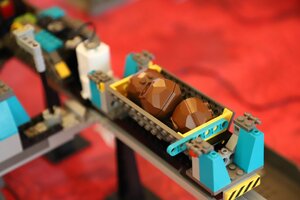
From the album: Real Legos
1 point -
IMG_0013low.jpg
pedroj234 reacted to Cirevam for a gallery image
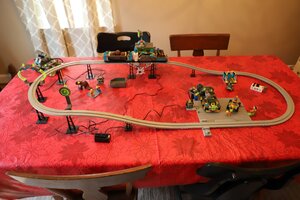
From the album: Real Legos
1 point -

Post Your Cool Custom Skins
TeamShattSean reacted to Fluffy Cupcake for a topic
Screenshot or Screenshot + Download it doesn't matter to me. This topic is different from the "Post Your Cool Minifgs" topic in that it does not revolve around default customization parts, but rather things modded in. I made this Canadian shirt for myself, it has the same leaf on both the back and front side:1 point -
How To Replace Character Builder Parts With Any Other Character Parts (Play As Any Character)
pedroj234 reacted to Fluffy Cupcake for a topic
Note: This works for only players, trying to replace NPCs this way will not work (oddly, no change will happen to them). First, make sure you have your files extracted or you won't be able to find them. Locate the following files: GAME DATA/CHARACTERS/BODIES/LEGS.TXT GAME DATA/CHARACTERS/BODIES/TORSO.TXT GAME DATA/CHARACTERS/HEADS/HEADS.TXT GAME DATA/CHARACTERS/HEADS/FACES.TXT In all these files the last 8 entries are the ones that will appear in the character builder, and the files already have a list of all valid characters parts, so you just swap (not replace) out the last 8 entries with the character parts you want to show in the builder! The only exception is FACES, each character has eight expressions, so one character is worth 8 lines, still the same swapping out process nevertheless. It is also important to note in HEADS the last 10 entries in the file NEED to have "store" at the end. Adding additional "store"s does nothing, removing crashes the game, only the last 8 show in the character builder. If you want to change the icons in the character builder go here: GAME DATA/FRONTEND/BODY PARTS If you want to change the icons for the characters you need to look here: GAME DATA/HUD/TEXT BOX FACES Grab a empty slate for them here.1 point -
Crazy Minifigs
pedroj234 reacted to Cirevam for a gallery image
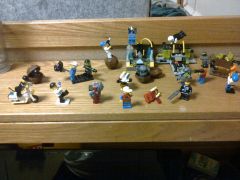
From the album: Real Legos
My LEGO Island minifigs came out to play. The Rock Raiders weren't pleased that they brought PM monsters with them. Here you will witness the law being enforced, the birth of toilet monsters, levitation, police brutality, insecure shipments of scarce resources, suicide bombings, The Sword of Ramas, vigilantism, and general lunacy. Yes, there is Visine and Glad in the picture. You don't need to comment on it. Oh wait, now that I pointed it out, you'll attempt to be funny by pointing it out anyways. But you failed to remember that I can delete your comments, so the joke's on you!© Cirevam
1 point -
Raiders Being Raiders
pedroj234 reacted to Cirevam for a gallery image
From the album: Real Legos
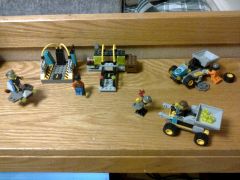
These are all the Rock Raiders legos I own right now. The only set I had ever bought was the Loader Dozer, but luckily my older brother had given me and my younger brothers several boxes of assorted bricks years ago. I had enough to remake some LRR stuff along with three Ice Planet sets and a few Race sets. I don't know why I was never big into LRR sets when I was a lad, especially since I played the game not long after it was released. Oh well, live and learn... HANGING ON THE EDGE OF TOMORROOOOOOOOOOW© HOLY BRICK ON OFFICER NICK'S STICK
1 point -
Dogfight
pedroj234 reacted to Cirevam for a gallery image
From the album: Real Legos
1 point -
Balanced Fighter 5
pedroj234 reacted to Cirevam for a gallery image
From the album: Real Legos
1 point -
Thumper 04
pedroj234 reacted to Cirevam for a gallery image
From the album: Real Legos
1 point -
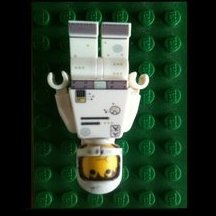
Post Your Cool Custom Skins
TeamShattSean reacted to Jobalisk for a topic
Yo, can someone link me how to do this stuff.0 points