
Leaderboard
Popular Content
Showing content with the highest reputation on 02/28/2021 in all areas
-

Character Skinner
Ben24x7 reacted to Jimbob for a topic
This is a simple modding tool for LEGO Racers which makes the process of inserting custom skin textures into the game easier. Using the GUI which is designed to look like the in-game character builder, you can scroll through all the textured body parts in the game (note that some parts don't have textures, but are defined separately in the binary files), select your desired part, and import a custom texture. The application then gives it the correct name and places it in the correct folders on your desktop, structured as an extracted LEGO.JAM file for ease. I made this tool as I discovered that the process of naming textures became laborious, as I had to frequently check my parts list and in some cases decipher which textures matched which character. The Character Skinner is therefore intended to aid this process, and is aimed at both beginner and advanced modders. I would like to give a huge thanks to le717 for helping me on the Python side of the tool, having never used Python before you really helped me. And thank you for your support along the way, despite my frequent nonsensical outbursts whenever I hit an error. Note: There are two keyboard shortcuts to make modification through the app faster. Pressing the Enter key performs the same function as clicking the 'Modify Texture' button, and the arrow keys can be used as an alternative to the on-screen arrow keys. Download Character Skinner v1.1 Character Skinner v1.0 Requirements - 24MB hard disk space - Windows operating system - The latest versions of Adobe Flash Player and Adobe AIR Installation Simply extract the .ZIP file and place it anywhere you have read/write permissions. For administrators this includes Program Files; for limited users this is restricted to folders such as My Documents and Desktop. IMPORTANT: Everything inside the Character Skinner folder must stay as-is, any changes to names or folder positions will crash the program. If you wish to hide the folder, just create a shortcut to the Character Skinner.exe file in the root directory. Note: This cannot currently be done, I will patch it in v1.2. Version History Character Skinner v1.1 - Added higher quality music and sound on/off button - Matched 'Close Help Window' text to other text buttons - Added file conversion for non-BMP images Planned Updates Note: Items with a strike through have been completed, but not yet updated. - Modification of expressions - Cycle menu options using up/down arrow keys - Mac support - Option to save to GAMEDATA and MENUDATA folders individually I have already started work on a Track Skinner, however this will take significantly longer due to the amount of different tracks and textures.1 point -

1:1 scale L.M.S. Explorer (+ldraw/studio 2.0 file downloads) - 2021-10-21: "Oh hey, this thread is 10 years old and still going!"
capttrips101 reacted to Sparks8805 for a topic
I built it. Yep. I know, I have no life...but it's so beautiful... Okay, so maybe not from the outside...but you can't tell me that THIS isn't a sight. All credit goes to Arthuriel for his awesome LDD bridge model which I followed down to the brick. Until I realized how many things couldn't be done with real Lego that is. I had to make several modifications in order to allow the windows and the elevator section to connect to the main bridge. I also had to lower the floor by the elevator doors in order for them to fit correctly. All in all, I made at least 35 Bricklink orders over a span of the last five months, and it took at least 15 hours to build the sections and connect them in a way that would insure that they were all on the same level. I know that if Lair ever sees this post, he'll give me a bunch of crap about not having Chief's chair in the model, but in my own defense, I didn't feel like painting a chair in a color that wouldn't quite match Dark Turquoise. I'm also considering adding a Brickstuff lighting kit for added effects. Anyway, the gallery with more photos is here. Oh, and I apologize to anybody who wanted a decent quantity of Dark Turquoise 2x2 tiles off of Bricklink...because they're almost all gone.1 point -

Running LEGO Rock Raiders on Windows 7/8/10 without VirtualBox (simple) also fix lag problems
phenix8fr reacted to Trilint for a topic
Some time later... So, the pictures showing how dgVoodoo should be set up are gone. Any idea how it should be set up? Tried a bit by myself, but can't get it to run. Edit: Nvm, got it to work absolutely fine.0 points -
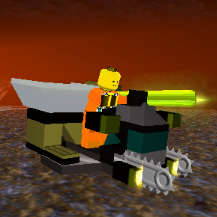
Air Filter (New Building)
phenix8fr reacted to aidenpons for a topic
With full thanks to Cyrem, for the original topic, Cirevam, for the modelling and releasing the model, I present to you a finally functional version of the Air Filter! That doesn't overwrite any existing buildings and adds on in the 11th slot. > Download! This mod doesn't actually require CE to run, as LRR supports 11 buildings and only uses 10. Balance: Does not require power 1 crystal, 9 ore to build +2 oxygen off the bat, then 2.5, then 3.3 It might seem a bit overpowered but you need a lot of them. The Support Station is significantly cheaper in terms of ore, crystals, and space, and also necessary for game progression. If you have balance feedback (or any feedback!) let me know. (However the Support Station is also the only building that gives out sandwiches. Build it for the dependencies, depower it, and you'll never have sandwich woes ever again ) @Cirevam - could you please make an icon for it? It currently just uses the Support Station's icon.0 points