
Leaderboard
Popular Content
Showing content with the highest reputation on 06/14/2021 in all areas
-

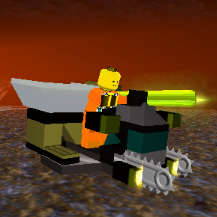
Lego Racers Unity remastered.
Das Glückskekschen reacted to Maxim Ivanov for a topic
Little video.1 point -
CE: Roadmap
trigger_segfault reacted to aidenpons for a topic
IT'S HAPPENING! CE is happening! Rejoice, all ye RRUsers! I have some requests! Description: Allow specifying starting levels via ObjectList via a new Levels parameter. Benefits: Building levels can be painfully specified via NERPs (yet to look into this fully) for the start of a level, but there's no way to start vehicles with upgrades. You can also specify Health, suggesting that the functionality of the .ol should be straightforward to extend. Examples: - A level in which you must get the lost Chrome Crusher back to base. It would feel much more like an extended mining operation if it was fully upgraded. - With Upgraded Hover Scouts and other vehicles, their upgrade level determines their functionality. Starting with a Hover Scout that was able to drill could make, say, Run the Gauntlet play quite differently. Description: Recharge Seams do not count as a wall for the purposes of landsliding Benefits: LRR already has a lovely random landslide generator that you can couple with Fall.map to cause extra landslides where you want them. The random generator can surprise you, like landsliding walls behind walls (otherwise fiddly to do), and just generally adding a bit of hazard fun that you can get rid of with reinforcements. However, this isn't usable in a level with Recharge Seams, which cannot be reinforced, and thus landslide endlessly, causing all sorts of annoying stupidity. Examples: This allows the random landslider to be used on levels which would benefit from not having to paint landslides by hand. Note: Recharge Seams can also act as monster emerge points. If the easiest way to prevent them from landsliding is to also disable monster emerging, that's fine. Description: Mid-level saving and loading Benefits LegoRR.exe has stopped working... By allowing saving, if we aren't able to find the cause of the crashes, we can at least save every so often on large maps so they don't explode as much. Examples: Perhaps this could be implemented by effectively writing everything into a map file: Surf.map, Dugg.map, Cror.map, ObjectList.ol, InitialCrystals, InitialOre, etcetera and then re-loading this in a special dedicated "Continue Last Game" level slot. However this would not record object levels, behave poorly with constructions in progress, and severely stuff up the task queue. Nevertheless, it would be a save functionality which could allow the player to recover from a crash: not having the above is merely a minor concern. As for the effect on level progression - once this saved level is won, the player can enable debug keys, load the original level, hit Ctrl+S to insta-win, save on the scoreboard, and then continue with the next level. Note: NERPs and record objects record everything in the .ol so it is highly possible that levels using the above idea would play up. However these levels are few and far between - the only one truly needing it in vanilla is Explosive Action. The map creator may need to write a disclaimer of sorts, saying "Do not use with saving and loading" Description: Extension of tutorial block limit beyond 56, preferably up to the limit of the .map file, 255. Benefits The Tuto.map is still relatively unexplored but hits a cap for no discernible reason at 56. While vanilla maps rarely use numbers beyond 5 (a notable exception being Don't Panic), it should be straightforward and useful to extend this limit. Examples Implementing this should be simply changing the number 56 to 255. However I have almost no knowledge on the underlying framework. Nevertheless, its inherent simplicity is why it is suggested here. Uses include: - Triggering monster invasions requires at least one tile for you to point out where the monsters emerge; the easiest trigger is another tile for a raider to walk on. Furthermore, being able to spend a list of tutorial blocks (eg 1-10) allows you to put short timing delays in between triggering an emerge at each different tutorial block, making it seem less scripted and more natural - Hidden caverns can be marked with a tutorial block to essentially check progress through the level - By marking every wall with a block, you can count the number of blocks destroyed & send measures (erosion, monsters) accordingly, to prevent strip-mining (experiments of this were where I first discovered a phantom limit) - Paving over Slug Holes requires 5 tutorial blocks per slug hole - more wacko ideas including Maze, Minesweeper, or an orbital laser used to demolish tiles, ideas both stymied by the 56 block limit (even a 10x10 grid would require 100 blocks) Description: New NERPS command: ForceSetTutorialBlockIsGround X. Regardless of the current tile state this would forcibly set the tile(s) marked X to ground. Benefits: There is no way to remove erosion. Neither is there a way to delete water. This command would enable this to become possible. (The tile may re-erode again: I don't mind if this happens or does not happen). Examples: Using this command and use of GetRecordObjectAtTutorial with regards to a LargeHeli present on level start, it would be possible to have the Tunnel Transport pick up water from a lake and dump it on lava, creating a ground tile. The converse would also become possible: deleting water with lava. Imagine Fire and Water, but instead of sailing over you make yourself a land bridge. SetTutorialBlockIsGround and SetTutorialBlockIsPath will demolish walls and remove rubble respectively, but they will not remove lava nor water. This would also allow for proper paving over slug holes: in the current implementation the hole is still there, but it merely has a power path over it. (But wait Aiden, isn't this hilariously technical in scriptomancy? Most of us aren't script wizards! - to which I say I can write up a template you'll be able to use, as well as what tutorial blocks to paint where. Should be straightforward enough!) Description: Allow vehicles to have an ore and stud cost which is returned when the vehicle is teleported up. Benefits: Currently, while CrystalCost works for vehicles, StudCost and OreCost in Lego.cfg do nothing. It would be possible to force the player to upgrade their vehicle to have its functionality (eg: no carrying until upgraded), but this wastes an upgrade slot that could be used for something more interesting. Examples: This would force the player to not only have crystals to spare, but also stockpile ore. This could make lategame vehicles more meaningful, as now not only do you need 5 Energy Crystals to teleport down the Chrome Crusher, you need to have stockpiled 150 ore. Furthermore, ore spent on upgrades is not returned when teleported up: so while I can make the Chrome Crusher cost 1000 ore on its drill upgrade, if a monster stunlocks it that's 1000 ore down the drain you won't see again. Note: Currently in the game a quiet distinction between Ore and Studs exists. Say I have 80 ore stockpiled from before I built an Ore Refinery, and then have collected 10 studs (=> 50 ore's worth). The game displays 80+50 = 130 ore. However, if there is a vehicle upgrade that costs 100 ore | 20 studs, it will not be available to click, because I neither meet the stud requirement nor the ore requirement. I am happy for this functionality to continue if it means vehicles can at least have an ore and stud cost! Description: Extend the UpgradeTypes limit beyond whatever it currently is (80-ish? Will experiment to see if I can find a number) Benefits: The game is known to crash when the UpgradeTypes { in Lego.cfg reaches about 80. This, as one can see, is immediately problematic for upgrading vehicles (eg: my [unreleased] Hover Scout Upgraded model requires basically ten UpgradeTypes due to the way its front piece works). One can be efficient but the LRR devs can hardly be called this and it would be significantly easier to have this overhead limit increased as to not worry about it. Examples: As above, the Upgraded Hover Scout has about seven front pieces alone, plus a change for the laser upgrade, plus defining the mini laser itself, plus some other stuff I probably forgot about when writing this post. I have leeway for this, but no more: were I to add another vehicle with extensive upgrades I wouldn't be able to do so. Looking forward to whatever comes out of this1 point -

Launch Rock Raiders Directly Into A Level
trigger_segfault reacted to Cyrem for a topic
LEGO Rock Raiders has an inbuilt executable parameter to launch the game directly into a game level. This function would have been used to debug levels when the game was in development. If you want to start the game into a level without having to navigate the menu, this tutorial will show you. Disable the front end You will first need to disable the game's front end. Firstly open the file 'Lego.cfg' located in LegoRR1. In the 'Main' block at the start of the file, scroll down till you find the setting called "FrontEnd" and change its value from "TRUE" to "FALSE". Save the file then re-build LegoRR1.wad if you need to. Shortcut In order for this to work you must create a shortcut to 'LegoRR.exe' which is located in the Rock Raiders install directory. Once you have created it, right click on it and go to Properties. In the 'Target' text field add this to the end after the closing quote. -startlevel Levels::Level01 "Level01" in the above code is the level you want to start. You can change this to "Level02", "Level03" etc... to start different levels. Batch File With the shortcut above, you may find it annoying to have to change it for each level. There is a better way to do it using batch files which will allow a user to enter the level number. Firstly create a new file in the Rock Raiders install directory, call it 'StartLevel.bat'. Make sure the file extension is '.bat' or this will not work. Open the file in notepad and paste this code: set /p level= Enter the level you wish to start: LegoRR.exe -startlevel Levels::Level%level%[/code] Save the file and that's it! Note that if the level number is below 10 you must put a 0 in front of the number for the batch file to work.1 point